

When a business page returns 502, correlate the request with the error log before restarting services. If the connection was refused, compare the upstream address with the application's actual listening socket.
Scope and prerequisites
This guide covers a native Linux Nginx installation proxying HTTP to a local application. Port 8080 is an example. You need authorized terminal access and permission to read logs. Record the time, URL, method and affected users first. Replace all example names, ports, paths and service names with verified deployment values. These are operating examples, not results from a tested customer environment. A container's loopback address belongs to that container; PHP-FPM sockets and HTTPS upstreams require separate investigation.
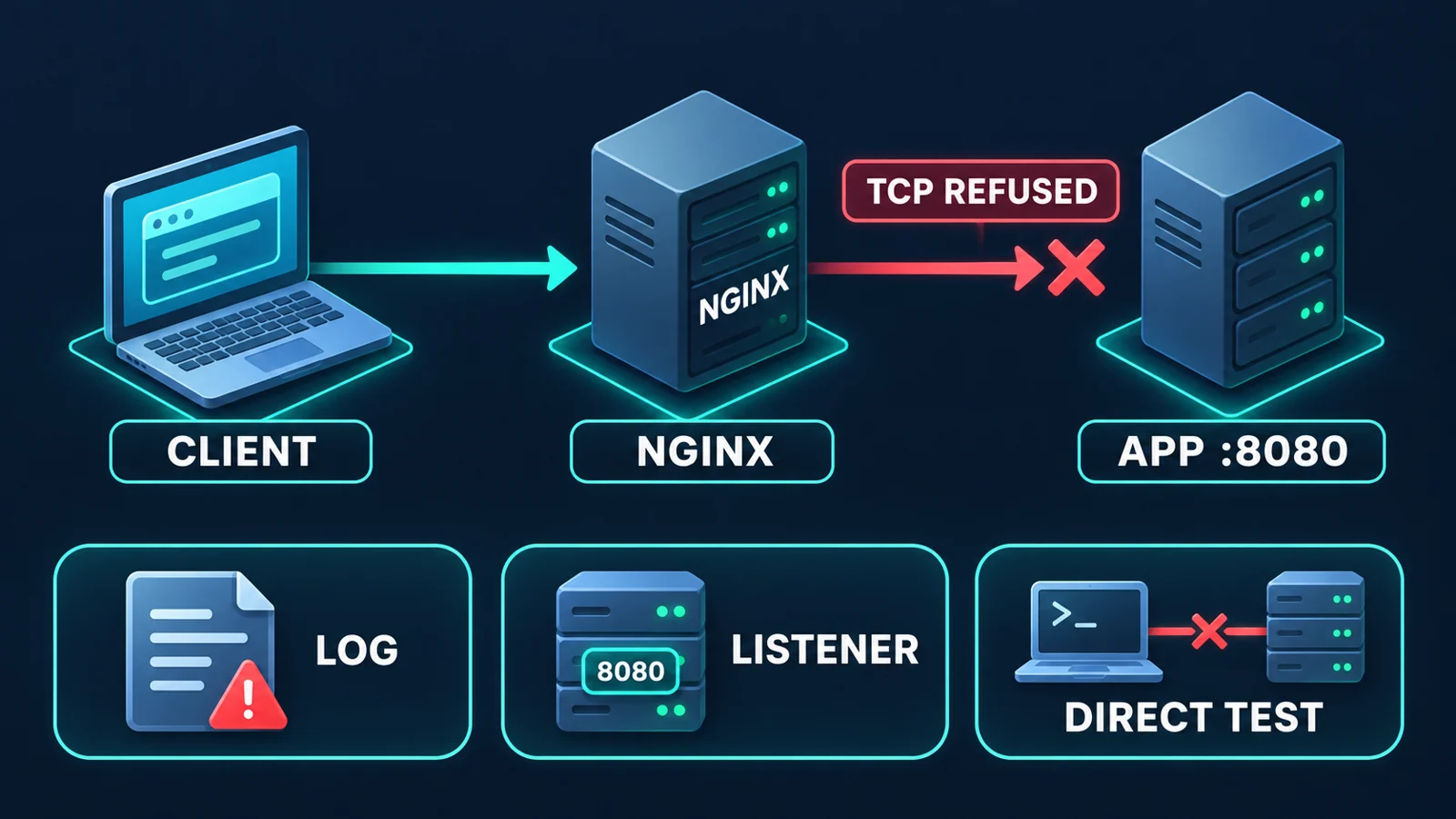
Diagnostic flow: correlate logs, listeners and a direct test. Port 8080 is an example.
1. Match one request to its error
Use a health endpoint that the application owner confirms is read-only. Never replay payment or order requests for troubleshooting.
curl --connect-timeout 3 --max-time 10 -sS -o /dev/null -w '%{http_code}\n' https://app.example.com/health
sudo tail -n 80 /var/log/nginx/error.log
The log location depends on installation and configuration. If the file is missing, inspect the actual error_log setting. Match the timestamp, server, request and upstream fields. A refused TCP connection may mean no listener or an active rejection; the message alone does not prove that the application crashed.
connect() failed (111: Connection refused) while connecting to upstream
| Observation | Next step |
|---|---|
| Connection refused | Compare destination, listener and rejection rules |
| Connection timed out | Investigate routing and filtering separately |
| Premature connection close | Check application logs and protocol |
| No matching error | Confirm the request reached this proxy or inspect the edge |
2. Identify the effective destination
The next command prints the entire configuration and can disclose sensitive values. Read it only in an authorized terminal; do not paste the raw output into a ticket or chat.
sudo nginx -T
This output describes configuration on disk, not proof of what the current workers loaded. Match the service binary and its configuration/prefix arguments, then correlate the last successful load.
Find the matching server and location, including regular-expression routing and included files. Check proxy_pass and every member of a named upstream. A matching port in an unrelated block is not evidence. Back up the exact file with its existing permissions before a change. Stop if configuration ownership is unclear.
3. Compare the listener and direct response
Run these checks from the Nginx host and network namespace. The destination must match the upstream recorded in the error.
sudo ss -ltnp
curl --connect-timeout 3 --max-time 10 -sv http://127.0.0.1:8080/health
No listener: ask the application owner to verify the service and configured port. An IPv6-only or different-interface listener does not establish IPv4 loopback reachability. If direct access works but the proxy fails, inspect the actual selected backend, Host header, other upstream members and security policy. An HTTP 401, 403 or 404 proves an HTTP response was received, not that the application is healthy. Do not expose the backend on every interface to hide the mismatch.

Illustrative equipment context, not a customer site. Same-host loopback traffic does not traverse an external switch.
4. Repair the smallest verified difference
If the application correctly listens on local port 8080 but this location points at the wrong port, adjust only that destination. Preserve the existing URI, Host and forwarding-header semantics. This is a directive example, not a complete replacement configuration.
proxy_pass http://127.0.0.1:8080;
If the application is down, inspect its documented service state and recent logs. Verify the service name from deployment records; any restart requires the application owner's maintenance process. Do not disable firewall or security controls.
sudo nginx -t
The reload command below assumes systemd and a verified nginx unit name. Reload only after a successful syntax test and a scope review. If the test fails, restore this change's backup and retest. If a reload fails, retain the running process and inspect the error instead of forcing a stop.
sudo systemctl reload nginx
5. Verify through the real entry point
Repeat the same read-only request from step 1. Compare status and expected content, and check that the corresponding error no longer appears. Cover each backend and proxy node for intermittent or load-balanced failures. One successful request cannot establish fleet recovery. Check existing read-only paths on other sites sharing the proxy. Roll back this change and retest if they regress.
Record the original upstream, actual listener, changed file, before-and-after checks and untested nodes. Remove tokens, internal names, client addresses and business parameters before sharing logs.
Ethernet switch and cables: remote upstreams may involve physical links, but link LEDs do not prove an application is listening. Photo: Raysonho, CC0, Wikimedia Commons; not this article’s site. Resized and converted to WebP. Source / 来源 CC0
FAQ
Will a longer timeout fix a refused connection?
Usually no. Check the target, listener and rejection cause first. Timeout changes need a separate workload assessment.
Why did restarting Nginx fail to help?
The proxy may be functioning while its destination is incorrect or unavailable. Restarting it does not start or repair the backend.
Is a direct HTTP 200 enough?
Verify the same path through the official entry point, inspect its content and cover other backend members and sites.
Related solutions and reading
Keep a sanitized diagnostic record when coordinating application, host and network teams. TCP port connectivity troubleshooting covers client-side connection layers; this article covers the Linux proxy-to-backend path.
Official references: Nginx proxy module and Nginx logging configuration.