
Connect commerce
and purchasing through
an owned platform
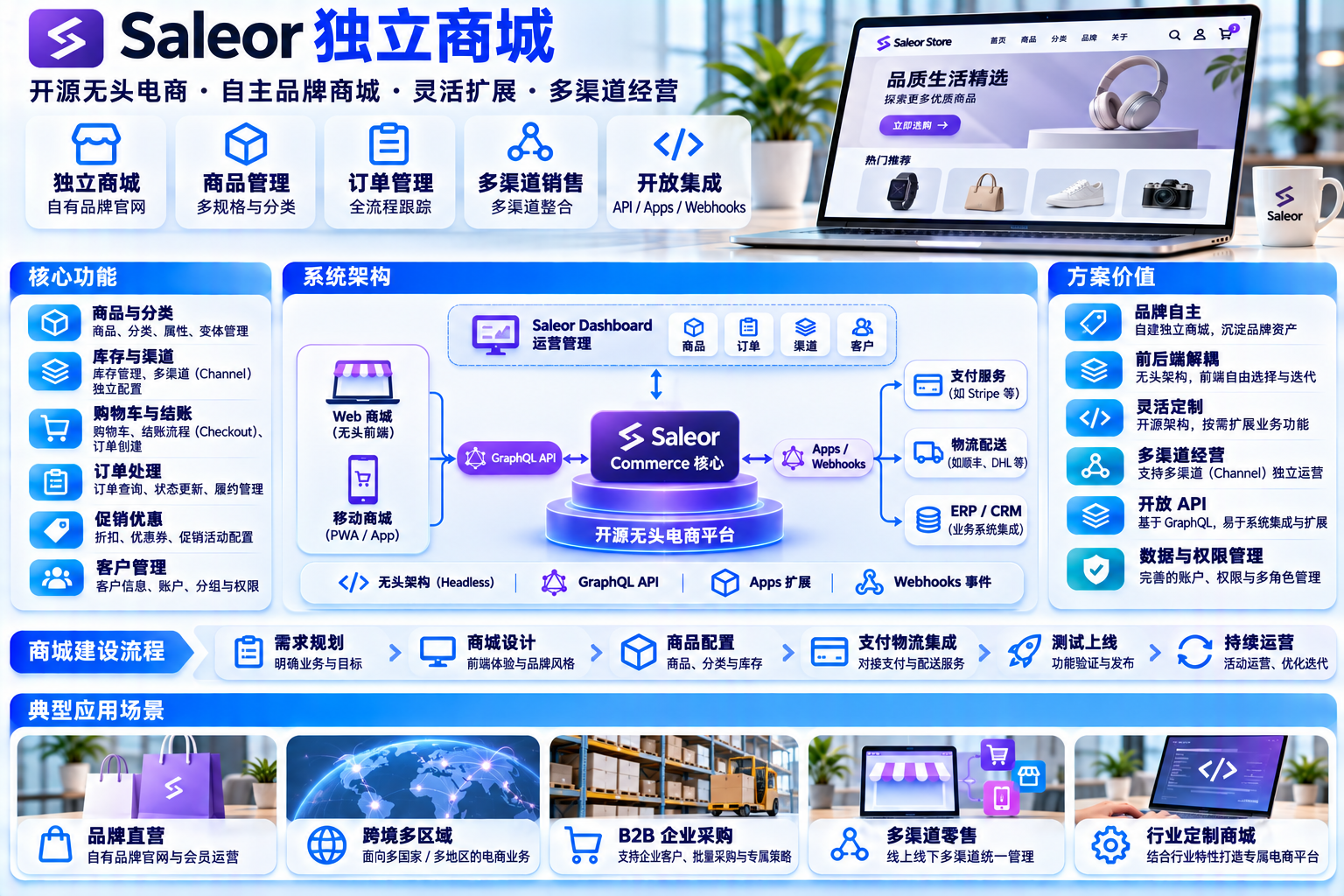
Use Saleor for product, checkout and order foundations, with a company-owned storefront; Catalog → Detail → Checkout → Orders → Account connect the buying journey while distinguishing native capabilities from enterprise customisation.
Interfaces, figures and prices are examples. Actual features, licensing and delivery scope are confirmed for each project.
Five commerce foundations for your own storefront
The interfaces below are solution concepts : products, IDs, amounts and accounts are fictional examples. They explain the proposed interaction structure and connect to no live catalog or payment service.
ALL DATA · DEMO ONLY
Product catalog
DEMO · 4 ITEMS SHOWN



Product details
DEMO · VARIANT / ATTRIBUTESample product A · Standard item
Cart and checkout
DEMO · NO PAYMENT
Order operations
DEMO · 4 RECORDSCustomer account
DEMO · NO REAL IDENTITYACCOUNT / SAMPLE
Account name Fictional business account
Account status Sample active state
Identity integration Customer identity / Proposed
Native account activationADDRESS BOOK
Billing address Sample address 01
Delivery address Sample address 02
Address count 2 sample records
Native address bookORDER HISTORY
Previous orders 4 sample orders
Reorder Order to checkout
Order events Sample event history
Native order historyPRICING / ACCESS
Customer segment Sample segment A
Customer pricing Segment display concept
Purchasing role Project-specific development
Configuration / Integration conceptProduct catalog
Products, variants, attributes, categories, collections, channel visibility, media and metadata provide the catalog foundation.
PRODUCTS · VARIANTS · CHANNELSProduct details
Combine variant selection, attributes, channel prices and stock availability in a purpose-built product page.
ATTRIBUTES · MEDIA · PRICINGCart and checkout
Saleor uses Checkout for both cart and checkout, with promotions, addresses, delivery and configurable completion flows.
CHECKOUT · PROMOTIONSOrder operations
Order editing, drafts, fulfilments, returns, activity and expiry settings provide the operational foundation.
ORDERS · FULFILLMENTCustomer accounts
Customer accounts provide activation, addresses, order history and reordering. Enterprise identity and purchasing roles need their own design.
ACCOUNTS · SSO · GROUPSFollow a purchase through its lifecycle
Animated points illustrate the proposed data flow, not real order timing or performance. Amber nodes identify custom work or external-system coordination.
Verify the foundation before defining custom development
Reviewed on 2026-11-15. Classifications use capabilities explicitly listed in Saleor's official feature pages and developer documentation. They correct a blanket assumption: customer segments and pre-acceptance approvals are officially listed, but actual availability must be checked against the chosen version and deployment rather than treating everything as custom development.
Native commerce foundations
A / NATIVEThe official product model includes Products / Variants / Attributes / Categories / Collections / Channels / Media / Metadata。
Saleor has no separate Cart model; it uses Checkout for cart and checkout, with lines, completion, promotions and custom checkout flows.
The official operations list includes order edits, activity, draft orders, fulfilments, returns and order expiry.
Customer accounts cover activation, addresses, order history and reordering. Permission groups apply to staff; merchant OIDC and procurement identity require separate validation.
Configurable / Partial coverage
B / CONFIGURABLEThe Operations page lists Customer groups and special pricing; Custom prices plus order-line overrides provide extension foundations. Validate the selected version, storefront configuration and contract-price governance.
The official capabilities include Approvals for approval before order acceptance and Draft orders for internal order review. Staff permissions do not constitute procurement roles; conditional routing and multi-party approval require implementation.
Draft orders are officially described as a way to send customer quotes, while Order expirations can expire quotes and release allocations. These foundations are not a complete RFQ application.
Channels configure product availability, currency, prices and delivery. They provide a foundation for distinct commerce contexts, not an automatic enterprise contract-price system.
Project-specific development
C / CUSTOM BUILDBulk SKU import, enquiry versions, negotiation, comparisons and quote-to-order orchestration require implementation using appropriate drafts, metadata, Apps and webhooks.
Design company membership, departments, cost centres, budgets, limits and separation between buyers and approvers.
Plan contract-price imports, validity periods, tiers and ERP synchronisation around the selected API version and business rules.
Amount, category and department routing, parallel approvals, rejection, audit trails, notifications and OA integration exceed a basic approval step.
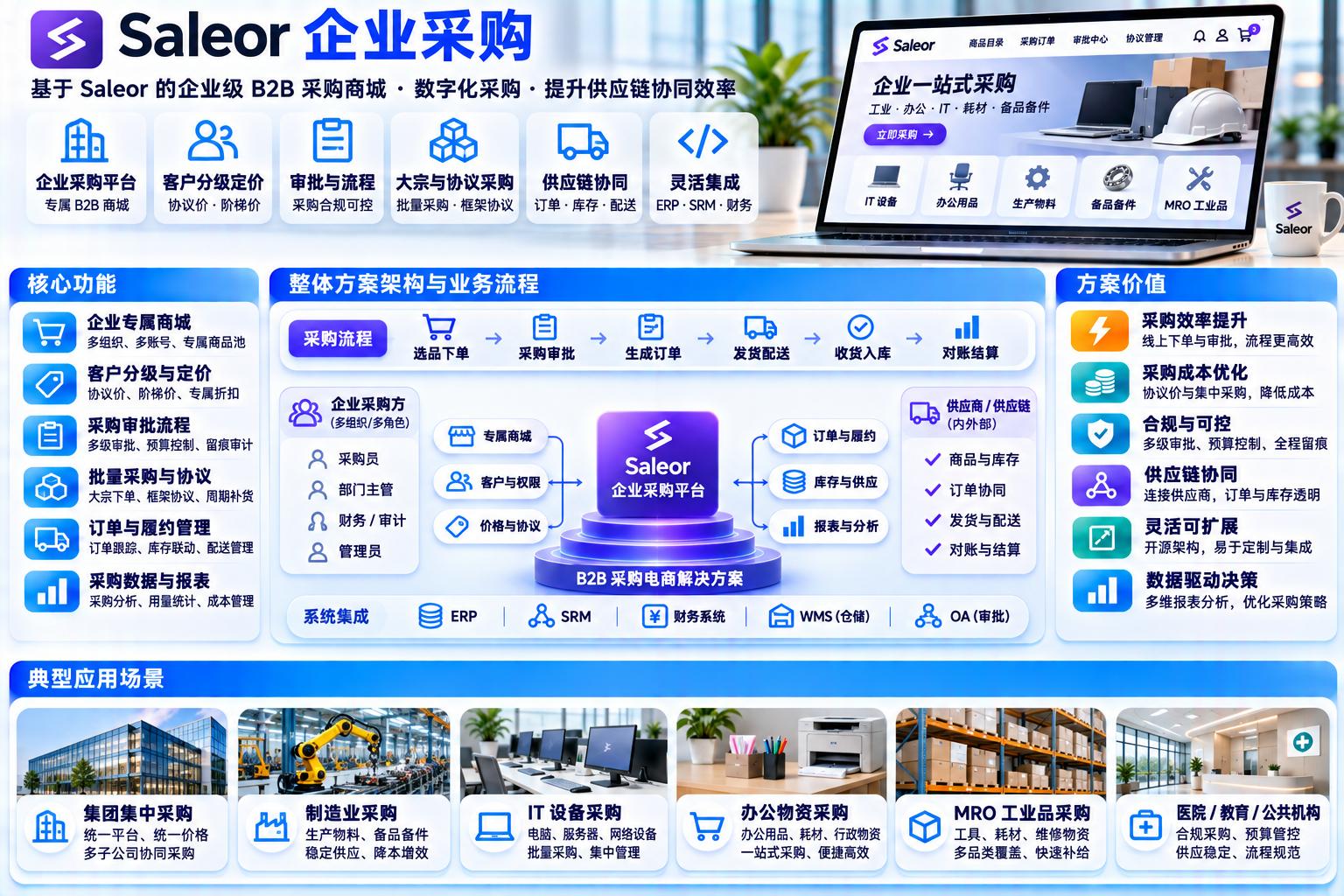
Use Saleor's native commerce foundations as the core for products, checkout, orders and accounts. Focus custom work on enterprise identity and pricing governance, RFQ and approval orchestration, and external-system synchronisation using supported extension points and documented upgrade tests.
Four proposed custom capabilities with explicit boundaries
This section describes proposed project scope rather than completed features or customer results. Each capability distinguishes reusable foundations from new implementation.

Procurement organisation
Company entities, members, departments, cost centres, budget limits and buyer / approver separation require an appropriate organisation and identity model.

BULK ENQUIRIES / RFQ
Design bulk SKU import, enquiry and quotation versions, negotiation, expiry and quote-to-order orchestration.

Customer-specific pricing
Plan customer, channel and contract-price presentation and custom line-price rules. Validate price consistency between storefront and order.

Procurement approval
Build amount, category and department routing with parallel review, rejection, audit events and notifications; integrate OA or ERP where required.
API-first layered architecture
Separate storefront and dashboard from the GraphQL commerce API. Add enterprise services through Apps, webhooks and metadata. This is an illustrative solution structure; select and test actual components per project.
EXTENSION MECHANISMS
- Apps: independently deployed applications for business integrations
- Webhooks: send order and stock events to external systems
- Metadata: attach project-specific structured fields
- Synchronous callbacks : delegate supported pricing, tax or shipping decisions to external services
IDENTITY AND PERMISSIONS
- OIDC / SSO: distinguish merchant authentication from customer login; validate providers and versions separately
- Permission groups: permissions for staff and sales operations
- Channels and access : validate APIs, roles and versions; channel configuration is not automatic tenant isolation
Connect commerce to your existing systems
Define integrations around the customer's actual systems. These are common integration surfaces and proposed patterns, not completed customer projects.
Enterprise resource planning
Synchronise product and price master data, customer records and accounting references through Apps or integration services.
MASTER DATA / PRICE SYNCWarehouse and fulfilment
Integrate availability, dispatch, multiple warehouses and return events with the appropriate webhook and API contracts.
STOCK / FULFILLMENT EVENTSPayment providers
Connect the merchant's selected payment provider through a suitable payment App; this demonstration connects to no payment service 。
PAYMENT APPS / NO DEMO PAYIdentity and single sign-on
Design merchant SSO and customer login separately. Procurement buyers, approvers and administrators need explicit organisation roles and tests.
OIDC / PERMISSION GROUPSOrder management systems
Map order states, splitting, fulfilments and retained history to the customer's OMS rules.
ORDER LIFECYCLEInvoicing and tax
Plan invoicing data, tax classes and exemptions against the customer's jurisdiction and accounting requirements.
TAX CLASSES / INVOICEMessages and notifications
Route order, review and quote-expiry events to agreed internal messaging channels.
WEBHOOK / NOTIFICATIONData and reporting
Send relevant commerce data to the customer's warehouse and define reporting measures with the business team.
DATA EXPORT / WAREHOUSEThree Deployment models deployment models, one delivery scope
Choose hosting around data ownership and operating requirements. Actual deliverables, schedule and acceptance criteria are agreed in the project scope.

Private deployment
Deploy to customer-controlled infrastructure. Define external integrations, network access and data flows explicitly; self-hosting does not remove those dependencies.

Managed hosting / Saleor Cloud
Evaluate a managed infrastructure service while retaining responsibility for the storefront and custom extensions. Confirm service scope, plans, costs and upgrade responsibilities.
Hybrid deployment
Host core commerce in the selected environment and integrate customer-controlled data and enterprise services through documented APIs and events.
Build your own storefront and connect purchasing with orders
A proposed six-stage path from brand planning to operations. Use native foundations where suitable, develop enterprise extensions, then validate integrations and handover.
Brand and domain
Define domain ownership, visual standards and applicable site requirements.
BRAND / DOMAINProducts and channels
Model product types, attributes, variants, categories and collections; configure channels, currencies and prices.
MODEL / CHANNELSStorefront buying journey
Connect catalog, detail, checkout, orders and accounts through the commerce API.
STOREFRONT APIAccounts and pricing
Configure accounts and addresses, validate pricing by version, and design staff and purchasing-customer identities separately.
ACCOUNT / PRICINGProcurement workflows
Build RFQ, approval orchestration, cost centres and ERP pricing integrations where required.
CUSTOM / APPSIntegration and handover
Validate payments, fulfilment and invoices, run agreed UAT, then hand over monitoring and operating procedures.
UAT / HANDOVERAgree the boundaries, then plan delivery
Review the customer's catalog, purchasing rules and integration scope. Identify native, configured and custom work, then define an implementation and acceptance plan. This page is a solution concept, not a quotation or project result.

Interfaces, products, identifiers, amounts, order states and accounts are fictional. Photos illustrate business contexts, not actual SKUs or customer cases.
This local introduction connects to no payment gateway, creates no real order, and collects no payment or identity information.
No customer names, deployment counts, sales results or conversion claims are presented. This solution page has not been deployed.
Saleor capabilities were reviewed against official feature pages and documentation on 2026-11-15. Confirm actual availability for the selected release before implementation.