
05 / Virtualization, cloud and computing
VMware Server Virtualization
Assess equipment, cluster capacity, migration dependencies and handover for a manageable VMware platform.
When to consolidate
Converting physical machines into virtual machines does not by itself solve capacity, network or availability problems. The assessment covers workload dependencies, resource peaks, hardware lifecycle, maintenance windows and data protection before host count, cluster boundaries and migration order are set.
- Uneven physical-server useSome servers remain idle while others approach limits, and every expansion requires another independently managed purchase.
- Growing application demandNew systems need test and production environments faster, while server-room space, power and network ports remain constrained.
- Hardware refresh and migrationAging servers must be replaced in controlled windows while application validation and rollback options remain available.
- Fragmented operationsHosts, storage and networking are maintained in separate interfaces without a joined view of alerts, capacity and change.
Unify resources, delivery and operations
- Resource consolidation and efficiencyConsolidate workloads on a capacity-aware platform instead of expanding isolated physical servers one by one.
- Unified visibility and controlBring hosts, clusters, virtual machines, storage and network paths into one documented operating view.
- Availability, backup and recoveryPlan high availability, independent backup, disaster recovery and restore validation as part of the platform boundary.
- Elastic growth and lower TCOReserve capacity, migration windows and operational records so future workloads can grow without rebuilding the entire platform.
Cluster design
The cluster and its boundaries
A VMware environment consists of hosts, management components, shared or software-defined storage, virtual networking and business virtual machines. The architecture must serve current demand while retaining clear maintenance, fault-isolation and expansion boundaries.

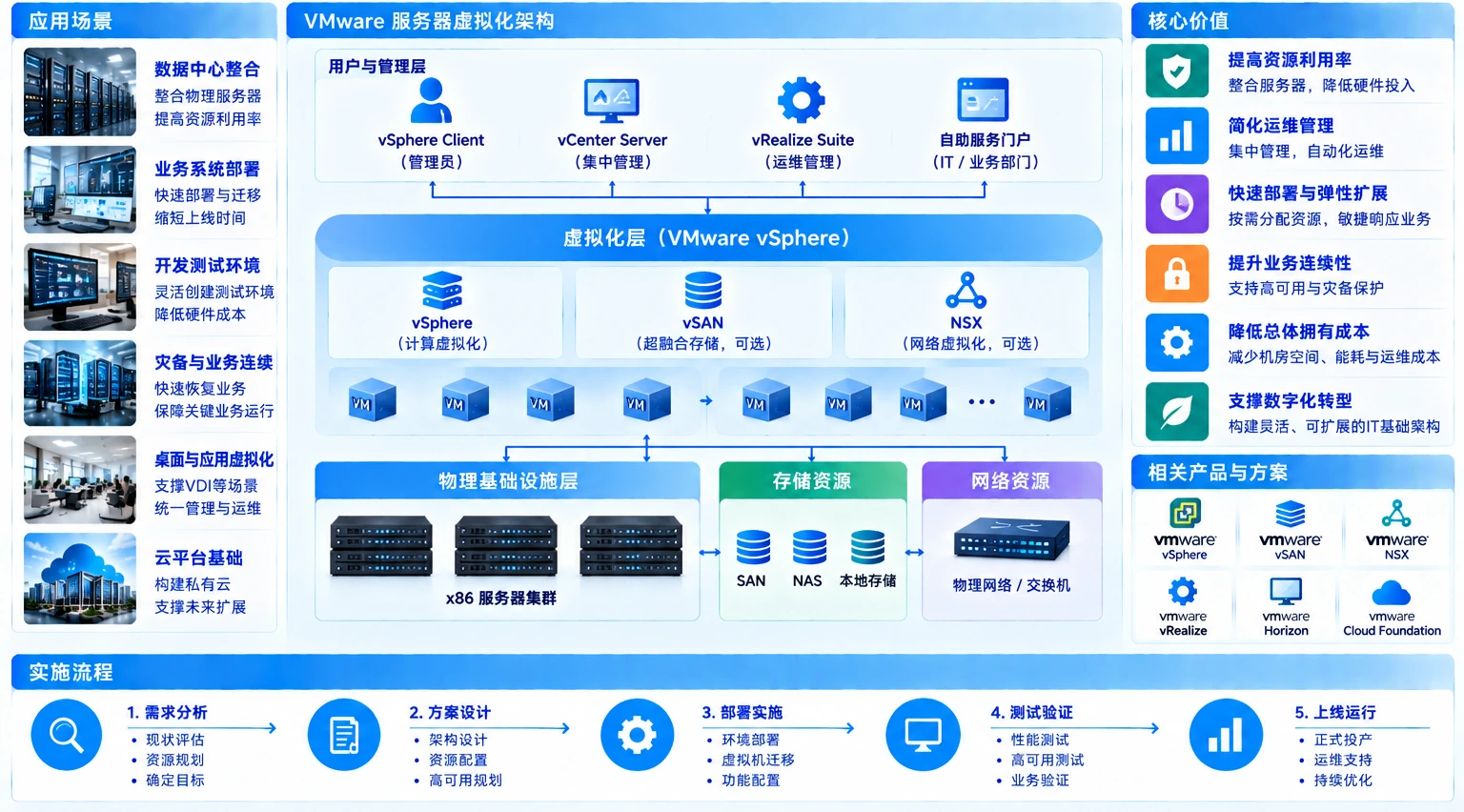
- Compute clusterCPU, memory, workload variation and maintenance requirements inform host specifications, cluster size and resource policies; VM count alone is not a capacity model.
- Storage pathCapacity, performance, redundancy, protocol and multipathing are assessed alongside virtual disks and backup locations.
- Virtual networkingManagement, workload, migration and storage traffic are separated through documented VLAN, uplink and access-control design.
Migrate in controlled waves
Migration is ordered by application dependency, not by server inventory. Databases, interfaces, licensing, time services, addressing and external devices are identified first. A lower-risk workload validates conversion, start-up, testing and rollback before later waves proceed.
- Dependency inventoryRecord application calls, shared storage, identities, addresses and operating windows so hidden dependencies are not discovered after cutover.
- Pilot and tool validationUse a controlled workload to test conversion, drivers, performance baseline, backup and recovery procedures, then correct the standard method.
- Wave-based cutoverDefine downtime, data synchronization, business validation and rollback conditions for each wave before approving the next.
From build to handover
Hardware, platform configuration, migration and operational handover are validated as separate gates so that problems do not surface together at the end.
- 01
Assessment and capacity model
Collect resource and workload information and confirm growth, redundancy, maintenance and backup requirements.
- 02
Detailed architecture
Document hosts, clusters, storage, networking, management addresses, permissions and monitoring.
- 03
Platform build
Install and configure hardware, firmware, the virtualization platform, storage and virtual networking, followed by foundation tests.
- 04
Workload migration
Convert, synchronize and cut over workloads in waves, retaining business validation and site-change records.
- 05
Operational handover
Deliver topology, configuration, access, monitoring, backup and operating information, including change and expansion paths.
Operate the whole platform
Virtualization concentrates workloads, so one platform issue can affect several applications. Operations therefore cover resource, hardware, storage, networking, backup and change, not merely whether the VMs are powered on.
- Capacity and contentionTrack CPU, memory, datastores and VM growth, identifying contention and capacity risk before it limits workloads.
- Hardware and cluster healthReview host alerts, time synchronization, cluster status, firmware compatibility and maintenance-mode operations.
- Backup and recovery validationA completed backup task is not proof of recovery; retention, restore paths and isolated test conditions need separate checks.
- Versions and changeBefore upgrades, validate compatibility, dependency, backup and rollback; update the baseline and procedures afterward.
Delivery proof
Questions before a migration window
Does server virtualization always require shared storage?
Shared or software-defined storage is selected according to availability, migration, performance and budget requirements; a product name alone should not determine the design.
Can every physical server be migrated directly?
Operating systems, drivers, licensing, peripherals, databases and dependencies must be checked. Some workloads may need a fresh deployment or must remain physical.
How are host specifications and capacity determined?
Capacity is based on current load, peak behavior, growth, maintenance reserve and failure conditions rather than a simple sum of rated hardware.
Is separate backup still required after virtualization?
Yes. Virtualization provides resource abstraction and some availability functions, but it does not replace independent backup, retention and recovery validation.
What remains in scope after go-live?
Hardware and cluster health, resource capacity, storage, networking, backup, alerts, access, versions and change records all remain operational concerns.