

Network and application use / Access management
Internet Access Management
Understand the business needs behind access, applications and traffic, with clear boundaries for network-edge controls, endpoint policies and audit responsibilities.
The aim is not to block all access, but to clarify business needs, policy boundaries and audit ownership.
01Why access management matters
Policies should follow business use
Website, application and cloud-service use varies by role, time and business need. Separate network-edge traffic from endpoint activity, then assign owners to policies, exceptions and audit findings so management does not become an unexplained blacklist.
For identity and entry-point review, coordinate with Identity and Access Management; for network-edge boundaries, coordinate with Next-Generation Firewalls while keeping the responsibilities of each control plane distinct.
Different access has different purposes
Office systems, cloud services, research, video and non-work traffic appear in the same edge-traffic view. Rules need to reflect roles and working periods.
Edge visibility is not complete endpoint visibility
Sangfor AC is suited to network-edge traffic and application controls, while IP-guard operates closer to endpoint web, program and activity policies. They are not interchangeable.
Audit findings should inform policy changes
Record policy hits, exceptions, users, endpoints and times to review permissions, restrictions, alerts and subsequent changes.
02Network-edge and endpoint controls
Coordinate edge and endpoint policies in parallel
Sangfor AC observes traffic and applications at the network edge. IP-guard handles website, program, device and activity policies at endpoints. Each control plane has its own responsibilities, feeding policy decisions, logs and adjustments rather than promising universal monitoring.
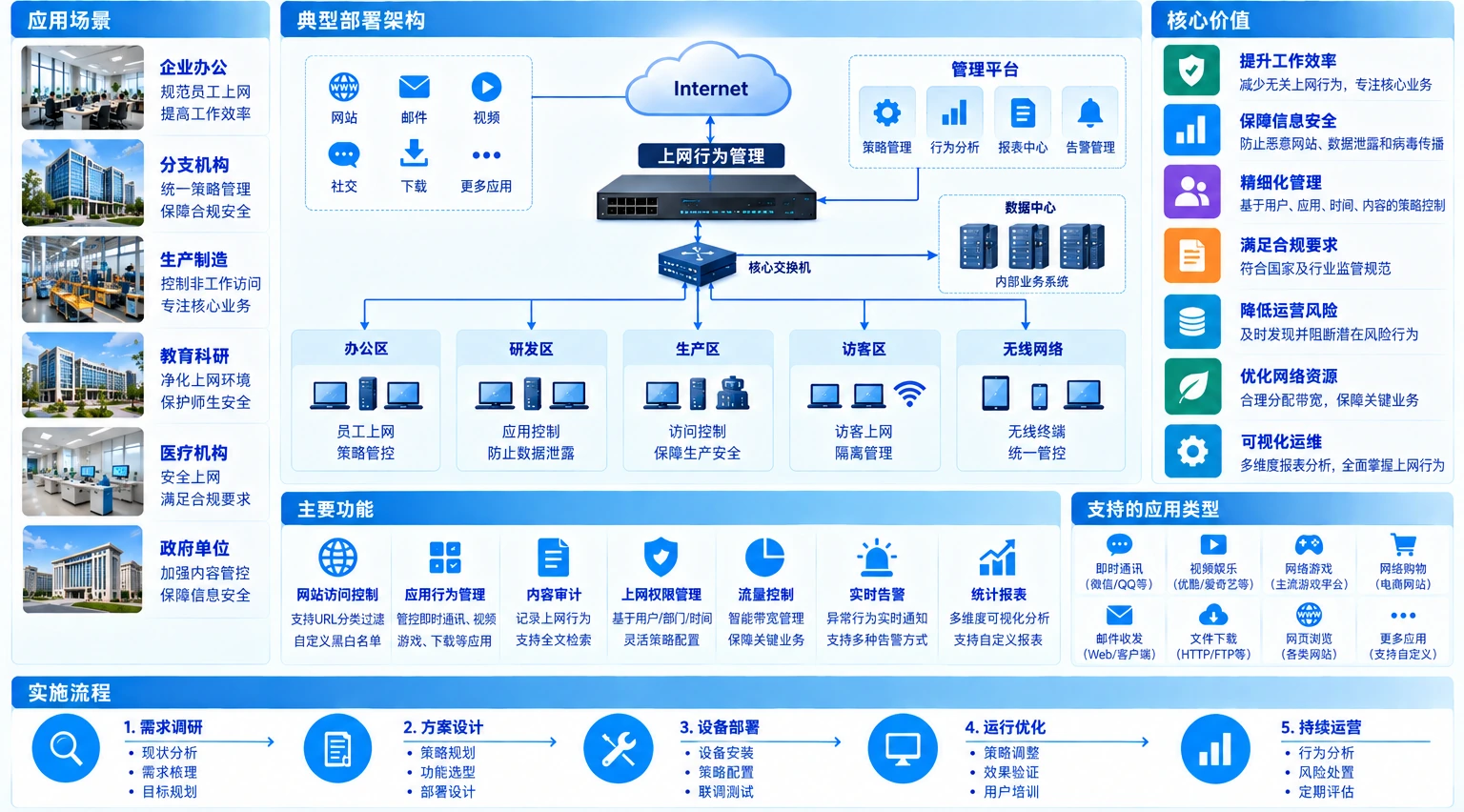
Enterprise users and endpoints are covered by network-edge Sangfor AC and endpoint-side IP-guard. The parallel control planes handle websites, applications, traffic and endpoint policies, feeding policy decisions and audit reports.
Input scope
Parallel control planes
Results and ownership
Illustrative workflow and architecture, not project results
03How Yuqi Intelligent helps
What we can do for your organization
From baseline inventory to policy rollout, select, validate and hand over capabilities against actual edge devices, endpoints, roles and maintenance windows.
Discovery interviews and inventory
Review users, endpoints, edge links, application categories, business periods, existing policies and log sources to define the management scope.
Product, model and licensing selection
Support selection, quotation and supply of Sangfor AC, IP-guard or suitable alternatives based on edge topology, endpoint systems, directory relationships, maintenance windows and management goals.
Edge policy design and deployment
Design AC policies for websites, applications, traffic, times and exceptions, then configure, integrate and verify network-side policy hits.
Endpoint policies and exception management
Organize IP-guard policies around roles, endpoints, software and business needs, defining permissions, exceptions, change ownership and audit scope.
Scoped pilots and adjustments
Pilot representative users, endpoints and business periods. Review allowed, restricted, alerted and excepted activity before expanding under agreed conditions.
Training, handover and agreed support
Provide policy inventories, test records, administrator training, incident procedures and operations documentation, with agreed support for later adjustments and reviews.
04Solution and usage scenarios
Make visibility, control and auditability practical
This office scenario illustrates common capability relationships, not a substitute for site inventory, product selection or compliance assessment. Verify the final scope against edge equipment, endpoint systems, user responsibilities and business periods.
- Edge: website, application, traffic and time-based rules
- Endpoint: website, program, device and activity policies
- Operations: exceptions, approvals, auditing and policy review
Illustrative office usage

05Implementation and customer handover
Pilot first, then hand policies to operations
Access management affects real users and working routines. Stage changes through inventory, design, pilot, validation and handover. Deliver policies, exceptions, audit and training records rather than only equipment or a license.
Inventory the scope
Confirm users, endpoints, edge devices, applications, business periods and compliance requirements.
Design policies
Turn websites, applications, traffic, times, exceptions and audit subjects into enforceable rules.
Validate the pilot
Validate business access, policy hits and exception handling for representative users and endpoints.
Hand over operations
Train administrators, deliver configuration and test records, and agree change and review procedures.
06Customer deliverables
Deliver policies that can be maintained
At handover, the customer receives searchable, changeable and reversible management records: what is controlled, who can change it, how to validate it and how to handle exceptions.
- User, endpoint, application and network-edge scope inventory
- Website, application, traffic, time and exception policy matrix
- AC and IP-guard deployment, licensing and policy-change records
- Pilot, policy-hit, allow/restrict and rollback test records
- Administrator training, audit-query and operations handover documentation
Give business owners, network administrators and endpoint administrators a shared scope and responsibility record so later changes do not fall between teams.
07Frequently asked questions
Clarify the control boundary first
Are Sangfor AC and IP-guard the same type of product?
No. AC primarily operates at the network edge for traffic, application and access policies. IP-guard is closer to endpoint website, program, device and activity policies. Whether to use both depends on the current environment, goals and compatibility.
Does access management mean unrestricted monitoring of every employee?
No. Define scope, purpose, roles, log fields, retention periods and query ownership in the solution and organizational rules. Apply necessary policies only to confirmed business risks and management subjects.
Is a blanket website URL rule sufficient?
Usually not. Websites, applications, traffic, times, roles and exceptions can interact. Understand business access before combining allow, restrict, alert and audit rules.
How can policy rollout reduce disruption to office work?
Establish an access baseline and asset inventory, then pilot representative users, endpoints and periods. Retain exception and rollback conditions and expand gradually based on test results.
Next step / POLICY REVIEW
Start with an access inventory or a policy issue.
Bring your edge-equipment details, endpoint scope, key applications and necessary business exceptions to define inventory, selection, pilot and handover boundaries.