
Source environment and dependencies
Physical servers / VMs / Cloud resources
Applications, databases, networking, permissions
Asset inventory / Backup and recovery baseline
Virtualization and cloud platforms / Migration and consolidation
Move distributed systems and resources into an environment that supports ongoing business. Yuqi Intelligent starts with assets and dependencies, then plans targets, phased migration, validated cutover and handover, with evidence for every batch and preparation for every changeover.
Understand how business operates before deciding where resources move.
Why it matters
Migration moves applications, data or runtime environments to new platforms. Consolidation reorganizes compute, storage, networking and management. They can be combined or phased; neither requires every system to move to cloud or one platform.
Aging equipment, facility changes, platform upgrades and dispersed branch resources can require migration. Identify system dependencies, target capacity, acceptable downtime and future maintenance ownership before moving equipment or data.
How the architecture works
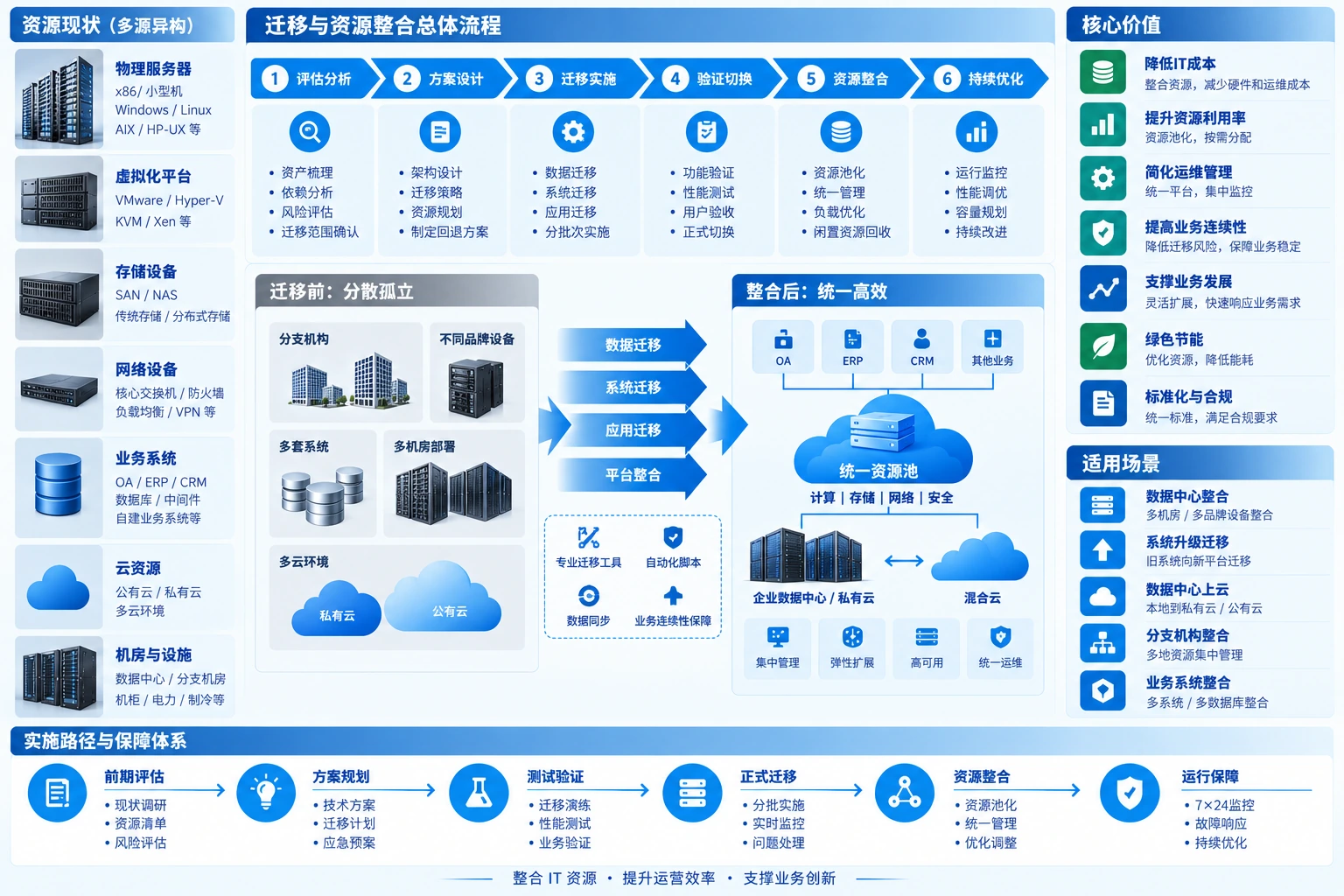
Keep approved workloads running at the source while preparing target systems/data with selected tools. Validate isolated test copies without accidental production writes. Once release conditions are met, perform final synchronization, entry-point changes and business acceptance in the agreed window, followed by observation and consolidation.
Physical servers / VMs / Cloud resources
Applications, databases, networking, permissions
Asset inventory / Backup and recovery baseline
Copy / Synchronize / Redeploy as supported
Isolate test copies; verify data and business
Capacity, dependency and access tests
Approved on-premises / Private / Public cloud
Compute, storage, network and security zones
Monitoring / Backup / Unified management
Owner-approved window → Planned write freeze → Final synchronization and consistency checks.
Change DNS or entry points → Test real workflows → Record acceptance results.
Roll back at predefined thresholds. Reconcile new target data first; do not write to both sides indiscriminately.
Retain the source and recovery records until observation, backup validation and business sign-off are complete. Resource reclamation, decommissioning and data deletion require separate confirmation; migration completion is not permission to delete old data.
The flow illustrates implementation, not universal support for real-time replication or zero downtime. Validate tools, cross-architecture compatibility, windows and rollback individually; animation is not a measured transfer rate.
Migration paths
Whole-system migration, application redeployment and data migration solve different problems. Source/target processor architecture, OS, platform support and licensing determine the available path.
| Path | When to assess it | Validation required |
|---|---|---|
| System or VM migration | Move existing environments between supported platforms | Drivers, boot, network configuration and conversion support |
| Application redeployment | Rebuild for a changed target platform or OS | Application versions, dependencies, configuration and licensing |
| Data-level migration | Change databases, files or storage platforms | Consistency, incremental sync, connection cutover and permissions |
Validate applications, data and real business tasks in isolation, recording completion time.
Control writes within the window, complete final synchronization and check consistency.
Decide cutover under predefined conditions; include new target data in rollback handling.
Adjust resources and reclaim idle capacity after stable operation. Old data is not deleted automatically.
Frequently asked questions
Not universally. Downtime depends on architecture, replication, data changes, networking and consistency. Rehearse and measure final synchronization and business validation before agreeing the cutover window.
Names alone do not establish conversion support. Check CPU architecture, OS, drivers, databases, application licenses and vendor support. AIX, HP-UX and other heterogeneous environments may require application redeployment or data migration rather than whole-system conversion.
Define triggers, decision-makers, source retention and data handling before implementation. If new data appears at the target, switching the entry point back is not enough; reconcile or synchronize it under the plan to avoid loss and dual writes.
No. It coordinates compute, storage, networking and management while preserving failure domains, permission isolation, redundancy and headroom. Benefits depend on actual workloads, not a fixed savings percentage.
Yuqi Intelligent assesses migrations, selects equipment/platforms, deploys environments, integrates migration and provides training. Coordinate software, database licensing and proprietary components with the customer and vendors, combining technical steps, business confirmation and windows in one plan.
Inventory servers, VMs, storage, versions and owners. Check application calls, database connections, IP/DNS, certificates, permissions and licenses. Capture capacity/load baselines and identify blocked systems and pilot candidates.
Plan compute, storage, network security and backups around workloads, with equipment/software supply, target deployment, isolated testing and sizing. Reserve redundancy and growth rather than sizing only by existing device count.
Plan batches, windows, steps and rollback; rehearse before execution. Migrate systems/data, integrate networking/permissions and validate business. Agreed owners approve critical cutovers; record results and unresolved items per batch.
After stable observation, optimize allocation, alerts, backups and management permissions, and assess idle resources for reclamation. Deliver topology, configuration, manuals and training, with ongoing troubleshooting and optimization as agreed.
Next step / Current-state assessment
Share existing platforms, key workloads, data scale, target environments and maintenance windows to map dependencies, pilot scope and implementation.