
Network security / wireless coverage
Enterprise wireless coverage
Yuqi Intelligent starts with spaces, endpoints and concurrency needs, then delivers wireless surveys, location and capacity design, equipment and PoE supply, configuration validation and handover for stable, roamable and maintainable access across offices, meeting, warehouse and public areas.
01 Define the problem first
Coverage is only the start; stability matters
Wireless coverage is not simply about having a signal. In offices, meeting, warehouse and public areas it must handle concurrency, preserve roaming, separate permissions and remain diagnosable during real use.
Locations, capacity, channels, power, PoE, uplinks and authentication need to be assessed together. When also checking Structured Cabling, Enterprise networking and SD-WAN or Identity & Access Management Platform, connect the work through the site interfaces and ownership boundaries rather than treating wireless as an isolated equipment purchase.
There is signal, but peak use is still slow
Coverage does not guarantee capacity; meetings, training and dense offices must be checked against concurrency and workload type.
Roaming is not smooth while moving
If AP power, channels, roaming policy and the wired side are not configured together, endpoints may drop or remain attached to a distant AP.
Employees, guests and devices are mixed together
Without clear SSIDs, authentication and access boundaries, experience, permissions and incident ownership are difficult to maintain.
02 Coverage and access architecture
Space zones, PoE access and logical permissions
APs in offices, meeting areas and public/warehouse areas connect in parallel to PoE switches, then to an uplink gateway and their network segments. Management controls policy and monitoring; user traffic does not all need the same management path.
Office, meeting and public or warehouse areas connect to PoE switches and then to an uplink gateway and employee, guest and device segments; management control is separate from user traffic paths.
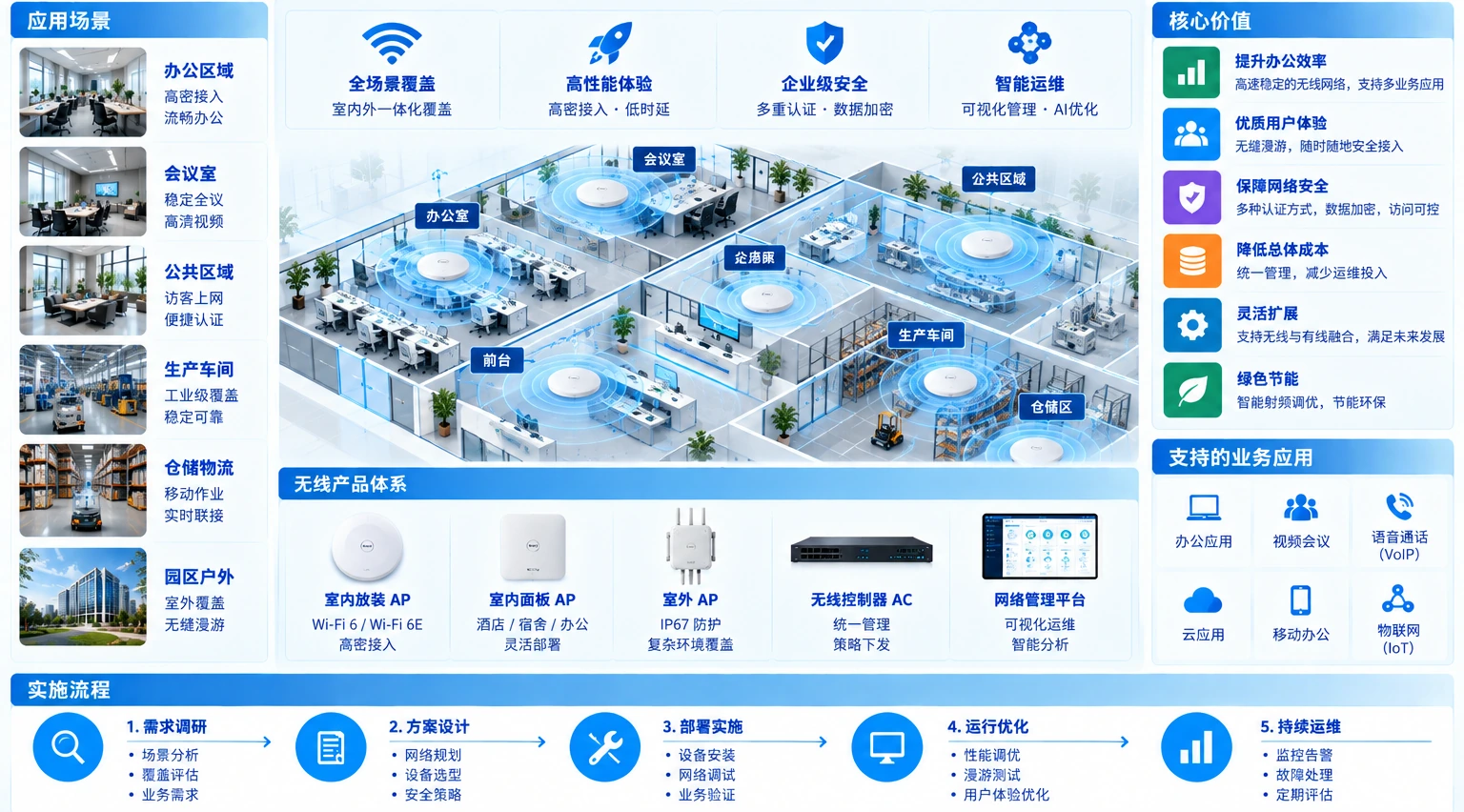
The diagram explains segmentation and ownership; it is not a project heat map or measured coverage result. Locations, equipment and policy require the floor plan, interfaces and validation records.
03 Wireless engineering and IT services from Yuqi Intelligent
From requirements and locations to a wireless delivery that can be validated.
Organise work packages around spaces, users, equipment and network boundaries, connecting AP selection, cabling and power, policy configuration, site validation and documentation handover.
Site and concurrency survey
Review floors, walls, desks, meetings, public areas, warehouses and endpoint types, turning peak usage into explainable coverage and capacity targets.
AP and switch selection and supply
Organise equipment lists, configuration guidance and supply scope around space, capacity, interfaces, PoE budget, uplinks and maintenance conditions.
Location cabling and PoE delivery
Set AP locations, cable paths, labels, switch ports and PoE power so wireless access rests on a testable wired foundation.
Channel, power and access configuration
Configure SSIDs, channels, transmit power, employee and guest segments, device networks and management boundaries, leaving room for site-based adjustment.
Roaming, coverage and concurrency validation
Validate coverage, roaming, representative business, authentication, isolation, PoE and uplinks across offices, meeting, warehouse and public areas.
Reports, configuration and maintenance handover
Deliver location plans, equipment lists, configuration backups, test records, issue closure, training and a basis for future troubleshooting and maintenance.
04 Phased implementation and client handover
Leave a usable basis for the next adjustment at every stage.
Start from the site and capacity baseline, then progress through locations, equipment, configuration, validation and handover records. Where cabling, power or other specialist work is involved, qualified partners should take that scope as required.
Site and capacity baseline
Review spaces, walls, user density, endpoint types, delivery windows and the existing network to define location and validation boundaries.
Location and equipment preparation
Lock APs, switches, PoE, uplinks, SSIDs, authentication and expansion headroom, with clear lists and stage ownership.
Segmented installation and configuration
Complete cabling, installation, power, channel and power settings, roaming and employee/guest/device policy by zone.
Testing, handover and operations
Complete acceptance through coverage, concurrency, roaming, authentication, isolation, links and records, then hand over change and maintenance paths.
05 Client delivery result
Deliver a maintainable wireless network, not just equipment
Deliverables follow the actual project scope and acceptance conditions. If identity and access policy also needs review, connect to Identity & Access Management Platform, and record configuration, changes and maintenance ownership in the operations documentation.
- Floor plans, priority areas and expansion headroom notes
- APs, switch ports, PoE, uplinks and configuration list
- Coverage, concurrency, roaming, authentication and isolation test records
- Configuration backups, training records and future maintenance and troubleshooting paths
06 Frequently asked questions
Clarify capacity, permissions and validation conditions first.
Is more AP coverage always better?
No. AP count must be judged with space, walls, user density, workload, channels, power, roaming and wired capacity. Too many devices can also create co-channel interference and roaming problems.
Why segment employees, guests and meeting devices?
Segmentation allows separate authentication, access scope, bandwidth and audit policies. Infrastructure may be shared, but permissions for different users and devices must remain clear and maintainable.
Can existing APs, switches and circuits continue to be used?
Start with equipment state, interface speed, PoE, uplink capacity, cabling quality, configuration capability and service lifecycle, then use testing to confirm what to retain, adjust or replace.
How are roaming and peak concurrency validated?
Test representative routes and usage across office, meeting, warehouse or public areas, reviewing endpoint roaming, AP state, PoE, switch ports, authentication logs and business access records.
Next step / FIELD REVIEW
Start with a floor plan or one wireless problem.
Tell us about spaces, users and existing network conditions in offices, meeting areas, warehouses or campuses. We will define survey, configuration, validation and handover scope around real usage.