

Network and information security / LAN access control
Enterprise LAN Access Control
Yuqi Intelligent starts with business flows, devices, subnets and server resources, connecting VLAN segmentation, inter-VLAN ACLs, firewall enforcement points and a permissions matrix into a verifiable access path. This controls which devices can reach which resources, not physical entry.
Define a clear management boundary for devices, subnets and server permissions.
01Clarify business flows and access needs first
Access permissions go beyond creating VLANs
Across office endpoints, servers, management devices and restricted endpoints, define who accesses what, which service is used, where policy is enforced and how the result is recorded.
Map business flows and the existing topology before choosing subnets, gateways, ACLs, firewall policy and logging ownership. Without an actual path and resource inventory, do not assume unrestricted connectivity or that every flow passes through a firewall.
Business requirements are not mapped to subnets
When actual application, endpoint and server dependencies are undocumented, VLANs become isolated numbers and policies cannot explain who has access or why.
Segmentation exists, but enforcement is unclear
Subnet segmentation is only the starting boundary. Inter-VLAN access must be enforced at the actual Layer 3 gateway, ACL or planned firewall path; a VLAN is not complete authorization.
Permissions have not become enforceable rules
Without a mapping of source, destination, service, action, owner and logging requirements, temporary exceptions accumulate and changes become difficult to reverse.
02Segmentation, enforcement and permissions
Enforce access control where traffic actually passes
Business requirements inform subnet and resource segmentation. A Layer 3 gateway ACL or planned firewall boundary then enforces specific rules, while the permissions matrix aligns sources, destinations, services, actions and evidence. The diagram illustrates relationships, not a project topology or a claim that all traffic crosses a firewall.
Business access needs enter VLAN and subnet segmentation, with Layer 3 gateway ACLs controlling access to servers and business resources. The permissions matrix supplies the rules; only designated cross-zone paths enter firewall policy. Traffic within one VLAN is not assumed to cross a firewall.
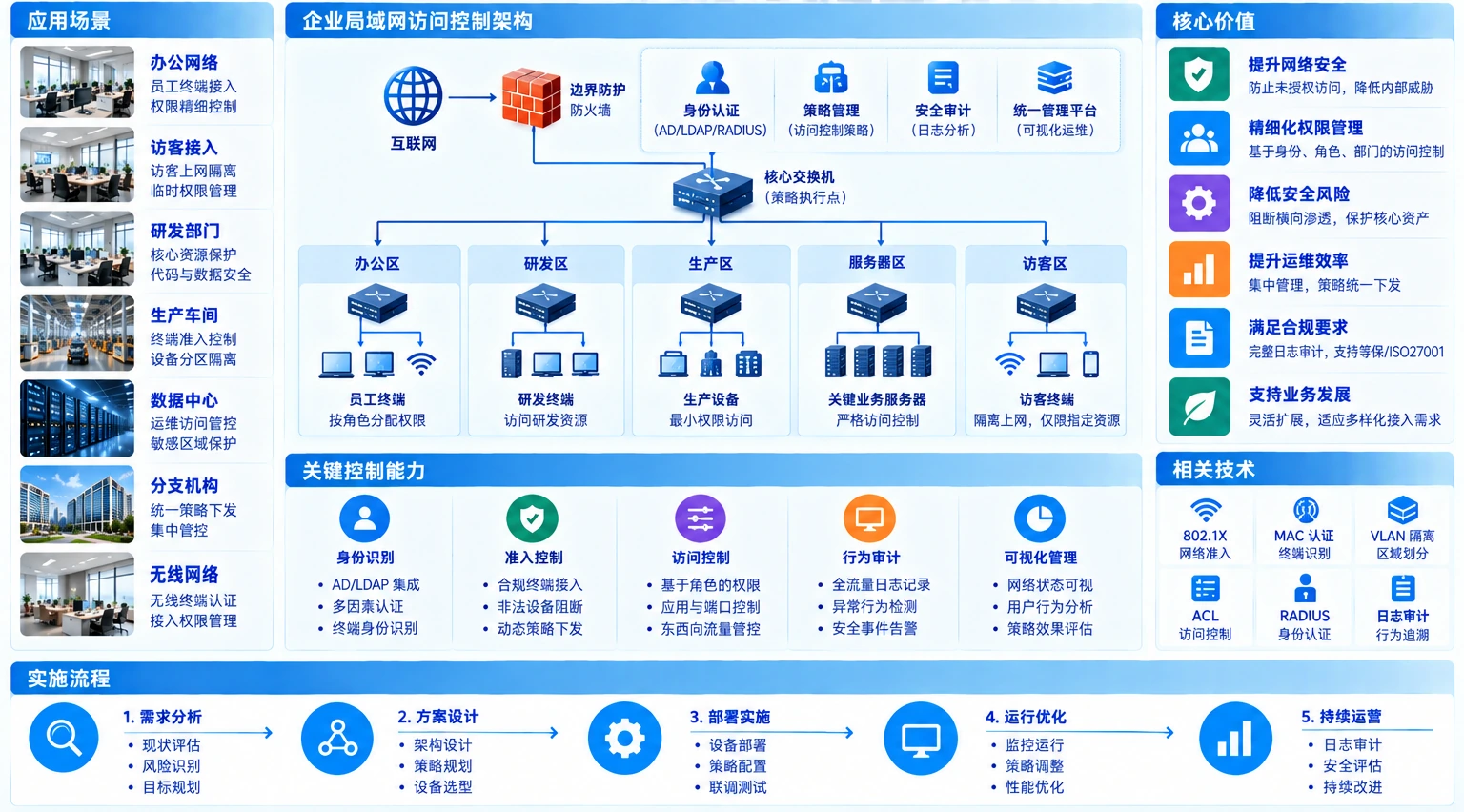
Internal traffic must cross a configured and verified enforcement point to be controlled. An internet-edge firewall does not automatically control all internal traffic.
EXAMPLEExample permissions matrix
Illustrative values must be checked against the actual topology, business flows, ports and device capabilities. Traffic within the same VLAN normally does not cross a firewall.
| Source subnet / subject | Destination resource | Service | Action | Enforcement point and evidence |
|---|---|---|---|---|
| Office endpoint VLAN (example) | Application server VLAN (example) | HTTPS / 443 | Allow for business use | Layer 3 ACL or designated firewall boundary; record rule hits |
| Office endpoint VLAN (example) | Management subnet (example) | Any | Deny by default | Gateway ACL denies and logs; exceptions require approval |
| Operations endpoint VLAN (example) | Server management address (example) | SSH / 22, HTTPS / 443 | Allow by role | Management-boundary ACL/firewall; retain operation logs |
| Guest or restricted endpoint VLAN (example) | Internal server VLAN (example) | Any | Deny | Layer 3 gateway denies; verify isolation and alerts |
03How Yuqi Intelligent helps
What we can do for your organization
Bring business-flow requirements, segmentation, enforcement points, equipment supply and validated handover into one implementation scope, reviewed against actual devices, subnets, servers and maintenance windows.
Business-flow and asset inventory
Start with application calls, endpoint types, server roles, subnets and existing routes. Confirm the objects, dependencies, owners and paths that need verification.
VLAN segmentation and access-boundary design
Organize subnets and gateway boundaries around office, server, management and restricted endpoint use. VLANs provide segmentation, not complete access control on their own.
Inter-VLAN ACLs and firewall policy
Define sources, destinations, protocol ports, actions, logs and exceptions as rules with explicit enforcement points. Use the actual topology to choose Layer 3 gateway ACLs, routing policy or firewall enforcement.
Permissions matrix and least privilege
Map business roles, devices/subnets, server resources and service ports individually. Define ownership for allow, deny, observation and temporary exceptions.
Equipment selection, supply and configuration
Support selection, quotation, supply, racking and configuration across switching, routing, firewalls, servers and logging. Illustrative rules are not presented as findings about your network.
Phased testing, handover and maintenance
Validate business access, isolation, logs and rollback in representative subnets before expanding in phases. Deliver topology, the permissions matrix, configuration backups, test records and change procedures.
04Phased implementation and customer handover
Verify one access path before expanding in phases.
Yuqi Intelligent can start with surveys, equipment selection and supply, then configure VLANs, gateways, ACLs and designated firewall policies. Representative subnets are used for business validation and rollback exercises. Identity or edge policies can be coordinated with Identity and Access Management and Next-Generation Firewalls, while each control plane retains a separately reviewed responsibility.
- Business-flow, device, subnet, server-resource and ownership inventory
- VLAN segmentation, Layer 3 gateway, ACL and firewall enforcement documentation
- Permissions matrix, exception conditions, logging requirements and configuration changes
- Phased tests, business validation, rollback conditions and operations handover
For a coordinated review of the existing topology and cutover window, see Network Modernization.
05Frequently asked questions
Clarify subnets, enforcement points and validation conditions first.
Does a VLAN provide complete access control?
No. VLANs primarily define broadcast domains and network segments. Inter-VLAN routing, ACLs, firewall policies, resource authorization and logs together determine access permissions. Locally switched traffic within a VLAN should not be assumed to pass through a firewall.
Must inter-VLAN traffic pass through a firewall?
Not necessarily. The actual gateway, routing and security-boundary design determine the path. Basic ACLs may run on a Layer 3 gateway, or designated cross-zone paths may be sent through a firewall. Confirm enforcement points against the existing topology first.
Can the example subnets and ports be copied directly?
No. The table is explicitly illustrative. Review business flows, server roles, protocol ports, device capabilities, logging requirements and maintenance windows, then test, observe and roll back in controlled phases.
Next step / POLICY REVIEW
Start with one real business flow.
Share your endpoints, subnets, server resources, existing gateways, firewall boundaries and maintenance window so we can define the inventory, policy, pilot, testing and handover scope.