

Enterprise infrastructure / storage networking
SAN and storage virtualization
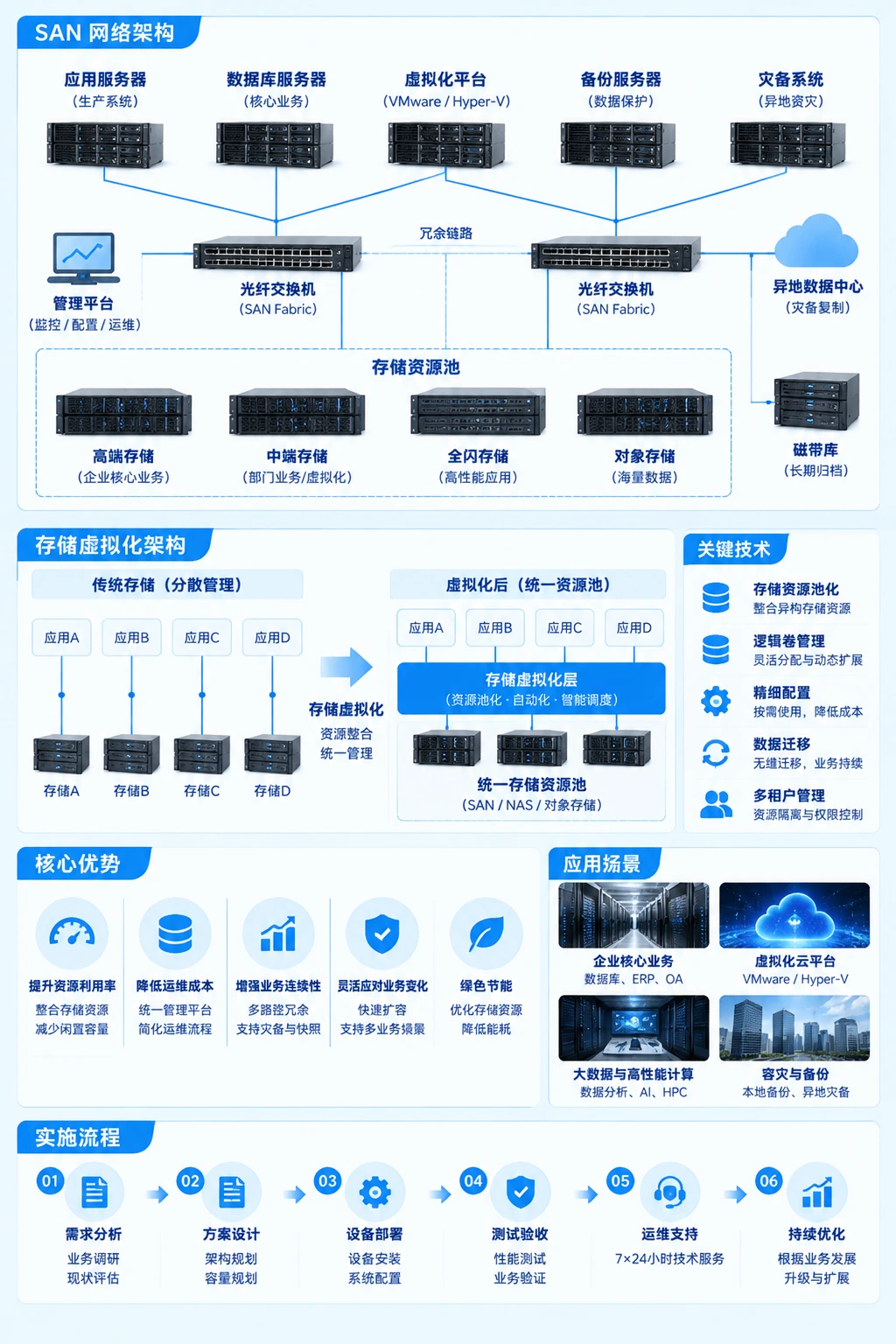
Yuqi Intelligent starts with SAN and storage-virtualization assessment, selection and supply, then delivers dual-Fabric / multipath, array and LUN deployment with business validation after migration. FC / iSCSI provides block access, while resource pools and independent backup manage capacity organization and recovery boundaries separately.
01 Why centralized storage
Make host paths, capacity and recovery boundaries manageable
When every server runs its own disks, capacity, paths, replacement and migration are often split across devices and teams. Centralized storage puts shared block access, resource organization and operational boundaries into an architecture that is easier to review, but it still needs an independent backup path.
FC / iSCSI block access
Provide block access to hosts through FC or iSCSI. Hosts use shared storage as logical volumes or LUNs; ports, permissions and mappings are confirmed for the equipment and systems.
Organize resources into pools
Organize local disks, arrays or multiple storage systems into a unified resource pool, then apply capacity, performance and redundancy policies. It is not the SAN protocol itself.
Outside the production boundary
Independent backup has its own media, path, retention and recovery validation. Array redundancy, dual Fabric and replicas cannot replace it.
02 How the architecture works
One business path, several independent boundaries
The host ports enter independent A / B Fabrics and then the array dual controllers and logical volumes. Independent backup sits outside the production-storage boundary; exact ports, equipment and validation scope are confirmed on site.
Host Port A and Port B connect to independent A and B Fabrics, which connect to the array dual controllers. The array provides logical volumes or LUNs; independent backup remains outside production storage with separate media, path and recovery validation.
-
01Dual host ports
Port AHost portsPort BHost ports
- 02 AFabric AIndependent switching paths
- 02 BFabric BIndependent switching paths
-
03Array dual controllers
Controller AController pathsController BController pathsLogical volume / LUNHost-visible volume
- 04Independent backup boundaryIndependent media · independent path · recovery validation
Dual paths are designed and validated against the actual solution. Implementation checks host ports, HBA / NICs, switches, zoning, array controllers, LUN mapping and multipath policy. Recovery must still be validated within an independent backup boundary.
03 What Yuqi Intelligent does
Storage services from Yuqi Intelligent
The service is more than purchasing an array: equipment selection, dual networks, multipath, host mapping, migration validation and ongoing operations are kept in one checkable work chain.
- 01
Assessment, selection, quotation and supply
Define SAN, array, switching and supporting-equipment options around workloads, capacity growth, interfaces, compatibility, racks and budget, then support quotation and supply.
- 02
Dual-network and multipath planning
Check host ports, HBA / NICs, independent A/B Fabrics, switching boundaries and multipath policy so path relationships can be configured, validated and maintained.
- 03
Array controllers and LUN mapping
Organize mappings for array dual controllers, storage pools, logical volumes / LUNs, host groups and permissions so host-side hosting is not missed.
- 04
Migration and business validation
Review legacy storage, dependent services, migration sequence, maintenance window, rollback and representative business access, then switch and validate within the confirmed scope.
- 05
Testing, delivery and documentation
Record ports, Fabrics, paths, controllers, capacity, mappings, alerts and test results, then hand topology, configuration and change records to operations.
- 06
Expansion and ongoing maintenance
Plan expansion, component replacement, path changes, configuration maintenance and support around capacity trends, port headroom, equipment lifecycle and runtime status.
04 Client delivery
Deliver equipment and complete documentation
After go-live, operations needs to understand every port, Fabric, controller, logical volume and backup boundary. If the scope also includes servers and storage hosting,high-performance computing nodes,vSAN storage virtualization or enterprise data recovery paths, we organize the agreed configuration, tests, changes and next steps into a delivery baseline that can be used after handover.

Delivery path
- 01
Architecture and scope confirmation
Confirm hosts, ports, Fabrics, array controllers, logical volumes, backup boundaries and site conditions.
- 02
Configuration and path checks
Configure equipment, switching, host-side multipath, storage mappings and permissions within the confirmed scope.
- 03
Migration, testing and rollback
Migrate or switch within the agreed window, validate paths, capacity, business access and recovery arrangements, and retain the agreed rollback path for exceptions.
- 04
Documentation, expansion and operations handover
Deliver topology, ports, mappings, configuration, tests, changes and capacity-maintenance recommendations so operations can take over.
FAQ
Common questions before selection
Start with current hosts, ports, storage, capacity growth, business dependencies, backup status and maintenance windows to define the assessment boundary.
01 Are SAN and storage virtualization the same thing?+
No. SAN primarily provides block access through FC or iSCSI. Storage virtualization further pools local disks, arrays or multiple storage systems and organizes policy, capacity and redundancy; one environment can use both.
02 Do dual Fabrics or multipath make an environment safe automatically?+
No. Dual paths are a design condition. Host ports, HBA / NICs, switches, zoning, array controllers, drivers and multipath policy still need checking, followed by failure and business-access validation within scope.
03 Is independent backup still needed with dual array controllers?+
Yes. Controller redundancy mainly reduces the single-point impact of an equipment or path failure. Independent backup still needs different media, paths, retention and actual recovery validation.
04 What should be prepared before migration?+
Prepare current host and storage lists, ports and paths, capacity and growth, business dependencies, maintenance windows, rollback conditions, backup status and acceptance method to set the migration sequence and validation scope.
Next step Start with the current paths
Tell us about hosts, storage and backup
Share current equipment, ports and paths, capacity changes, business dependencies, migration window and backup status. We will confirm assessment, selection, implementation and delivery scope against site conditions.