

Offline storage and business continuity
Offline Data Storage
Connect removable media, offline custody, retention, verification, restoration and business continuity to reduce the impact of production failure, deletion and shared-domain risk on every copy.
Copy roles
Three copies, three jobs
Separate daily access, rapid recovery and offline retention according to business needs.
Manage production, fast-recovery and long-term offline copies separately so every recovery choice does not depend on the same online devices and permissions.
Custody boundary
Disconnect the copy from production
Offline storage is not simply moving a drive. It keeps a copy outside the everyday account, network, device and permission boundary. First determine which systems, data and points in time deserve offline custody.
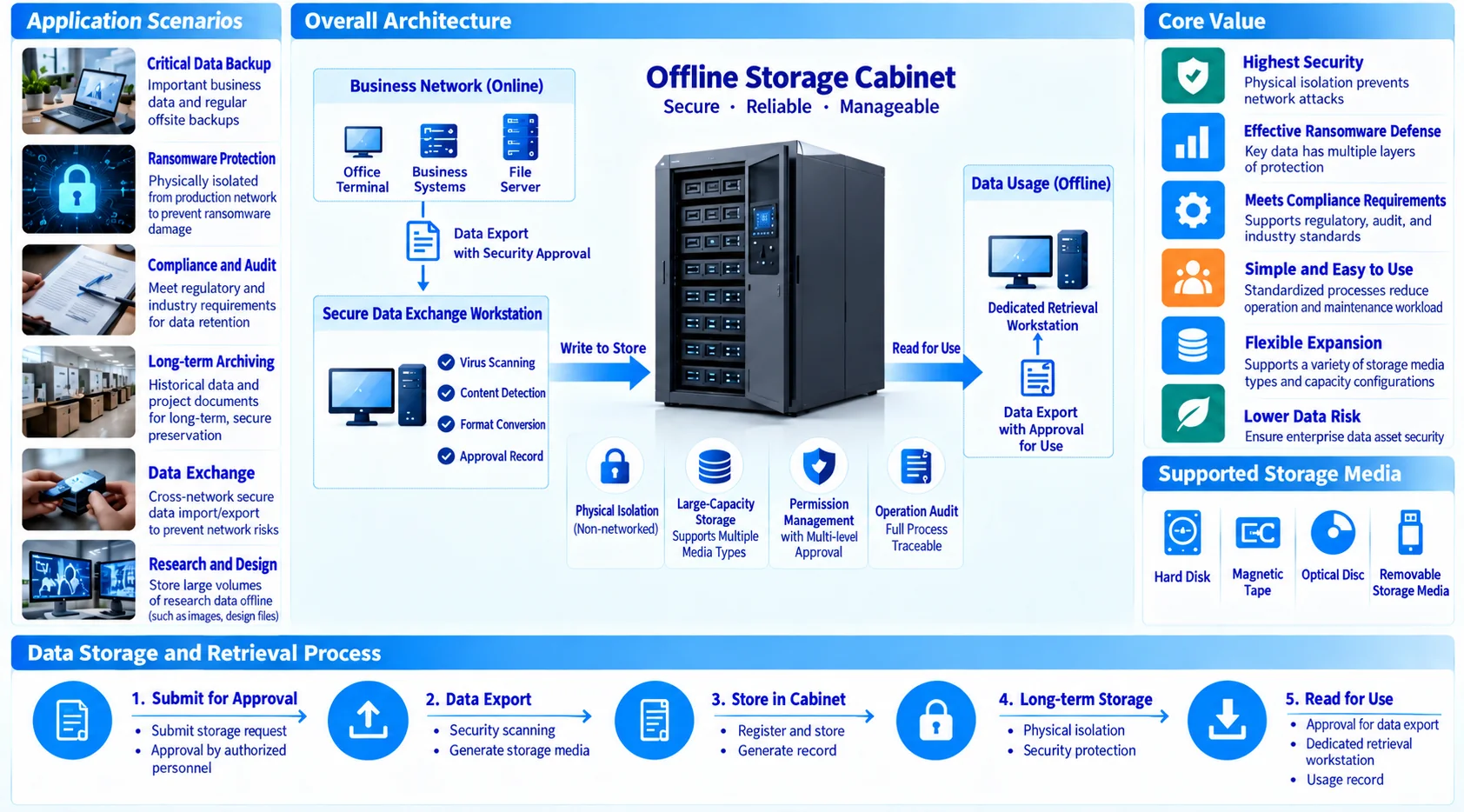
- Copy layersSeparate fast recovery, daily backup, offline retention and long-term archive purposes.
- Access isolationControl media access, checkout, return and approval so online identities do not own every copy.
- Point-in-time choiceChoose offline points in time around data change, business cycles and recovery objectives.
Custody record
Track every medium
Offline media should be managed as an enterprise asset: what it contains, its point in time, retention date, location, authorized users and rotation date should be recorded consistently.
Use media IDs, retention periods and rotation rules to create a searchable lifecycle and avoid having a drive that cannot be found or trusted.
- Intake recordRecord media ID, data scope, creation time, check result and custody location.
- Custody and rotationReview media state, retention, environmental conditions and rotation by schedule.
- Checkout and returnKeep approval, checkout, use, return and exceptions in one record.
Retrieve and validate
Retrieve it. Verify it.
Recording that media exists does not prove that data is usable. Periodically retrieve representative media and check reading, integrity, recovery resources, access and business files against agreed acceptance conditions.
Medium, interface, file system and reading equipment are usable.
Compare checksums, directories, key files and representative retrieval.
Business owners confirm the point in time and usable result.
The result is not merely that a drive spins; the copy must enter the recovery process within the target window and be confirmed by technical and business owners.
04 / Continuity path
Keep the recovery path ready
Offline storage helps during an outage only when it is connected to recovery order, communications, ownership and exercise maintenance. Recheck the path whenever systems, people or sites change.
- Recovery orderRecover infrastructure, platforms and databases before applications and file services.
- Communication and approvalDefine technical owners, business approvers, communication windows and escalation paths.
- Exercise and failbackRecord recovery timing, exceptions, remediation and failback conditions, then schedule the next retest.
Next step
Make offline custody reviewable.
Bring your systems, retention requirements, media policy or recovery exercise notes.
Discuss offline storage