

File servers
Retain versions of project files, contracts and shared directories so deletion does not leave only the latest copy.
Data protection / Backup strategy
Keep independent copies. Verify the recovery path.
Yuqi Intelligent assesses protection scope, capacity and backup windows, then supports product selection, policy deployment, recovery exercises, handover and maintenance.
01 / Start with the protected assets
Deletion, malicious encryption, hardware failure and version rollback make reliance on the original file unsafe. Start with a data inventory, then decide where copies belong, how long to retain them and how to recover.
File servers, virtual machines, databases and key endpoints require different protection methods. Where a single site cannot continue service, coordinate with Off-Site Disaster Recovery to plan copy locations and service takeover.
Retain versions of project files, contracts and shared directories so deletion does not leave only the latest copy.
Consider systems, configuration and application dependencies together; copying one virtual disk is not enough.
Coordinate backup windows and consistency checks with business operations. A successful backup does not mean the data is immediately usable.
Include design, quotation and research files on key workstation roles in a defined protection scope.
02 / Signature visual
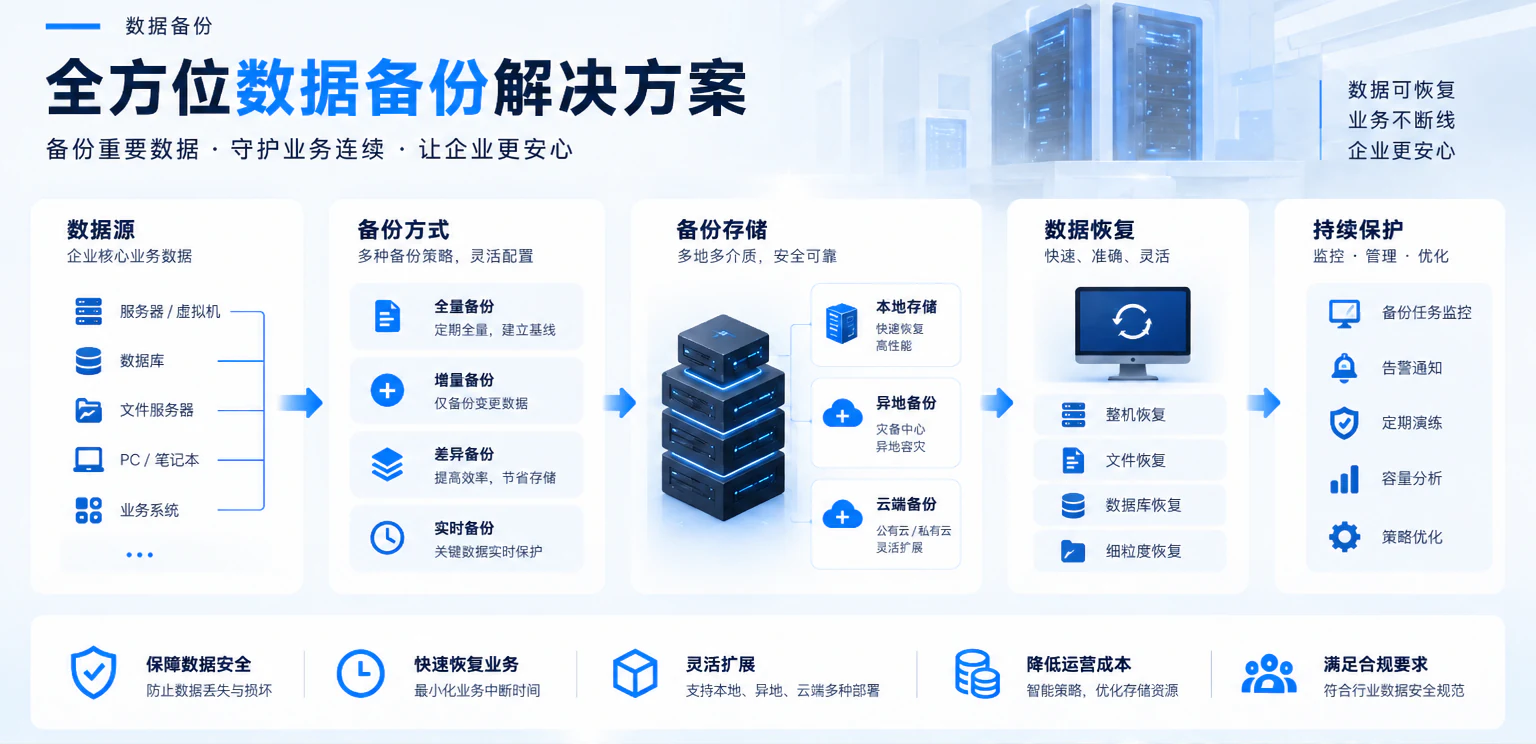
Production data enters a task and retention plan. Choose local, off-site, offline or immutable copies in parallel as required, then verify recovery in an isolated environment.
Backup success does not prove business recovery. RAID, snapshots and replication do not automatically replace independent backups.
File servers · Virtual machines
Databases · Key endpoints
Run within the agreed window
Define retention first
Follow recovery steps
Check consistency and business functions
Illustrative relationships: backup paths may run in parallel, while recovery is validated separately in isolation. Media, versions and compatibility depend on selection and testing.
03 / From assessment to handover
From scope, capacity and window assessment to backup software, storage selection and supply, task deployment, recovery exercises and training, Yuqi Intelligent implements protection around daily data and applications.
Inventory file servers, virtual machines, databases and key endpoints, confirming capacity, backup windows and retention.
Compare backup software, storage and copy locations against the environment and compatibility, with quotation and supply support.
Configure tasks, retention, alerts and maintenance rules so administrators know what to review daily.
Verify readability, permissions, configuration and business procedures against database and application dependencies.
Configure offline, off-site or immutable copies according to protection requirements, defining access conditions and maintenance ownership.
Run recovery exercises, record the process, deliver operating documentation and provide ongoing support as agreed.
04 / Protection paths
File servers emphasize versions and shared permissions; virtual machines require system and dependency coverage; databases need consistency windows; key endpoints require a defined role and file scope. Final protection and implementation conditions follow site assessment.

05 / Deliverables
Copies are the foundation; recovery exercises and management records make maintenance practical. Agree deliverables by scope rather than substituting a backup-success screenshot for business validation.
Clearly identify the files, virtual machines, databases and endpoints covered.
Document task windows, version retention, capacity and copy locations.
Review recovery prerequisites, operation sequence, checkpoints and results.
Hand over administrator procedures, alert handling, contacts and responsibility boundaries.
Frequently asked questions
Frequency depends on data changes, business windows, capacity and retention. Yuqi Intelligent defines protection scope and recovery objectives first, then schedules tasks within maintainable windows.
Usually yes. RAID, snapshots and replication address availability, version rollback or copy synchronization, but do not automatically replace isolated independent backups.
No. Restore files, databases and applications in isolation, checking consistency, permissions and business functions. Exercise records demonstrate whether the recovery path works.
Next step