
Endpoints and authorized access
PC / Compatible client / Optional web access
Authentication / Secure access / Application catalog

Virtualization and cloud platforms / Application virtualization
Deliver the right business applications to the right people rather than repeatedly installing and maintaining every endpoint. Yuqi Intelligent assesses and deploys publishing platforms, runtime environments, endpoint access and permission policies around compatibility, access methods and data boundaries.
Decide where the application runs before discussing delivery and data security.
Why it matters
Application virtualization concerns delivery and runtime environments. Common approaches include server-hosted remote applications and packaged applications running in controlled environments on compatible endpoints. They are different technologies with different data and offline boundaries.
Assess centralized delivery when installations are dispersed, versions differ, branches are difficult to maintain or partners need only specific software. Review dependencies, peripherals, licensing, concurrency and update frequency before choosing remote publishing or packaging; not every application belongs on one platform.
How the architecture works
The diagram illustrates remote publishing. After authentication, users receive authorized applications and connection management assigns a host session. Applications run on hosts and access business backends, while endpoints receive the interface and send input. Packaged local execution is a different path requiring separate endpoint-data and cache assessment.
PC / Compatible client / Optional web access
Authentication / Secure access / Application catalog
Application groups / Permissions / Version policies
Session allocation / Reconnection / Monitoring
Remote application processes / Dependencies
Authorized access to files and business databases
Application packaging/distribution → Compatible endpoint loading → Controlled local execution. This path does not use the remote application hosts above. Confirm application files, caches and business-data locations separately; centralized-data assumptions do not apply automatically.
Remote publishing does not make software inherently compatible. Pilot multi-user operation, license dongles, drivers, printing, graphics and licensing. Packaging or streaming may execute on endpoints and is not the same as remote display transport. Animated lines show relationships, not measured speed or performance.
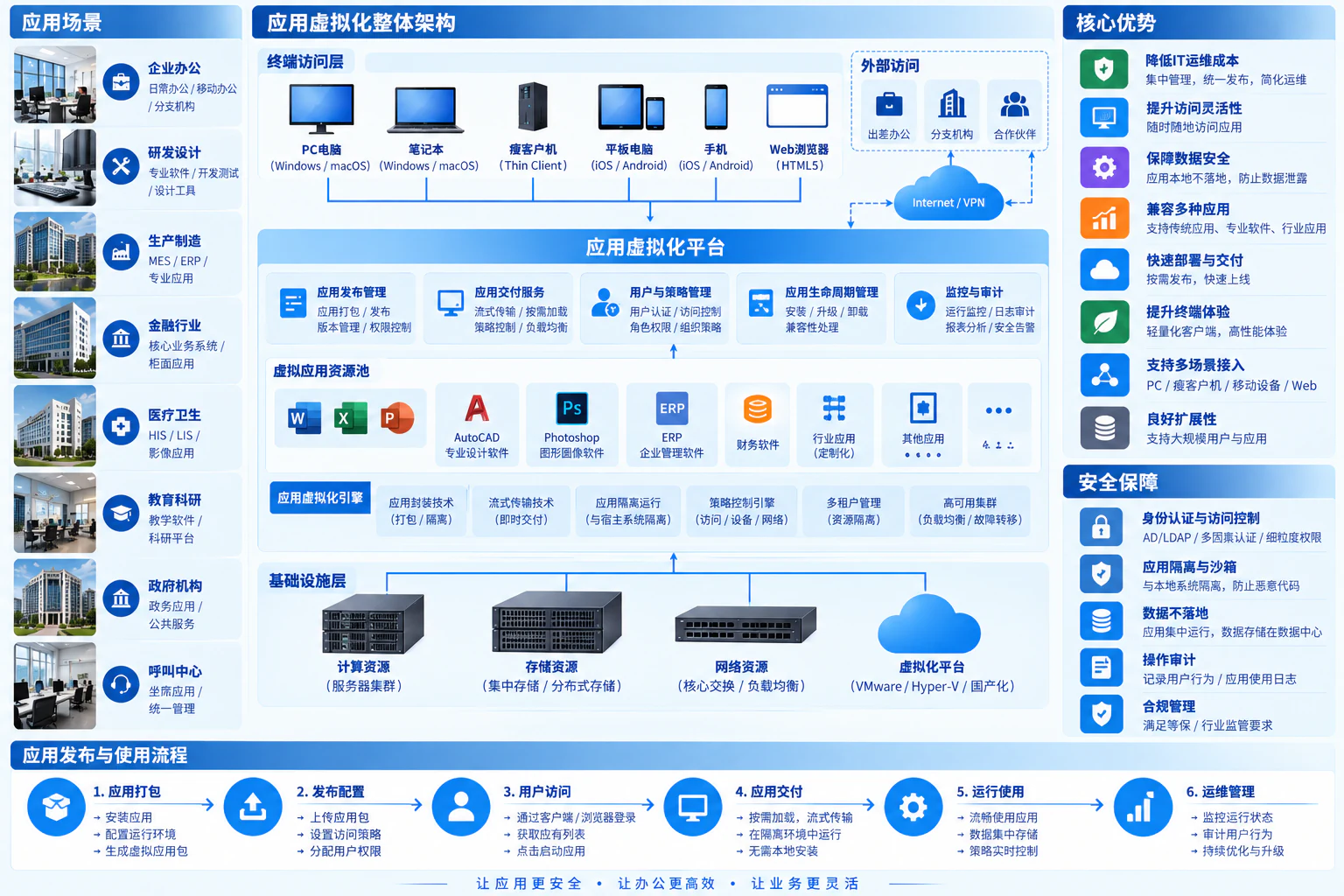
Distinguish execution locations first
Application virtualization includes different delivery methods. Server-hosted remote publishing and packaged endpoint execution have different network, data-location, endpoint-compatibility and maintenance requirements.
Applications are installed and run on servers; endpoints receive interfaces and send input. This suits validated centralized applications, but file, clipboard and printing redirection require separate controls and do not inherently prevent endpoint data storage.
Applications and dependencies are packaged for supported local endpoint environments. This can reduce installation conflicts, but does not remove every driver, peripheral, OS or licensing constraint, or eliminate endpoint resource needs.
| Review item | Why it matters |
|---|---|
| Versions and dependencies | Runtimes, plugins, browser components, drivers and OS versions may constrain one another |
| Business backends | Applications must also connect to databases, file shares, license services and identity systems |
| Peripherals and operations | Validate printing, scanning, USB license devices and file import/export through actual use |
| Updates and rollback | Upgrade a test group first, expand after business validation and retain a supported rollback version |
Frequently asked questions
It depends on the solution. Remote publishing may use compatible clients or supported browsers; packaged applications usually require a corresponding runtime. Verify browser, peripheral and file-handling support by product and version.
Each needs validation. Multi-user support, licensing, database connections, drivers, dongles, graphics and printing affect feasibility. A software name alone cannot establish compatibility.
Remote publishing usually runs applications on servers, with endpoint interface and input. Packaging, isolation or streaming may run applications on endpoints. Endpoint dependencies, caches, offline support and maintenance differ.
Not directly. File downloads, drive mapping, clipboard, printing and permissions still require business-specific controls alongside endpoint and application measures. Centralized delivery is one component, not an absolute data-loss prevention guarantee.
Yuqi Intelligent supports enterprise office, branch access and specialist software with application inventory, platform/equipment selection, publishing and training. Go beyond application startup to real workflows, manageable updates/rollback and traceable permissions.
Review versions, dependencies, plugins, drivers, peripherals, data connections and licensing using representative workflows. Identify applications suited to remote publishing, packaging or retained local installation.
Configure publishing platforms, hosts, network security and storage for execution models and concurrency. Check platform, OS and application licenses. Validate a test environment before confirming production capacity and redundancy.
Configure application groups, departmental permissions, secure access, file and printing redirection. Verify users see and use only approved applications; record versions, dependencies and data boundaries, then publish in batches with rollback.
Resolve startup, session, peripheral and performance issues, maintain version/dependency inventories, and provide update testing, configuration backups, diagnostics and administrator training to limit broad disruption.
Next step / Site assessment
Share software names and versions, users and concurrency, peripherals and current maintenance issues to define testing, delivery and implementation boundaries.