

Data protection / Files and workflows
Data Encryption
Protect drawings, contracts and business files with clear rules for authorized internal use and external collaboration.
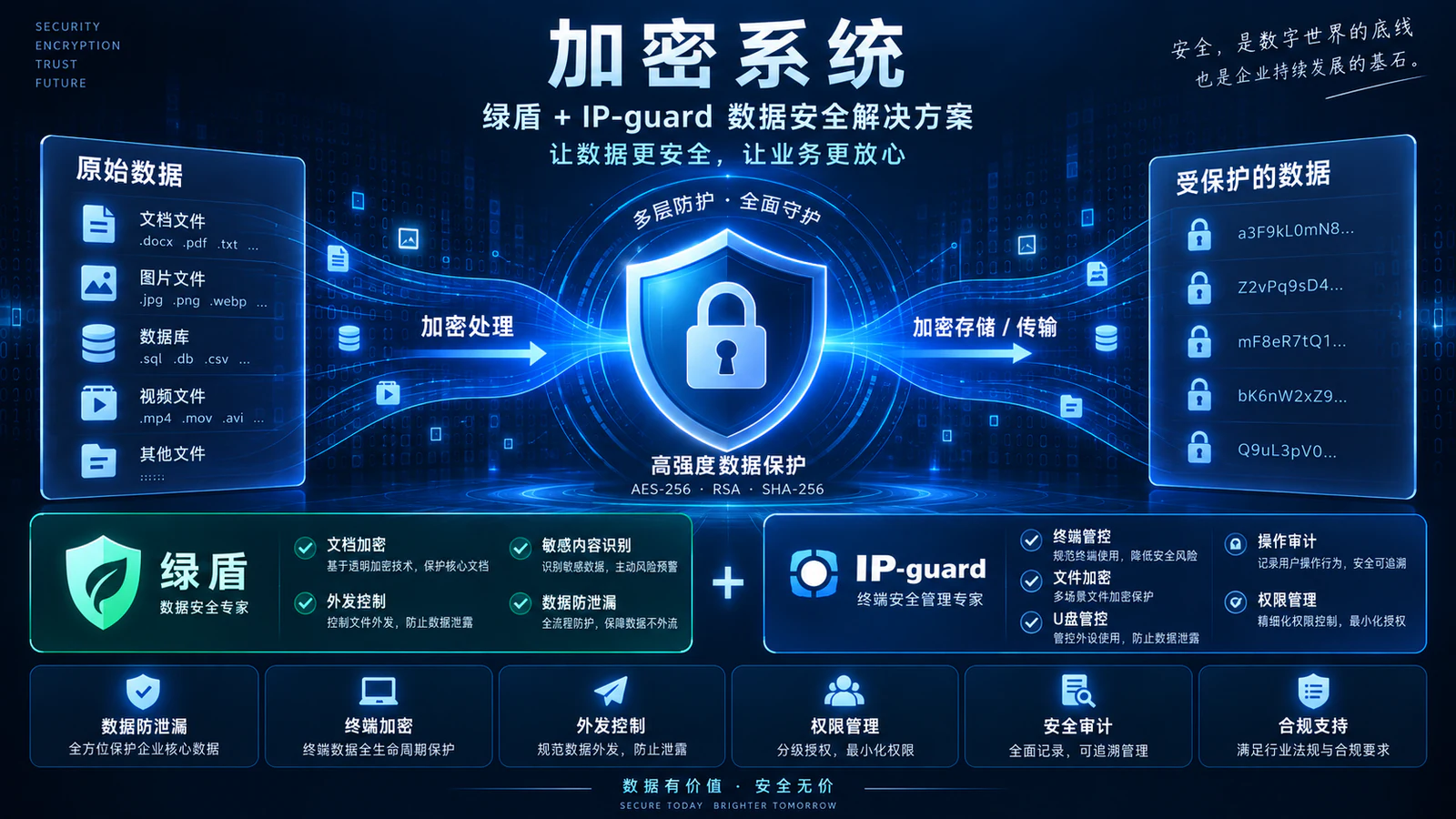
Yuqi Intelligent supports selection and supply of Green Shield, IP-guard and other suitable solutions, including pilots, encryption policies, permissions, external-sharing approvals, training and maintenance documentation.
Start with a file that needs to be shared. Define the scope, then validate the solution and workflow.
01Why data encryption matters
Control how important files are used and shared
Drawings, quotations, contracts and research documents are copied, reviewed, handed over and shared. Define who can open them, on which endpoints, under which approval process and how access is withdrawn when permissions change.
For identity-source review, coordinate with Identity and Access Management; for endpoint and internal-access boundaries, see Internal Network Security Controls to integrate file protection with the wider enterprise workflow.
Design drawings
Versions are copied, reviewed and shared. Authorized users must remain identifiable beyond the engineering endpoint.
Quotations and contracts
External sharing needs named recipients and time limits, with recorded rather than verbal approval.
Research and development files
Project handovers, staff changes and removable media alter the actual scope of file use.
External sharing and staff departures
Record permission changes, exception requests and revocation so protection remains maintainable.
02File-protection workflow
Authorize internal use; approve external sharing
Protect files in their real workflow. Creation and saving enter encrypted protection, while authorized endpoints continue working. External collaboration follows request, approval and controlled delivery; unauthorized paths are tested separately as conditional branches.
Created or saved files enter encrypted protection for authorized endpoint use. External sharing follows request, approval and controlled delivery; unauthorized opening or copying is a conditional blocking path that requires validation.
01 / Input
02 / Protected area
03 / Sharing rules
04 / Controlled delivery
Conditional branch / Validation
Approval is a workflow step, not a guarantee against every data leak. Capabilities depend on product version, licensing, policy and compatibility testing.
Illustrative selection and capabilities, not measured results
03Implementation by Yuqi Intelligent
What we can do for your organization
From product selection and licensing to endpoint deployment, encryption policies and training, Yuqi Intelligent implements protection around the files and software employees use daily.
- 01
Inventory files and workflows
Inventory sensitive files, roles, endpoints, applications, sharing paths and current owners to define the protection scope.
- 02
Selection, quotation and supply
Assess Green Shield, IP-guard and alternatives against the environment and goals, covering products, licenses, compatibility and quotations.
- 03
Design encryption and access policies
Translate file classification, endpoint use, permissions, sharing approvals, exceptions and auditing into enforceable configuration.
- 04
Pilot deployment and integration
Test opening, editing, saving, approvals and external sharing with representative users, applications and files.
- 05
Compatibility validation and rollout
Confirm versions, performance, permissions and rollback conditions, then migrate within an agreed window to reduce daily disruption.
- 06
Training, documentation and support
Train administrators and key users, deliver configuration, test and exception-handling records, and support later changes as agreed.
04Products and usage scenarios
Choose protection for the file and software environment
Green Shield and IP-guard are not a mandatory combined installation. The diagram is conceptual; confirm products, modules and algorithms against the environment, licensing, compatibility and maintenance ownership.
- Design collaboration: Authorized users continue editing, saving and reviewing on controlled endpoints.
- Contract sharing: Handle external delivery according to recipient, duration and approval rules.
- Research handover: Update permissions and retain operations records when personnel or projects change.
Illustrative file usage

05Customer deliverables
Hand over software, policies and operating records together
Document the protection scope, access ownership, approvals, test results and recovery paths so administrators and key users can maintain the solution.
- Protection inventory: files, users, endpoints, applications and external recipients
- Permissions matrix: roles, use, exceptions, approvals and revocation
- Policy configuration: products, licenses, versions, compatibility and deployment
- Validation report: opening, editing, saving, sharing, approval and audit tests
- Operations handover: administrator procedures, recovery, migration and rollback
06Frequently asked questions
Three questions to resolve before purchase and rollout
Must Green Shield and IP-guard be purchased together?
No. Assess each against the file scope, endpoint environment, sharing process and compatibility. Select one or combine them after validation.
Can authorized users still edit and collaborate after encryption?
The goal is to preserve existing workflows on authorized endpoints. Validate specific applications, versions and policies in a pilot, and migrate only the validated scope.
Does sharing approval guarantee that files cannot leak?
No. Approval, permissions and auditing make sharing more controlled and traceable, but effectiveness still depends on versions, licenses, policies and compatibility validation.
Next step / DATA PROTECTION REVIEW
Start with a file that needs to be shared.
Bring your file types, endpoint environment, external recipients and current workflow to define protection scope, product selection, pilot validation and handover documentation.