JENKINS-BASED · BUILD & DELIVERY

Automated builds and continuous delivery

One commit moves through triggering, building, testing, archiving, approval, deployment and verification . Yuqi customizes and integrates Jenkins to make releases versioned, traceable and explicitly approved.
Core / plugins / custom engineering Human release approval Version-based rollback design
yuqi-ci / order-service · Pipeline #128 · mainDemo
Build stages · Demo BUILD #128 / DEMO
Commit
Build
Test
Archive
Release approval
Deploy
Verify
Interface concept only. Jenkins is not connected. Build, approval and deployment require project configuration.
DEMO DATA / Interface, stages, logs and artifacts are simulated No real build
Local presentation only · No Jenkins installation or real build or deployment Jenkins customization and integration · Official sources reviewed 2026-11-15
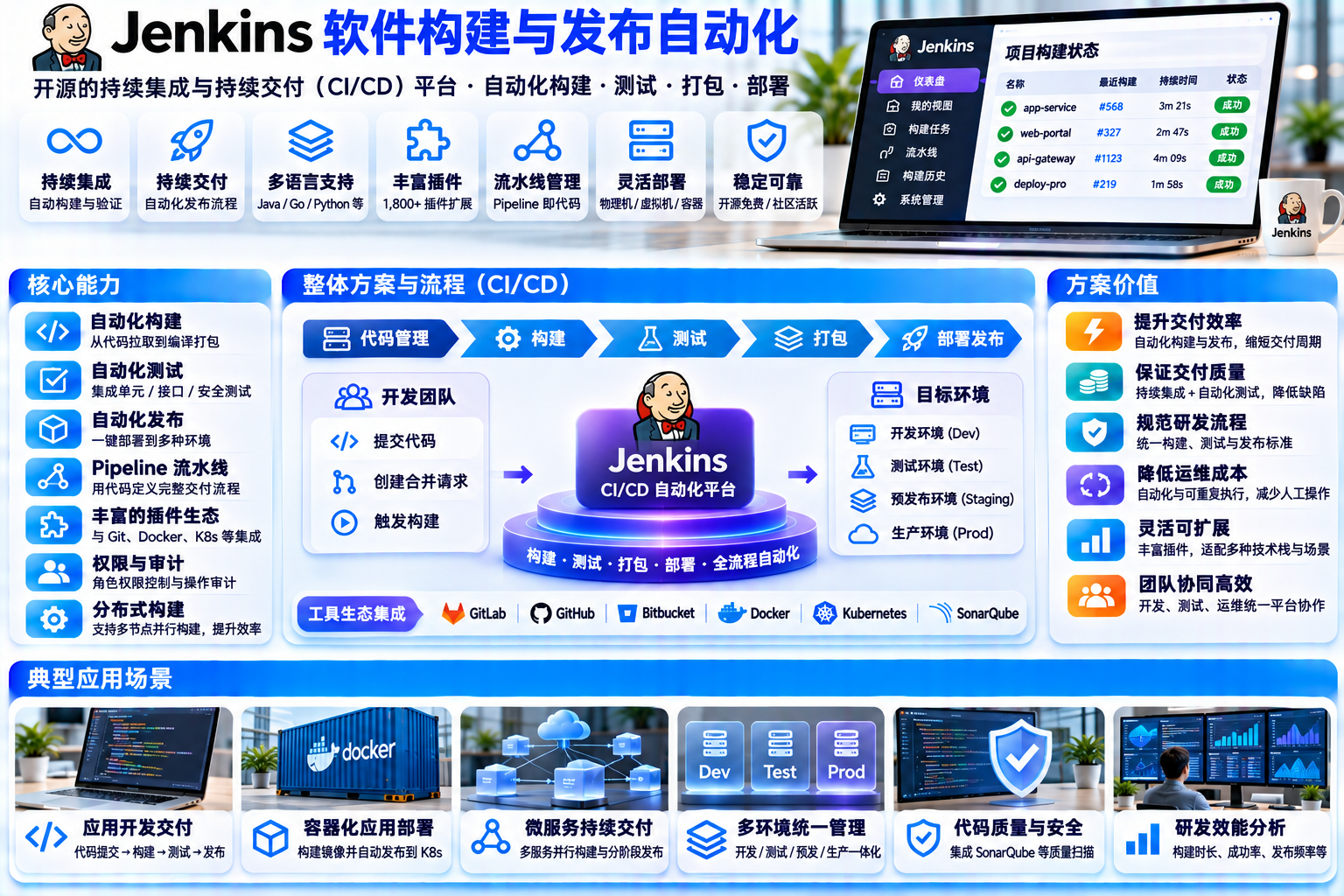
Jenkins automated build and delivery — Chinese-language solution illustration
Jenkins automated build and delivery · Illustration in Chinese, not a delivered interface

Interfaces, figures and prices are examples. Actual features, licensing and delivery scope are confirmed for each project.

01 / CAPABILITY BOUNDARY

Start with the boundaries: who provides what

Jenkins Pipeline is a plugin suite. Distinguishing core, plugins and project engineering keeps delivery expectations clear.

Official documentation reviewed Capability classification · Demo
01JENKINS CORE
Core capabilities

Included in Jenkins core

MIT License

The core automation engine schedules work and records results. Pipeline syntax, repository integrations and approval steps rely on additional plugins.

Automation engine and job scheduling Build queue / executors / workspaces Build history and console logs archiveArtifacts / artifact archiving fingerprint / file usage tracking Distributed Controller / Agent architecture Authentication and authorization framework Security configuration baseline
Sources: Jenkins Core Pipeline steps, node management and security documentation. Pipeline access to core steps still requires the Pipeline plugins.
02PLUGINS
Plugin capabilities

Select, install and maintain plugins

Separate plugin licenses

Pipeline uses a plugin suite. Credentials provides credential storage and APIs; Credentials Binding exposes selected credentials to pipeline execution. JUnit reports also require a plugin. Lock versions and review dependencies.

Pipeline suite / Jenkinsfile Declarative / Scripted syntax Stage View visualization Git / GitHub Branch Source Multibranch / webhook triggers Credentials API & Binding JUnit test report aggregation input / human approval step sh / Nodes and Processes Mailer / Email Extension notifications Matrix / Role Strategy authorization Docker / Kubernetes Agent
Sources: Pipeline, credentials, JUnit and Declarative Pipeline documentation. Credentials storage and binding are distinct plugin responsibilities.
03YUQI ENGINEERING
Yuqi custom engineering

Project-specific services and customization

Defined in the service agreement

Deployment is implemented through configured steps and integrations; the official example uses sh 'make publish' to invoke a script. This layer connects scripts, environments, permissions and operating procedures.

Jenkinsfile / Shared Library templates Stage orchestration and quality gates Deployment scripts and version rules Artifact repository / environment integration Release policies and approval matrix Credential scopes and access controls Network allowlists and boundaries Execution record retention Rollback design and rehearsal Controller / Agent operations support
Contracts define delivery and operational responsibilities. Upstream code, plugins and dependencies retain their respective license obligations.
Scope boundary: Plugin features require selection and configuration. Deployment needs project scripts or integrations. Application state and database rollback require separate design and rehearsal; Jenkins alone does not guarantee recovery.
02 / PIPELINE CONSOLE

Open up a complete delivery

Select a stage to review its role, run a simulated build, or inject a test failure. Follow the stage states, log output, artifact availability and manual handling path.

Interface, logs and artifacts are simulated
yuqi-ci / order-serviceBranch main Ready
Demo
STAGES / Pipeline stages DEMO
Select a stage to review its responsibilities and dependencies. These are concept notes, not configured capabilities.
CONSOLE OUTPUT · order-service #128 · Demo
Static overview: commit, build, test, archive, approve, deploy and verify. Enable JavaScript to operate the demo.
ARCHIVED ARTIFACTS / Demo 0 / 3 available
Artifact details · Demo: run and archive a build to unlock. Artifact versions, independent checksums and deployment scripts support a planned rollback path.
Tests failed · Demo Pipeline stopped before artifact publication or deployment. The project owner notification is simulated.
DEMO DATA / Stages, durations, logs, artifacts, notifications and approvers are simulated. No Jenkins service is connected. Simulated result
03 / DELIVERY RAIL

One commit, the full delivery path

Eight stages connect a commit to release verification. Failed tests stop the delivery path; release approval is a human gate. Verification failures require a separately designed version-based rollback.

Workflow concept · Demo
Animated delivery workflow · Demo Failure branch / notification / manual handling
Eight-stage delivery workflow with failure and rollback paths Top row: commit, trigger, build and test. Bottom row runs right to left: archive, approve, deploy and verify. Failed tests enter notification and manual handling. Rollback is an optional response to failed verification. All states are simulated. FAIL Fix and submit again Verification issue / approved rollback 01 / COMMITCode commit git push · main · Demo 02 / TRIGGERTrigger pipeline Webhook / scan · Plugins 03 / BUILDAutomated builds Agent / dependencies / compiler 04 / TESTAutomated tests Unit / integration / reports 05 / ARTIFACTArchive artifacts Version / checksum / fingerprint 06 / APPROVALRelease approval input step / human gate 07 / DEPLOYDeployment execution Deployment script / environment 08 / VERIFYRelease verification Smoke tests / observations / record Tests failed Stop / no publication or deployment Notify owner Email / IM · Plugins Manual handling Diagnose / fix / rerun Return to archived version Artifact version + deployment script + approval
Scroll the diagram horizontally, or select a step below · Demo
Failure branch · Demo  Failed tests → stop → notify owner → manual handling → fix and resubmit. No artifact publication or deployment in this example.
Rollback path · Demo  Rollback uses an archived artifact, a deployment script and approval. Rehearse it in advance; application and database recovery are not automatic guarantees.

Select Play to advance, or inspect one step at a time. All node states, logs and results are simulated.

Running Complete Approval / rollback Failure / notification DEMO RAIL / Workflow concept
04 / ROLLBACK BY DESIGN

Rollback is an engineering plan , not just a button

Jenkins supports archiving, file fingerprints and resumable pipelines through its core and plugin ecosystem. Restoring an application and its data requires a project-specific recovery plan and rehearsal.

Versions and records are simulated
ARTIFACT VERSIONS / Archived artifacts · Demo
v2.4.0

Previous stable version / checksum and scripts retained

Rollback target
v2.4.1

Current release / tests and approval completed

Current
v2.4.2-rc

Candidate build / archived, not approved for release

Unreleased
v2.4.1 → v2.4.0: retrieve the same artifact and run the approved deployment script with environment parameters · Demo
01
Traceable artifact versions Bind each release to its artifact version, checksum and build identifier. Avoid an ambiguous latest package.
02
Parameterized deployment scripts Reuse the deployment mechanism with an explicit artifact version instead of improvising recovery commands.
03
Approval and execution records Record rollback as a release action with approval, logs and a result that can be reviewed later.
04
Project design and rehearsal Rehearse in staging. Review database changes, queued messages and state compatibility separately.
Recovery boundary: Jenkins does not automatically restore every application or database. Schema changes, new data, external state and irreversible actions require a separate recovery or compensation plan and explicit project approval.
05 / TECHNICAL ARCHITECTURE

Six roles, three boundaries

Identify the repository, Controller, build Agents, test tools, artifact repository and target environments, including credential handling and network access.

Architecture concept · Demo
Delivery roles and boundaries · Demo Dashed boxes = network boundaries
Jenkins-based build and continuous delivery architecture Repository events trigger the Controller, which schedules Agents. Agents execute build and test tools. Artifacts can be transferred to an external repository. Deployment scripts access controlled environments. Credential storage and runtime binding require plugin and access configuration. Internal development and build zone Deployment zone / controlled access Code repository Git / branches / PRs / tags Webhook integration Artifact repository Nexus / Artifactory Version / retention policy Jenkins ControllerSchedule / access / history WAR / Docker / LTS or Weekly Core / build on separate Agents Encrypted credential storage Encrypted at rest / ID references Plugins / scoped binding Build Agents Fixed / container / K8s Core + plugin integrations Test tools / reports Unit / integration / scan JUnit XML / report plugins Plugins / project scripts Deployment scripts Custom version parameters Target environments Test / staging / production Test: candidate builds Staging: deploy / rehearse Production: approval / window Access allowlist / least privilege Scoped runtime credentials Version + script + approval Architecture concept · Demo | Sources: node management, credentials, security and installation documentation
Jenkins core Core architecture + plugins External services / Yuqi integration DEMO / Architecture concept
Credential handling

Credentials provides storage and APIs; Credentials Binding exposes selected secrets to pipeline execution. Encryption at rest does not prevent secrets reaching an Agent. Restrict scripts and nodes, avoid Groovy interpolation and prevent log disclosure.

Network boundaries

Controllers and Agents operate in the build zone. Target environments use controlled network access and least privilege. Artifact storage uses the configured artifact manager; external repositories require integration.

Security baseline

Configure and verify authentication, authorization, CSRF, markup handling, Controller isolation, build permissions and multibranch credential scopes for the selected version.

06 / WHAT YUQI DELIVERS

Five areas of Yuqi delivery

Jenkins is the engine. These project services define how it fits your application, infrastructure and release process.

Service scope concept · Demo
Laptop displaying a code editor
01 / PIPELINE

Pipeline customization

Implement Jenkinsfile and Shared Library templates for the application stack, branch policy, quality gates and failure handling, with changes reviewed in source control.

JenkinsfileShared LibraryQuality gates
Network ports and blue cables
02 / INTEGRATION

Environment integration

Connect repositories and deployment environments; implement parameterized scripts and confirm network access prerequisites.

Artifact repository Deployment scripts Network boundaries
Release planning board with notes
03 / GOVERNANCE

Release policies

Define version rules, entry conditions, release windows and approval responsibilities. Identify automatic steps and explicit human decisions.

Version rules Approval matrix Release windows
Team reviewing work on a laptop
04 / ACCESS

Access configuration

Configure roles and credential scopes; review multibranch access, build authorization and execution records under least privilege.

Role matrix Credential scopes Least privilege
Colleagues discussing a delivery plan
05 / OPERATIONS

Operations support

Support deployment, upgrades, backups and monitoring of Controllers and Agents, plus plugin maintenance, incident handling and recovery rehearsals.

Upgrades and backups Monitoring and alerts Rehearsal support

Jenkins-based customization and integration

Yuqi uses Jenkins as the automation foundation and customizes Jenkinsfile, shared libraries, deployment scripts and business interfaces. Third-party components remain identified. This concept does not represent a launched product.

Extension directions / proposed

Unified release portal

Organize release requests and results by project, environment and role.

Test and quality overview

Integrate test reports and quality tools to explain gates and failure causes.

Artifact and release traceability

Connect commits, checksums, approvals and deployment records.

Pipeline template center

Maintain reusable templates and upgrade policies for different application stacks.

These are proposed extensions. Features, delivery and acceptance criteria require project agreement.

07 / BUSINESS VALUE

Value is visible in each release

No invented percentages or delivery times. Evaluate fewer manual steps, traceable delivery evidence and a rehearsable recovery path.

Comparison and record fields are simulated
01 / LESS MANUAL WORK
Less manual packaging
and repeated deployment work

Automate repeatable build, test, package, archive and deployment steps. People handle exceptions and approvals using a documented process.

Manual: build locally → transfer package → deploy →
Pipeline: commit → configured stages Replace repetitive steps
02 / TRACEABLE RELEASE
Versioned delivery
with records and verification

Connect build identifiers, checksums, test results, approvers, deployment outcomes and verification conclusions so reviewers can identify exactly what was released.

Artifact version / checksum Traceable
Test report / approver / execution log Reviewable
Release verification conclusion Auditable context
03 / REHEARSED ROLLBACK
Rehearsable rollback
Explicit confirmation

Specify the artifact version, deployment mechanism, approval and rehearsal steps before release, then test the path in staging.

Select the rollback version Explicit
Reuse scripts + human confirmation Recorded
Staging rehearsal / separate data plan Verifiable
Source code displayed on a screen SCENE / Context photo · Demo
One commit, a traceable delivery path Repository → pipeline → artifacts → deployment records. Each stage retains reviewable evidence · Context photo / Demo
08 / TYPICAL SCENARIOS

Common release situations, concrete business needs

Scenarios illustrate proposed services, with no customer case studies, business results or performance guarantees. Confirm implementation during discovery.

Scenario concept · Demo
S-01

Parallel branch development

Build and test branch changes and pull requests before merge. Define a consistent path for maintaining a releasable main branch.

MultibranchPR checks
S-02

Scheduled version releases

Archive candidates before approval. A designated role confirms release within the agreed window before production deployment.

Release windows Human approval
S-03

Urgent fixes

Use a dedicated fix branch with a defined minimum approval path and full execution records. Complete regression verification and release archiving under the agreed policy.

Hotfix Complete records
S-04

Multiple deployment environments

Promote the same artifact with separate environment configuration. Keep differences in scripts and configuration, not verbal handovers.

Parameters Separate configuration
S-05

Vendors / multiple teams

Scope roles and credentials by project, including multibranch access. External teams see only authorized pipelines and artifacts.

Access isolation Scoped credentials
S-06

Gradual legacy integration

Begin with versioned artifact retention, then add tests and deployment scripts. Modernize in stages without replacing every system at once.

Incremental adoption Archive first
Team collaborating with laptopsSCENE / Context photo · Demo
Define boundaries for collaboration Who can trigger, approve and access credentials? · Context photo / Demo
Laptop and external monitor showing codeSCENE / Context photo · Demo
Familiar developer workflow Developers keep committing in their repository. Automation starts after the commit · Context photo / Demo
09 / DEPLOYMENT OPTIONS

Choose an integration that fits your environment

Jenkins provides WAR files, Docker images and native packages, with LTS and Weekly release lines. Controller and Agent topology depends on infrastructure and workload.

Deployment concept · Demo
MODE A

One Controller + fixed Agents

A clear starting point for focused build workloads: deploy a separate Controller and configure Agents for the required toolchains.

WAR / native packages Consider LTS
MODE B

Controller recovery + Agent groups

Schedule Agents by labels. Plan Controller backups, recovery and maintenance windows. Rehearse recovery; automatic active/passive failover is not a default Jenkins capability.

Label-based scheduling Configuration backups
MODE C

Containerized / dynamic Agents

Provision build environments through Docker or Kubernetes plugins. Review toolchain isolation, plugin licenses and cluster permissions.

Docker PipelineKubernetes · Apache-2.0
MODE D

Coexist with the current release system

Begin with builds, tests and artifact retention. Keep existing approval and deployment tools, integrating them incrementally.

Gradual integration Archive before deployment

Installation options and release policies depend on the chosen version. WAR bundles Winstone / Jetty. Traditional servlet-container deployment has documented limitations; verify Agent transport and supported Java before delivery.

10 / DELIVERY CHECKLIST

From discovery to handover, eight reviewable steps

Installation is only one step. Each stage produces reviewable deliverables, including plugin license checks and rollback rehearsals.

Workflow concept · Demo
01Discovery

Review the current release process

Inventory repositories, branch rules, packaging, deployment, participants and pain points.

02Scope agreement

Define boundaries and acceptance

Agree on core, plugin and custom scope, target environments and preserved systems.

03Environment preparation

Controller and Agents

Select versions, hosts, network access, credential types, authorization and artifact repository prerequisites.

04Plugin review

Select plugins and check licenses

Lock plugin versions and dependencies, review licenses and document differences for project acceptance.

05Pipeline implementation

Jenkinsfile and scripts

Implement stages, quality gates, artifact archiving, approval, parameterized deployment and notifications.

06Integration and rehearsal

Include failure and rollback

Verify success, failure, notifications and manual handling; rehearse rollback in staging.

07Trial operation

Apply release policies

Trial the process with limited scope. Review versions, approvals, logs and release windows for repeatability.

08Documentation handover

Training and operations support

Deliver architecture, runbooks, incident handling, upgrade and backup guidance, plus controlled access handover.

11 / LICENSE & SOURCES

Review each license, beyond the open-source label

Jenkins core uses MIT; plugins have independent licenses. The following review is dated 2026-11-15 and uses the official license page and repository pom.xml <licenses> declarations.

Official sources reviewed
JENKINS CORE
MIT License

Jenkins core uses the MIT License. Preserve applicable copyright and license notices for use, modification and redistribution. The software is provided as-is; review plugins and dependencies separately.

License boundary: The core license does not automatically license plugins . Contracts define custom deliverables while upstream and dependency obligations continue to apply.

Reviewed 2026-11-15 Recheck the locked delivery versions Include transitive dependencies

Pipeline and steps

Pipeline · workflow-aggregator Plugin suite MIT Pipeline: Basic Steps MIT Pipeline: Input Step input approval MIT Pipeline: Nodes and Processes sh stepMIT

Repositories and triggers

Git plugin MIT GitHub Branch Source MIT Generic Webhook Trigger MIT

Credentials and authorization

Credentials API MIT Credentials Binding MIT Matrix Authorization MIT Role-based Authorization Strategy MIT

Tests, notifications and Agents

JUnit Split from core in 1.577 MIT Mailer MIT Email Extension MIT Docker Pipeline MIT Kubernetes plugin A license difference within this candidate list Apache-2.0

These are candidate plugins, not a promise to install all of them. Review the actual locked versions and full dependency tree before delivery.

01
Core license jenkins.io/license/Core MIT / retain the selected version's complete notices
02
Official repository github.com/jenkinsci/jenkinsREADME: Java-based automation server, plugin ecosystem, WAR / Docker / native packages, LTS and Weekly releases
03
Pipeline documentation jenkins.io/doc/book/pipeline/Pipeline plugin suite / Jenkinsfile / Declarative and Scripted / nodes, stages and steps
04
Pipeline syntax and Core steps jenkins.io/doc/pipeline/steps/core/archiveArtifacts and fingerprint are documented under Jenkins Core; Pipeline plugins expose their use in a pipeline
05
Installation and release lines jenkins.io/doc/book/installing/WAR bundles Winstone / Jetty; review current LTS and Weekly release policies
06
Distributed architecture jenkins.io/doc/book/managing/nodes/Controller / nodes / Agents / executors. Run builds on separate Agents; storage depends on the configured artifact manager.
07
Security and credentials jenkins.io/doc/book/security/ · /doc/book/using/using-credentials/Credentials provides storage and APIs; Credentials Binding supplies pipeline bindings. Encryption at rest still requires permissions and Agent isolation.
08
Approval and test report plugins plugins.jenkins.io/pipeline-input-step/ · /junit/input supports Proceed / Abort; JUnit reports were split into a plugin in 1.577
Photos and usage: This page uses 10 user-supplied context photos, described as Unsplash assets in the original delivery ( local WebP files , with no external image dependency). They are not Yuqi or customer premises, endorsements or deployment evidence. Confirm individual sources and any applicable model, property or trademark permissions before public use. Interfaces, logs, artifacts and results are simulated.

These 10 user-supplied context photos are not Yuqi or customer photographs. The original describes them as Unsplash assets but did not include per-image source links; verify those before public use. Asset record · Unsplash License

12 / TALK TO US

Understand the current process, then decide on the pipeline

Confirm scope through project discovery
Modern office with glass partitions
ASSESSMENT FIRST

Reviewing today's release process reveals where to start

Begin with how code merges, packages are built, releases are approved and failures are handled. Assess the workflow before selecting tools.

Process discovery and scope agreement Plugin selection and license review Rollback design and rehearsal advice