
Public-cloud interfaces
Accounts / Projects / Regions
Supported resource and billing APIs
Virtualization and cloud platforms / Cloud resource management
Know where resources are, who uses them, what they cost and which changes are permitted. Yuqi Intelligent brings cloud accounts, resources, permissions and operating data into clear workflows, moving beyond provisioning to sustained management.
Unify management views and rules, not the underlying resources of different clouds.
Why it matters
Cloud resource management covers compute, storage, networking and related services from request and creation through change and release. Cloud management platforms typically obtain state through provider APIs, connectors or agents and act within granted permissions.
Multiple accounts, departmental provisioning, unclear costs, unclaimed idle resources and ownerless alerts call for shared inventories and operating rules. Smaller environments can start with native cloud management and tagging rather than a complex multi-cloud platform.
How the architecture works
Administrators and departments request or view resources through a management portal. The platform aggregates assets, monitoring and cost data; approved actions reach cloud APIs and results return for review. Business systems remain in their own environments; the CMP is not an application gateway.
Separate viewing from execution; approve high-impact changes through defined workflows.
Discovery and state ↑ Approved management actions ↓
Accounts / Projects / Regions
Supported resource and billing APIs
Virtualization / Containers / Local platforms
Connectors or agents as required
Tickets / Monitoring / Identity directories
Clear ownership prevents duplicate execution
Applications retain their existing network paths. These connections carry management and state, not application data. Keep native emergency access if the platform loses contact, and reconcile unfinished jobs to avoid repeated changes.
Capabilities depend on supported platforms, API versions and permissions. Assets, metrics and bills may synchronize with delay; reports are not real-time settlement. Resources remain in their environments; cross-cloud migration or scheduling needs separate assessment. Animation is not live telemetry or a performance measurement.
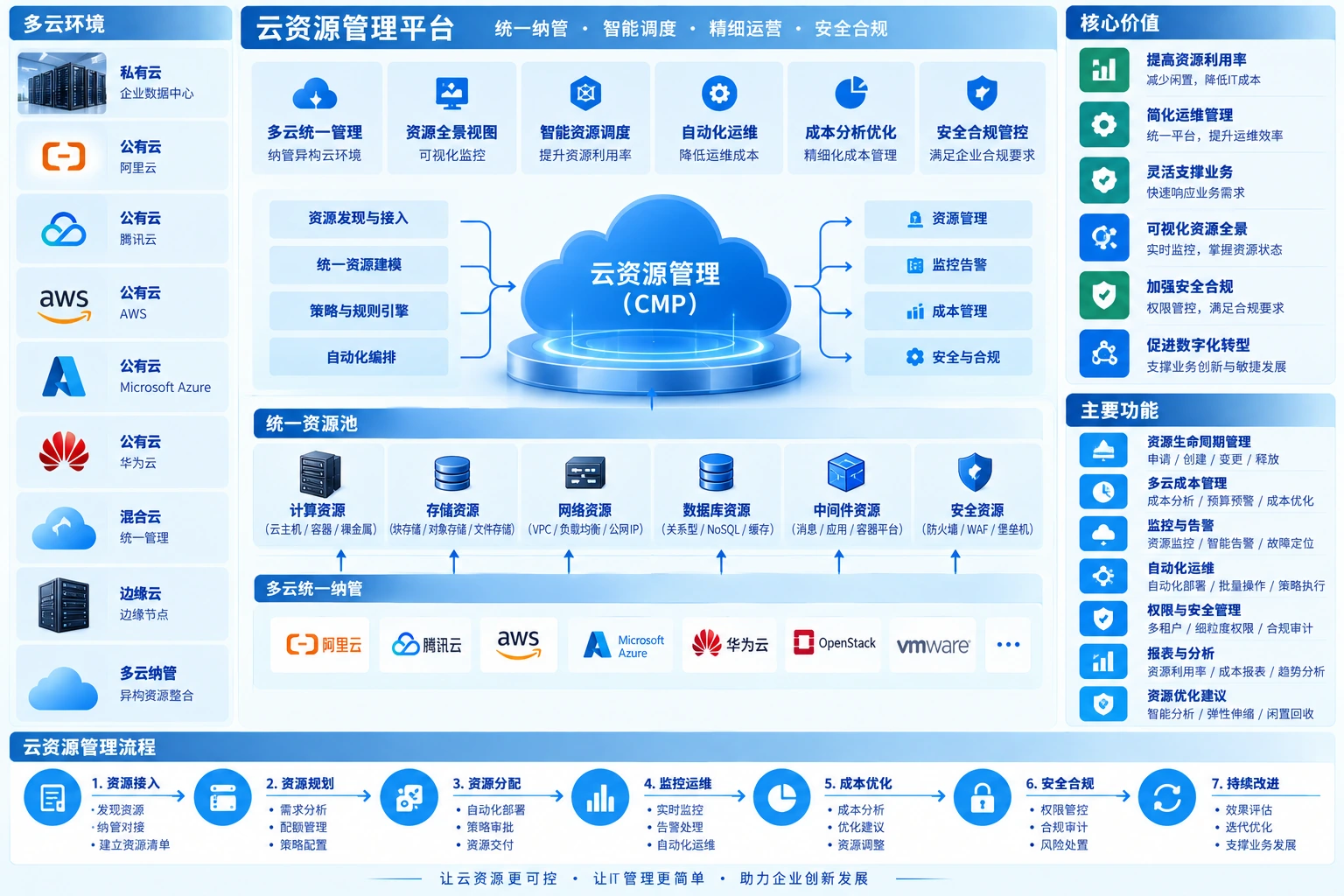
Management depth
The platform reads state and performs approved operations through environment APIs. After integration, define which resources are view-only, which support changes and which workflows are governed.
Align account, region, project and resource identifiers with business owners. Build a trustworthy inventory before optimization to avoid duplicate counts or unclaimed resources.
Grant creation, adjustment and start/stop capabilities by role, retaining execution logs and failure handling. Preserve native emergency management access.
Connect service catalogs, quotas, approvals, expiry reminders and cost ownership. Budget alerts do not cap spending automatically, and low utilization alone does not justify deleting a resource.
Specify business purpose, size, duration and cost center, not just a resource name.
Validate quotas and permissions, read back actual state after execution and route failures for handling.
Link performance, alerts and costs using consistent definitions for utilization and budget variance.
Remind owners to renew or reclaim resources; shutdown, downsizing and deletion require authorized workflows.
Frequently asked questions
Check provider, product, version, API and resource type. Discovery does not prove support for modification, automation or complete billing allocation. Document read-only and actionable capabilities separately.
Usually it manages resource metadata, metrics, logs or cost information while business data stays in its original environment. Confirm collection, storage, permissions and retention for the selected platform.
Budget alerts are normally notifications, not hard spending limits. Quotas, automatic shutdown and creation restrictions are separate policies requiring coverage, latency and impact validation.
Expiry-based reclamation can be assessed, but identification rules, dependencies, retention, approval and recovery must be defined. Low utilization alone does not make a resource unnecessary; important resources must not be released without confirmation.
Yuqi Intelligent assesses resources, selects/deploys management platforms, integrates accounts/APIs, configures permissions/workflows and hands over reporting and operations. Confirm managed resources, allowed actions and approvers before expanding automation.
Inventory accounts, subscriptions/projects, regions, resource types, owners and permissions. Check API/version support and list managed resources, read-only scope and unsupported operations. Connected does not mean fully manageable.
Deploy the platform, connectors and components with least-privilege cloud access, identity, roles and auditing. Store and rotate credentials through controlled mechanisms; never place keys on public pages or ordinary handover documents.
Configure quotas, catalogs, requests, approvals and expiry reminders by department/project, with alerts, ticket links and controlled automation. Validate execution and failure handling before production changes; retain approval for high-impact actions.
Standardize tags and cost allocation, review sizing, utilization, idle resources and budget variance. Downsize, stop, release or purchase commitments only after confirmation. Deliver reports, manuals and training.
Next step / Current-state assessment
Share cloud environments, account/resource scale, management challenges and approval processes to define integration boundaries, priorities and validation.