

VMware vSAN / Storage virtualization
vSAN Storage Virtualization
Plan and deploy vSAN, diagnose and repair faults, and expand or migrate clusters, handing capacity, policies, failure domains and business validation to the operations team.
- Planning and deployment / Compatibility and policies
- Fault diagnosis / Repair and remediation
- Expansion and migration / Operations handover
A resource pool is not simply the sum of raw disks. Protection overhead, rebuild headroom and independent backups need separate review.
How objects enter the resource pool
Follow one object across nodes through writes, reads, repair and rebalancing
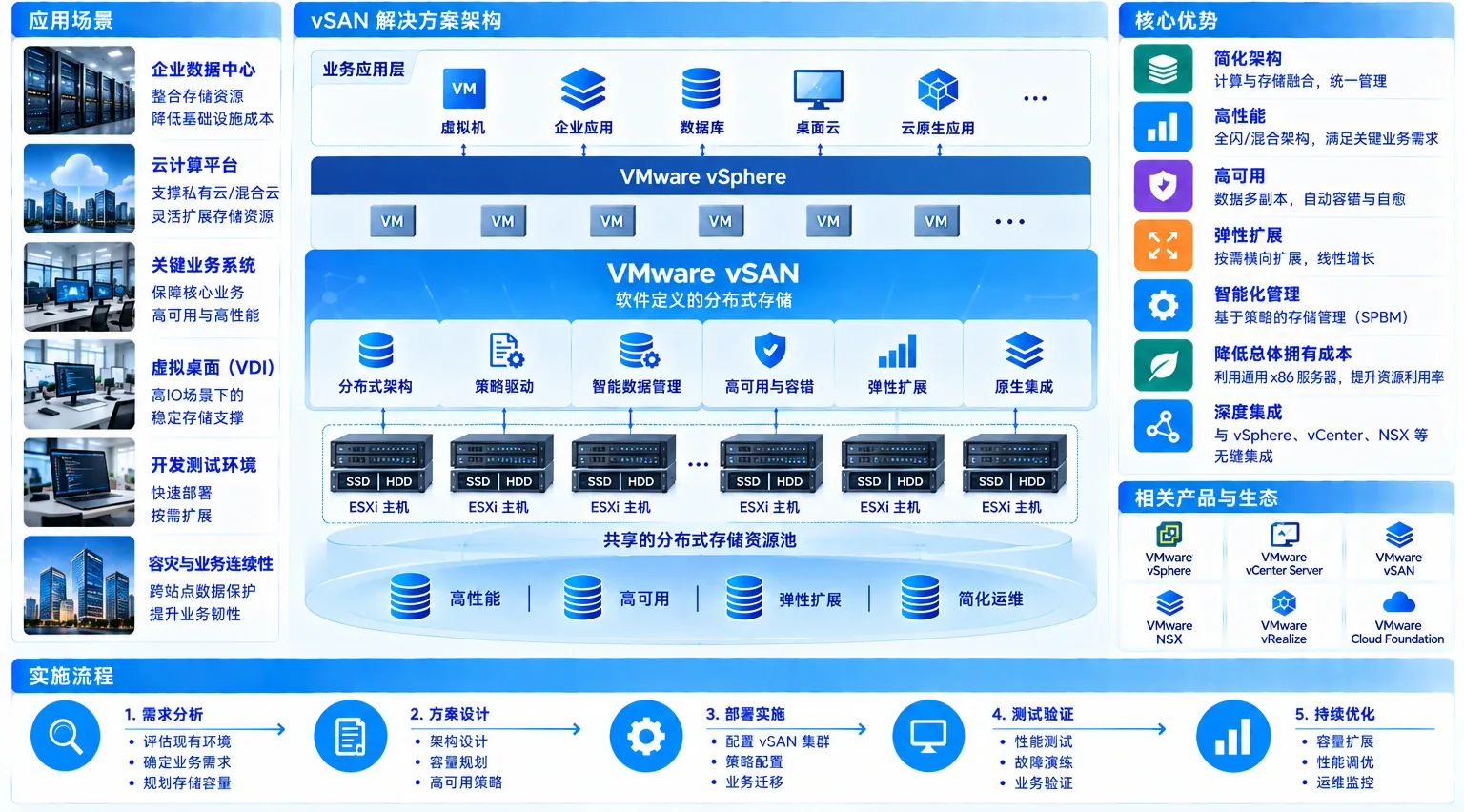
This time-compressed example uses OSA RAID1 / FTT1: four hosts contribute local disks to a distributed datastore consumed by VMs. Failure states illustrate a sequence, not live cluster telemetry.
The animation shows a VM writing object A, synchronous copies on H1 and H2, and a witness component on H4 participating in quorum. After H2 goes offline, H1 serves reads; policy is repaired on H3 when conditions permit. H5 later contributes capacity and triggers rebalancing.
The illustrative cycle lasts about 12 seconds. Pause holds the current frame; replay returns to writing object A. vSAN policy availability is not independent backup. Confirm design against versions, certified hardware, capacity and failure domains.
Fault diagnosis and repair
When vSAN fails, Yuqi Intelligent helps diagnose, repair and validate recovery
Yuqi Intelligent has five VMware engineers handling cluster takeover, diagnosis, repair, migration and expansion. Services cover impact assessment, root-cause investigation, repair implementation and business validation for existing clusters.
A typical sequence is symptom → investigation scope → treatment. For inaccessible objects or disk faults, preserve evidence, review replicas and backups, and confirm the plan before acting.
Repair workflow
Assess, preserve evidence, diagnose, repair with authorization and validate business- 01Intake and impact assessmentIdentify affected clusters, hosts, objects and VMs.
- 02Logs / State preservation / Backup reviewPreserve evidence and verify available replicas, backups and recovery conditions.
- 03Root cause and repair planSeparate hardware, network, capacity, policy and version factors, documenting known risks.
- 04Repair in an authorized windowReplace, repair or rebuild under the approved plan and change authorization.
- 05Business validation / HandoverValidate health, object consistency and business reads/writes, then hand over recommendations.
Deliver repair records, root causes, known risks, health checks, object-consistency and business read/write validation, and follow-up recommendations.
Why it matters / Suitable scenarios
Turn local disks into a policy-managed resource pool
As VMs grow, shared-storage expansion becomes constrained or ownership of nodes, disks, networking and maintenance is fragmented, vSAN can combine supported local devices into a virtualized storage view. Suitability depends on hardware, versions, networking, capacity and maintenance windows, not node count alone.
Consolidate server-local disks
Bring supported local disks into a distributed datastore, reducing dependence on one host's storage.
Expand virtualization clusters
New nodes contribute compute and capacity, after checking policy, networking, failure domains and rebuild headroom.
Observe maintenance and failures
Include object state, node health, synchronization and repair in shared inspection and handover records.
Core capabilities
Design capacity, policies and failure boundaries together
Capacity is not the sum of raw disks, and availability does not replace backups. Review policies and device types separately for OSA and ESA.
How Yuqi Intelligent implements
Turn compatibility and failure boundaries into an executable checklist
Start with assessment, combining ReadyNode/hardware compatibility, networks, disks, policies, migration windows and failure exercises in one delivery path instead of adding capacity and ownership records after deployment.
Check supported combinations of hosts, controllers, disks, firmware, drivers and vSAN versions.
Choose speed, latency, redundancy and traffic separation by workload, version, ReadyNode certification and network conditions. Do not treat 10GbE as a universal ESA prerequisite.
Distinguish OSA disk groups from ESA single-tier NVMe pools, calculating protection overhead, rebuild space and growth headroom.
Pilot and retain independent backups before validating maintenance, offline nodes, rebuilding, alerts, business access and rollback windows.
Typical topology
Separate node, dual-switch and network responsibilities
The topology illustrates relationships, not port, VLAN, MTU, link-aggregation or version-support requirements. Define management, vMotion and vSAN network isolation and redundancy for each project.
Delivery and operations handover
Deliver a cluster the operations team can maintain
Host, disk, network, version, license and management-access records.
Protection policies, failure domains, capacity accounting, reserves and expansion criteria.
Representative workloads, reads/writes, links, offline nodes, rebuilds, alerts and rollback records.
Topology, inspections, changes, replacement, backup boundaries, owners and recommendations.
Where the project also involves VMware Server Virtualization compute resources or Data Backup for independent recovery, documentation separates dependencies and responsibilities.
Frequently asked questions
Clarify constraints before selecting the architecture
Does vSAN simply add up all local disk capacity?
No. Deduct protection, replication or erasure coding, object layout, metadata, rebuilding and maintenance reserves. Verify usable capacity against architecture, policies, devices and growth assumptions.
Do OSA and ESA use the same disk structure?
No. OSA commonly uses disk groups with SSD cache and SSD/HDD capacity tiers. ESA uses supported single-tier NVMe pools; do not carry dedicated cache and HDD tiers into ESA. Verify versions, certified hardware and project requirements.
What can three-node or four-node clusters support?
Three-node RAID1/FTT1 is an example, subject to version-specific node, witness, failure-domain and policy requirements. Four-node RAID1 may rebuild in remaining space after a node fails; this is not immediate restoration of all redundancy.
Can vSAN replace backups?
No. Policies and cluster availability are not independent backups or recovery. VM restart normally involves capabilities such as vSphere HA; backups, retention and recovery exercises still need separate design.
Can you take over a vSAN cluster deployed by another team?
Start with a takeover assessment of versions, hardware, firmware/drivers, disk groups, networking, policies, capacity, logs and backups. Define repair, migration or expansion boundaries before changing production.
What is checked first during vSAN fault diagnosis?
Start with symptoms and impact, then check cluster health, offline hosts, disks/groups, firmware/drivers, network latency/loss/partitions, capacity, resynchronization, inaccessible objects and VM read/write errors. Preserve evidence and review copies/backups before agreeing treatment.
Under what conditions can repair or rebuilding proceed?
Confirm the authorized window, remaining capacity, quorum/policies, available replicas and business-validation path before selecting repair, replacement or rebuild. Actions depend on versions and risk assessment; lossless or immediate recovery is not guaranteed.
Next step / Storage assessment
Start with existing hosts, disks and business windows.
Share nodes, disks, networking, VM priorities and migration timing to assess OSA/ESA boundaries, policies and validation scope.