
Small businesses rarely lose the most time on the editing button itself. Delays come from unapproved product facts, media scattered across chats and employee laptops, inconsistent brand terms, untracked music and voice sources, and revision rounds with no clear owner.
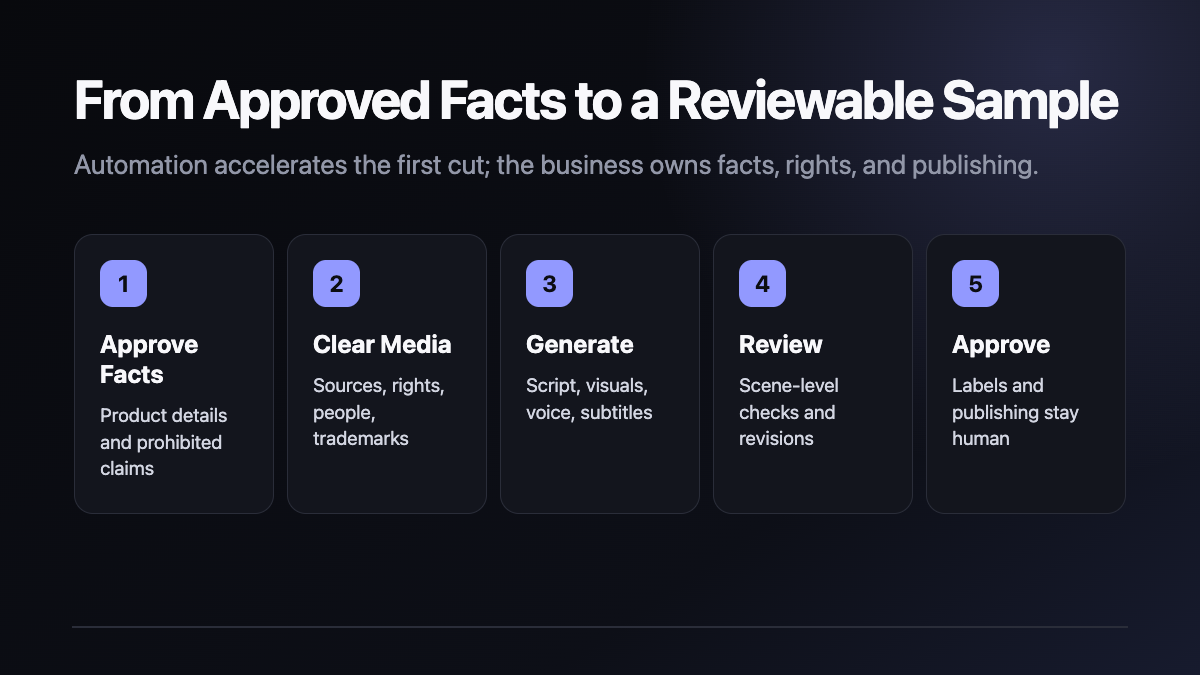
A MoneyPrinterTurbo enterprise video workflow is worth evaluating because it connects topic input, script creation, media matching, voice, subtitles, background music, and video composition in an open-source system. The safe pilot goal is not unattended bulk publishing. It is one reviewable, revisable sample whose inputs and approvals can be explained.
This guide is based on the official repository, README, configuration template, Docker Compose file, and v1.3.5 release. We did not install or run MoneyPrinterTurbo locally and did not generate or benchmark a video. Commands, URLs, configuration behavior, and failure conditions below are official instructions, not independent test results.
What MoneyPrinterTurbo provides
The official project can generate or accept a script, use local media or online providers, call several LLM and TTS services, create subtitles and background music, and compose vertical 9:16 or horizontal 16:9 video. It exposes a WebUI, API, CLI, and batch interface.
Those capabilities do not guarantee a production-ready business video. Product claims, visual relevance, brand pronunciation, media rights, advertising language, and platform AI labels remain human responsibilities.
At the August 26, 2026 snapshot, the repository had about 116,446 stars and 17,711 forks. The latest stable release was v1.3.5. Attention and activity do not prove customer adoption, production reliability, or commercial return.
Supported systems and baseline hardware
The official README recommends Windows 10, macOS 11 or later, or a mainstream Linux distribution. Local installation requires Python 3.11 or later. The stated minimum is a four-core CPU and 4 GB of RAM; a GPU is optional. Eight GB of RAM is recommended, while local Whisper transcription, batch generation, and heavier processing benefit from a discrete GPU.
A business pilot should also reserve disk space for source media, downloaded models, working files, and approved outputs, and should record the versions of Python, Docker, FFmpeg, and the project checkout.
Option 1: Docker Compose
Clone the official repository and prepare the configuration file:
git clone https://github.com/harry0703/MoneyPrinterTurbo.git
cd MoneyPrinterTurbo
cp config.example.toml config.toml
Run the release Compose file:
docker compose -f docker-compose.release.yml upThe official Compose file binds the WebUI to 127.0.0.1:8501 and the API to 127.0.0.1:8080, while mounting config.toml and the storage directory. Open:
http://127.0.0.1:8501
http://127.0.0.1:8080/docs
Do not expose those ports directly to the public internet. A shared deployment needs a reverse proxy, authentication, TLS, logging, and a deliberately limited network scope.
Option 2: Local uv setup
The official macOS and Linux path recommends uv:
git clone https://github.com/harry0703/MoneyPrinterTurbo.git
cd MoneyPrinterTurbo
uv python install 3.11
uv sync --frozen
sh webui.sh
Windows users can run webui.bat. The README warns that the Windows project path should not contain spaces, special characters, or Chinese characters.
A compatible virtual-environment path is also documented:
python3.11 -m venv .venv
source .venv/bin/activate
pip install -r requirements.txt
The primary dependency definition is pyproject.toml, while uv.lock pins the environment. Record the lockfile and Git revision instead of writing only “latest version.”
Configure models, media, and voice
On first launch, the application can create config.toml from config.example.toml. The WebUI also exposes provider and media settings.
Review at least four groups:
- LLM provider. Script and search-keyword generation may require a provider account, key, and usage fees. Compatible gateways and local models are also supported.
- Video media. The example configuration defaults to Pexels. Pexels, Pixabay, Coverr, and other services have their own keys and terms. Business-owned media should live in an approved directory with rights records.
- Voice. Edge TTS is available without an API key, while Azure, Gemini, ElevenLabs, Fish Audio, and other services have separate accounts and licenses.
- Subtitles and local models. The default edge mode uses TTS timestamps. Whisper downloads a model; the documented
large-v3model is about 3 GB.
Never commit keys or expose them in screenshots and logs. The MIT license for the code does not automatically license media, fonts, music, voices, model output, or third-party APIs.
Start and validate one sample
After the WebUI and API documentation are reachable, test a non-sensitive subject through the CLI:
uv run python cli.py --video-subject "A new product at a local coffee shop"The official documentation says the agent path returns the generated file path and batch execution emits a JSON summary. Business validation must go beyond finding an MP4 file. Record:
- code and configuration versions;
- the approved subject and product facts;
- the LLM, media, TTS, and subtitle providers;
- downloaded and local assets;
- script, first cut, revision, and approved output;
- runtime, API usage, and failures;
- the final human approver.
A seven-day business pilot
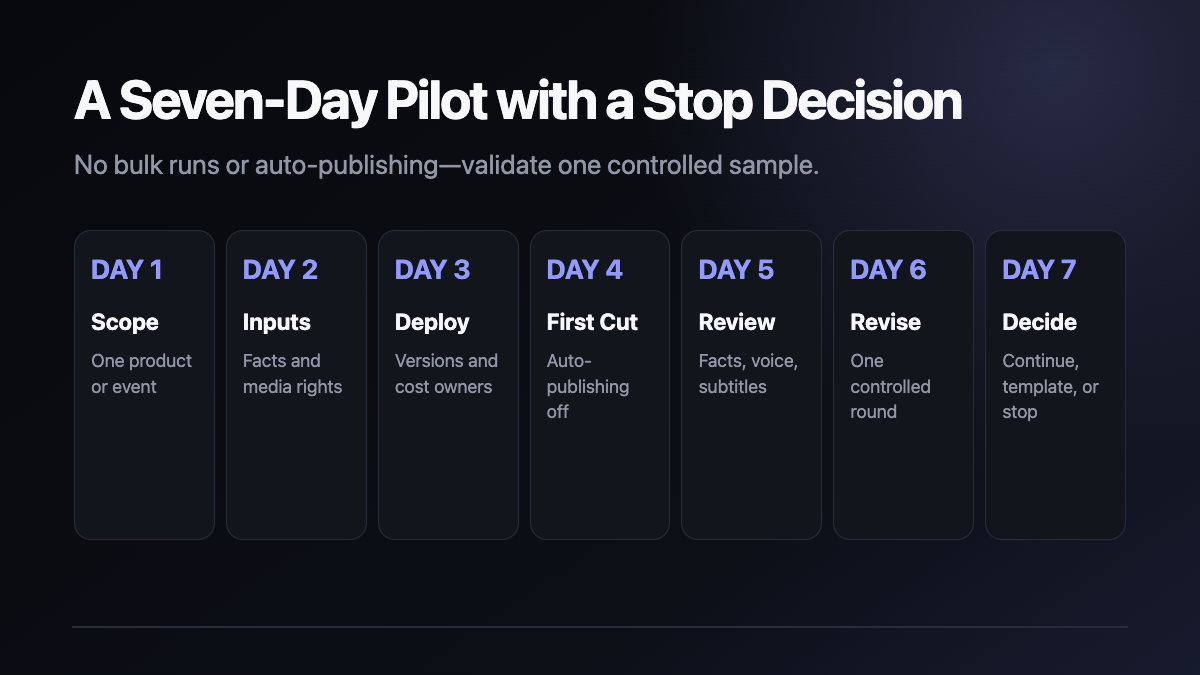
Day 1 — choose one scenario. Use one product, store event, or training topic.
Day 2 — govern the inputs. Approve product facts, brand terms, prohibited claims, and rights for 10 to 20 media files.
Day 3 — deploy. Start Docker or uv, and record versions, ports, configuration, and cost ownership.
Day 4 — create one first cut. Keep automatic publishing disabled and produce one 30- to 60-second sample.
Day 5 — human review. Check every scene for facts, people, trademarks, subtitles, voice, music, and advertising language.
Day 6 — one revision round. Convert feedback into a versioned change record instead of an open-ended chat thread.
Day 7 — continue or stop. Use time, errors, provider cost, revision count, and business feedback to decide whether to template or expand the workflow.
Eight checks before publication
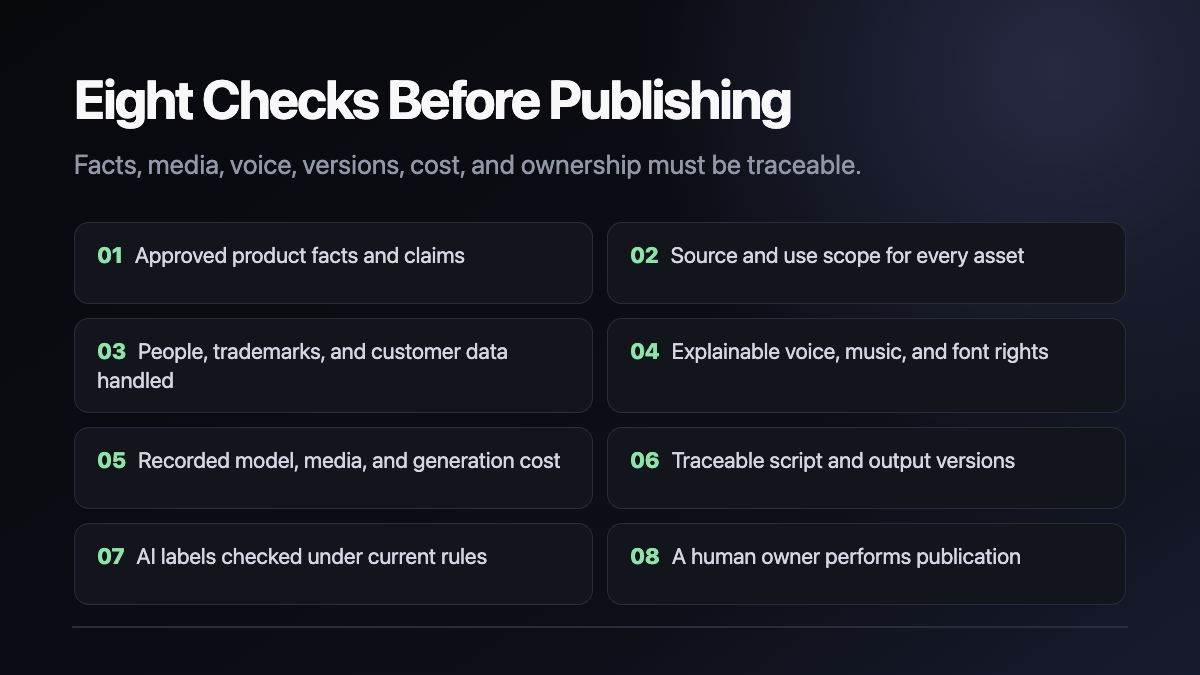
- A business owner confirms product facts, prices, parameters, and claims.
- Every media file has a source, rights status, and permitted use.
- People, trademarks, and customer data are authorized or removed.
- Voice, music, fonts, and subtitle styles have explainable rights.
- LLM, TTS, stock-media, and generative-video costs are recorded.
- Script, first cut, revision, and approved output have version identifiers.
- AI-generated or synthetic content is labeled under current platform rules.
- A named human owner performs the public publishing action.
Troubleshooting
FFmpeg is not detected
The official FAQ documents No ffmpeg exe could be found. Install FFmpeg and set ffmpeg_path in config.toml to the actual executable. Windows paths require correct backslash escaping.
Whisper download fails
Whisper needs to download a model on first use. When direct Hugging Face access fails, the official README provides a manual path under MoneyPrinterTurbo/models/whisper-large-v3. The smaller large-v3-turbo option is about 1.6 GB.
Too many open files
The official FAQ recommends checking ulimit -n and increasing a low limit. A business deployment should document the host baseline and owner rather than relying on an undocumented temporary command.
Media does not match the script
This is a content-quality failure, not a server-startup failure. Narrow the subject, prefer approved local media, use the documented media-matching options, and require a scene-by-scene business review.
Upgrade, rollback, and removal
Before an upgrade, record the Git revision or release, config.toml, storage, approved media, templates, and accepted outputs. Test the new version against the same sample and eight checks before switching.
Stop Docker with:
docker compose -f docker-compose.release.yml downStop local WebUI or API processes with Ctrl+C. The README does not provide a dedicated uninstaller. After backing up configuration, storage, approved assets, and outputs, an administrator can remove the checkout, virtual environment, and unused images. Do not delete volumes as a substitute for a documented data-retention decision.
Rollback to a recorded Git revision or image version, restore matching configuration and storage, and repeat the same sample. The latest tag is not an auditable rollback reference.
License, rights, and publishing boundary
The project code is licensed under MIT, which requires preserving the copyright and permission notice and provides no warranty.
Media, music, voices, fonts, likenesses, trademarks, model outputs, and third-party APIs are not automatically licensed by MIT. The official README explicitly notes that some bundled background music came from YouTube and should be removed if infringing. A commercial workflow should replace it with clearly licensed music and retain source records.
MoneyPrinterTurbo supports third-party automatic uploads to social platforms. An enterprise pilot should keep that capability disabled. Public publishing should remain a human action after facts, brand, rights, and AI-label checks pass.
Practical next step
Begin with one product and one sample. MoneyPrinterTurbo is useful when it accelerates the first cut while making script, media, voice, revisions, and publishing ownership easier to audit—not when it produces a larger volume of unreviewed content.
Shanghai Yuqi Intelligence Technology Co., Ltd. can help businesses in Shanghai and nearby areas govern media and brand rules, deploy a pilot, create a reviewable sample, and establish version and pre-publication checks. Model fees, media terms, copyrights, and platform requirements still need to be confirmed against official sources, provider terms, and the business's own compliance review.