
Repeated presentation revisions are rarely caused by text-box alignment alone. They usually begin with conflicting source versions, unapproved facts, inconsistent brand rules, and feedback scattered across chat threads. AI can accelerate a first draft, but it can also move those errors faster.
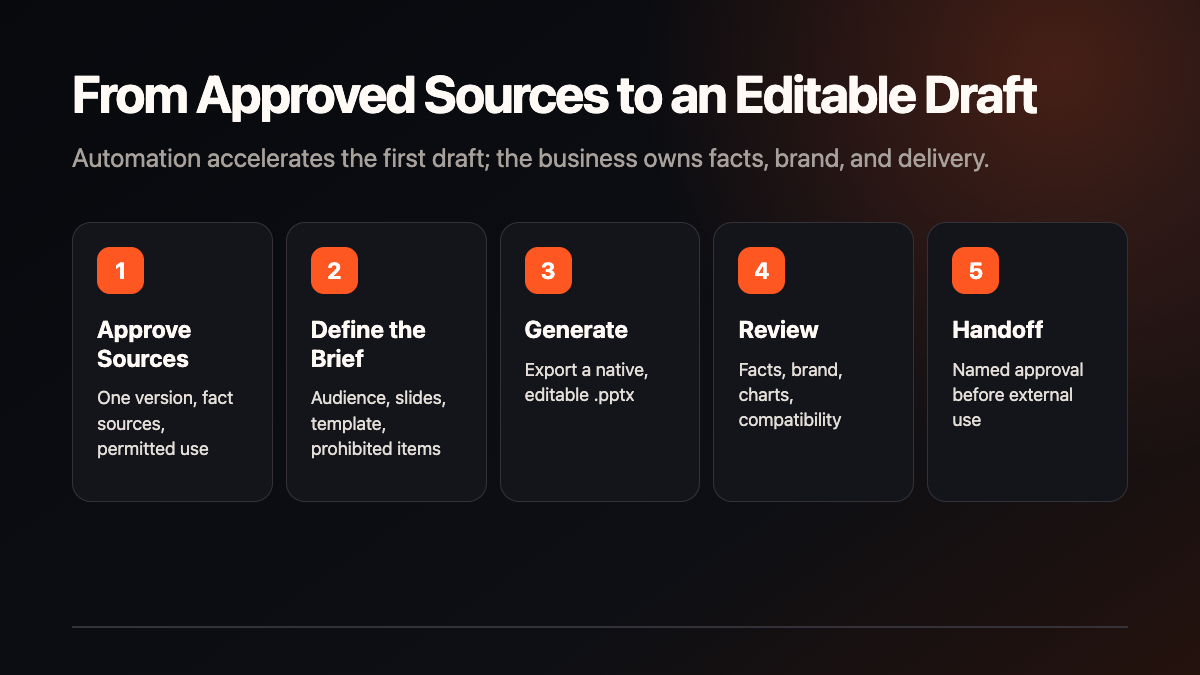
The useful enterprise proposition of PPT Master is narrower and more practical: turn approved PDFs, DOCX files, web pages, images, or text into a native, editable .pptx, then keep fact checking, brand review, and final version ownership with the business.
This guide is based on the official repository, README, Getting Started guide, FAQ, Windows installation guide, and v5.0.0 release notes. We did not install PPT Master, generate a deck, or test model cost, timing, or cross-suite fidelity on this machine. Commands and expected outputs below are official instructions, not a local verification record.
What PPT Master Does
PPT Master is designed to run inside an agent-capable tool that can read and write files, execute commands, and maintain a multi-turn session. It analyzes source material, builds the narrative and visual structure, and compiles SVG into PowerPoint DrawingML. The default output is written to the current project's exports/ directory.
The result is not a stack of full-slide screenshots. Text, shapes, charts, tables, and selected master-layout features can remain editable in PowerPoint. The project also documents template filling, native charts and tables, animation, speaker notes, and narration paths.
The official FAQ makes two important boundaries clear: the model sets the quality ceiling and human polish is still expected; PowerPoint is the primary validation target for animations and formulas, while WPS, Keynote, and LibreOffice may render differently.
Requirements
The official baseline includes:
- Python 3.10 or later;
- installation by Git clone, ZIP, or a supported skill marketplace;
- an authenticated agent tool that can read and write files and execute commands;
- local storage for project files and exports;
- optional model, image-generation, or image-search accounts and related charges.
On Windows, select “Add python.exe to PATH” during Python installation. macOS and Linux users can use their system package manager. Pandoc is only required for older or specialist formats such as .doc, .odt, .rtf, .tex, .rst, .org, and .typ; .docx, .html, .epub, and .ipynb follow the Python path.
Installation
The official Git path is:
git clone https://github.com/hugohe3/ppt-master.git
cd ppt-master
python3 -m pip install -r requirements.txt
If pip is not recognized on Windows, use:
python -m pip install -r requirements.txtYou can also download a repository ZIP or the approximately 56 MB skill-only release package. A skill marketplace installation provides the skill files, but the official guide still requires installing dependencies from requirements.txt inside the installation directory.
For an enterprise pilot, use an isolated test directory and virtual environment so that project packages do not silently alter a shared system Python. This is our deployment recommendation, not an official mandatory command.
Configure Sources and the Assignment
Place approved PDF, DOCX, image, or other source files in a dedicated task directory under projects/. Do not use raw customer-confidential material for the first pilot.
Your agent assignment should specify:
- presentation purpose and audience;
- 16:9 or another canvas format;
- an 8–12 slide range;
- free design or an approved enterprise template;
- which facts may only come from supplied sources;
- brand colors, fonts, logo, footer, and prohibited elements;
- which slides and object types require manual inspection.
The default workflow asks for design confirmation first. Quick mode skips confirmation, runs as a one-shot non-resumable process, and does not create the svg_final/ preview. That makes Quick mode a poor default for a first enterprise acceptance test.
Run and Validate Success
PPT Master does not require a separate long-running web server. From the repository directory, provide the source and assignment to the selected agent. The official example is:
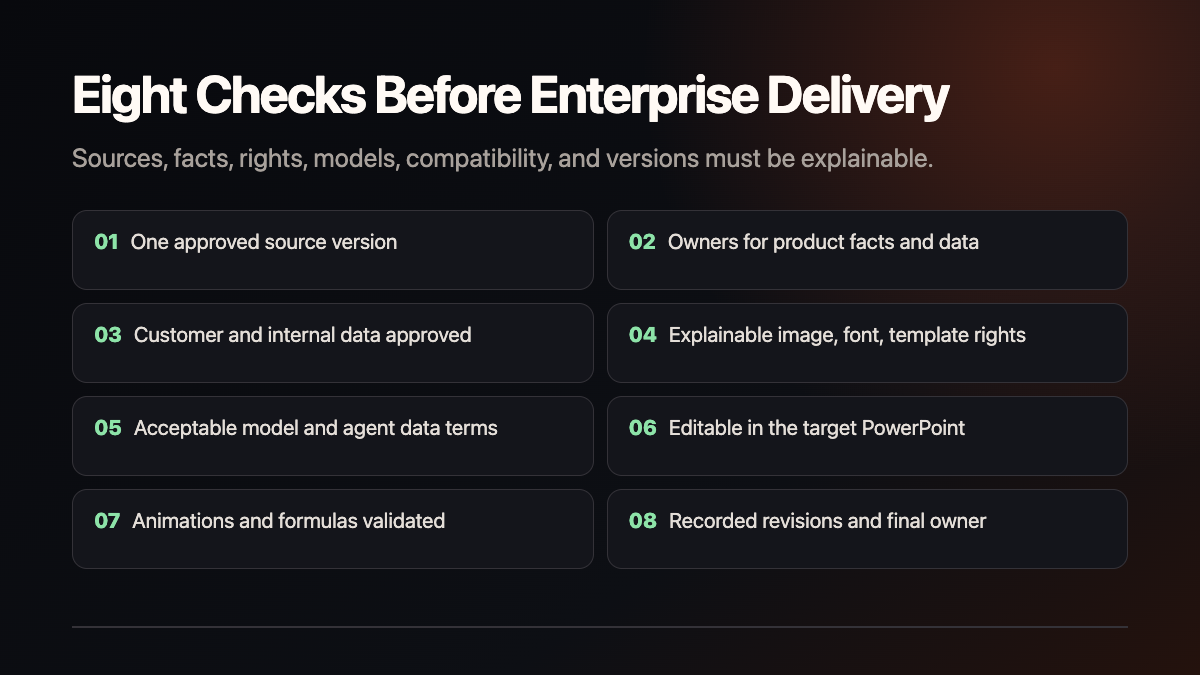
Please create a PPT from projects/q3-report/sources/report.pdfA useful first-round acceptance gate should verify all of the following:
- A
.pptxappears underexports/; - the file opens in the target Microsoft PowerPoint environment;
- text and principal objects remain editable;
- slide count, audience, story, and brand requirements are satisfied;
- every factual claim maps back to an approved source;
- there is no overflow, obstruction, misalignment, or incorrect chart data;
- animation, formulas, and critical charts pass in the actual delivery software.
A Seven-Day Enterprise Pilot
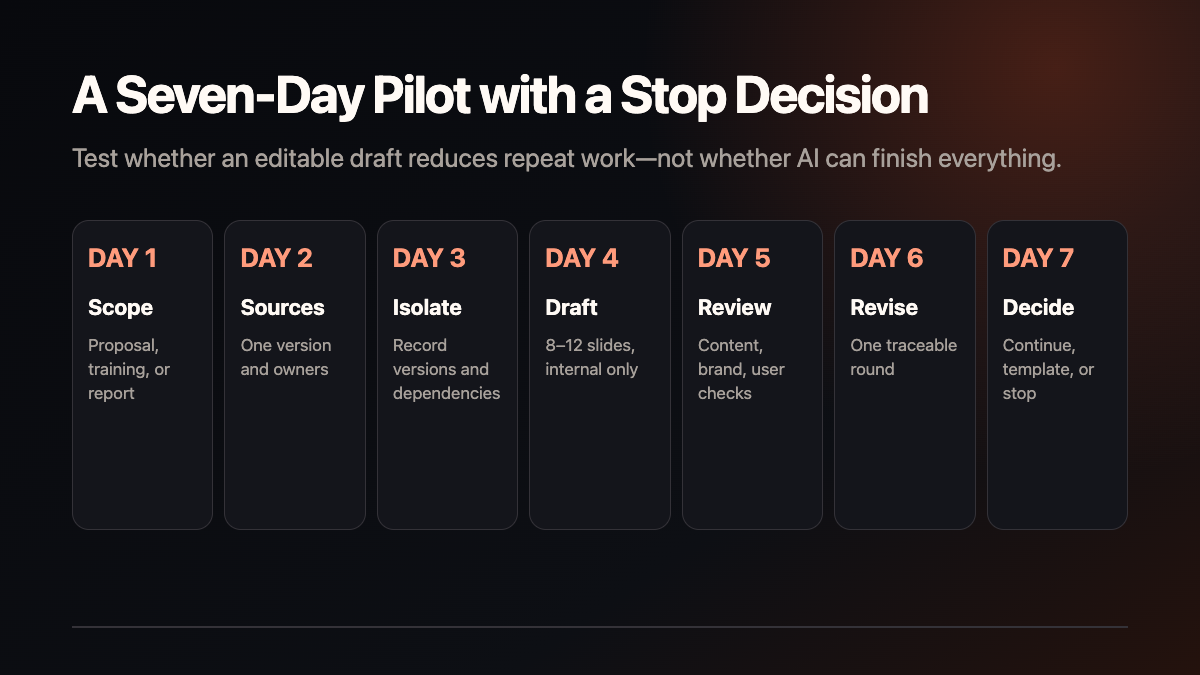
- Day 1: Choose one low-sensitivity sales proposal, training deck, or project report.
- Day 2: Create one approved source version and assign owners for facts, media, fonts, and brand rules.
- Day 3: Install in an isolated directory and record Python, repository commit, model, and dependency versions.
- Day 4: Generate one editable 8–12 slide draft. Do not send it externally.
- Day 5: Have content, brand, and end-user reviewers inspect every slide.
- Day 6: Complete one traceable revision round.
- Day 7: Continue, template, or stop based on repetitive work saved, error types, and real user feedback.
Troubleshooting
Python or pip Is Unavailable
Confirm Python 3.10 or later. On Windows, try python -m pip and verify PATH. If import fitz fails, the official Windows guide recommends upgrading pip before trying the prebuilt PyMuPDF wheel.
Visual Quality Is Weak
The official framing is that the harness sets the floor and the model sets the ceiling. Reduce source volume and slide scope, define the audience and design specification, and then assess whether a larger-context model is warranted. Repeated full regeneration should not be the only repair method.
Text Overflows or Objects Overlap
Regenerate the affected slide or correct it in live preview. Record slide number and issue type so the team does not rebuild the entire deck without diagnosis.
Different Office Suites Render Differently
Default charts and tables can export as editable DrawingML shapes. The --native-charts-and-tables option creates PowerPoint-native objects with embedded data, but cross-suite rendering can differ. Animation and formula-heavy work should use PowerPoint as the primary acceptance environment.
Upgrade, Roll Back, and Remove
For a normal Git clone, the project documents this updater:
python3 skills/ppt-master/scripts/update_repo.pyVersion 5.0.0 is a special migration. Its release notes say repository history was rewritten and old clones do not share a common ancestor with the new history. Before migration, protect unpushed changes and back up projects/, enterprise templates, and .env. A safer enterprise path is to clone into a new directory and re-run the same acceptance sample instead of force-merging a production folder.
Rollback must point to a recorded repository commit, dependency environment, and known-good sample—not merely “the previous version.”
The project does not provide a one-click uninstaller. With an isolated test directory and virtual environment, first back up projects/, exports/, templates, and approved configuration; then let an administrator remove the clone and its dedicated environment. If packages were installed into a shared system Python, do not bulk-uninstall every item in requirements.txt until ownership is audited.
License and Data Boundaries
The code is MIT-licensed, which requires retaining the copyright and license notice and provides no warranty of fitness. The open-source license does not automatically clear rights for enterprise source files, trademarks, fonts, images, chart data, model output, or third-party services.
“The pipeline runs locally” must not be shortened to “all data stays local.” Model communication depends on the selected provider. Before using customer, pricing, contract, or internal operating data, confirm the allowed model, retention terms, and redaction requirements.
Recommended Next Step
Start with one complete, low-risk source package. The objective is not to prove that AI can draw attractive slides. It is to test whether the business can repeatedly obtain an editable draft while preserving fact ownership, brand review, and version control.
Shanghai Yuqi Intelligent Technology Co., Ltd. can help businesses in Shanghai and nearby areas structure source and brand rules, build a small PowerPoint workflow pilot, and establish review and version handoff checklists. Model behavior, data terms, asset rights, and delivery quality remain subject to official documentation, provider terms, and the company's own acceptance test.