
A display must be legible, not merely illuminated
Meetings, auditoriums, monitoring and showrooms have different viewing distances, text sizes, sightlines and lighting. Define who sees what from where before choosing screen size and technology.
Enterprise multi-source displays / LED and LCD video walls
When multiple people need to view several sources, switch content by scenario and use displays reliably in meetings, auditoriums, control rooms or showrooms, design must begin with viewing conditions, signal paths and operation together.
The display is the result; viewing distance, text size, light, maintenance and budget are the starting point.
01Start with viewing and operating requirements
Enterprise displays combine multiple inputs, viewers and live switching. Screen size alone does not prove legibility, source compatibility or the operator's ability to select the right view quickly.
Review viewing distance, text height, light, bezels or pixel pitch, native resolution, maintenance access and budget before choosing LED, LCD or a combination. For coordinated space and wiring requirements, review Auditorium and Meeting Systems and Structured Cabling alongside site conditions.
Meetings, auditoriums, monitoring and showrooms have different viewing distances, text sizes, sightlines and lighting. Define who sees what from where before choosing screen size and technology.
Computers, cameras, meeting endpoints and players may feed the system together. Signal routing, processing and presets must show operators where each view comes from and where it goes.
LCD bezels, LED pixel pitch, native resolution, structural loading, cooling, power and rear access affect total cost. Do not compare display-panel prices alone.
02Multiple sources, independent branches and central control
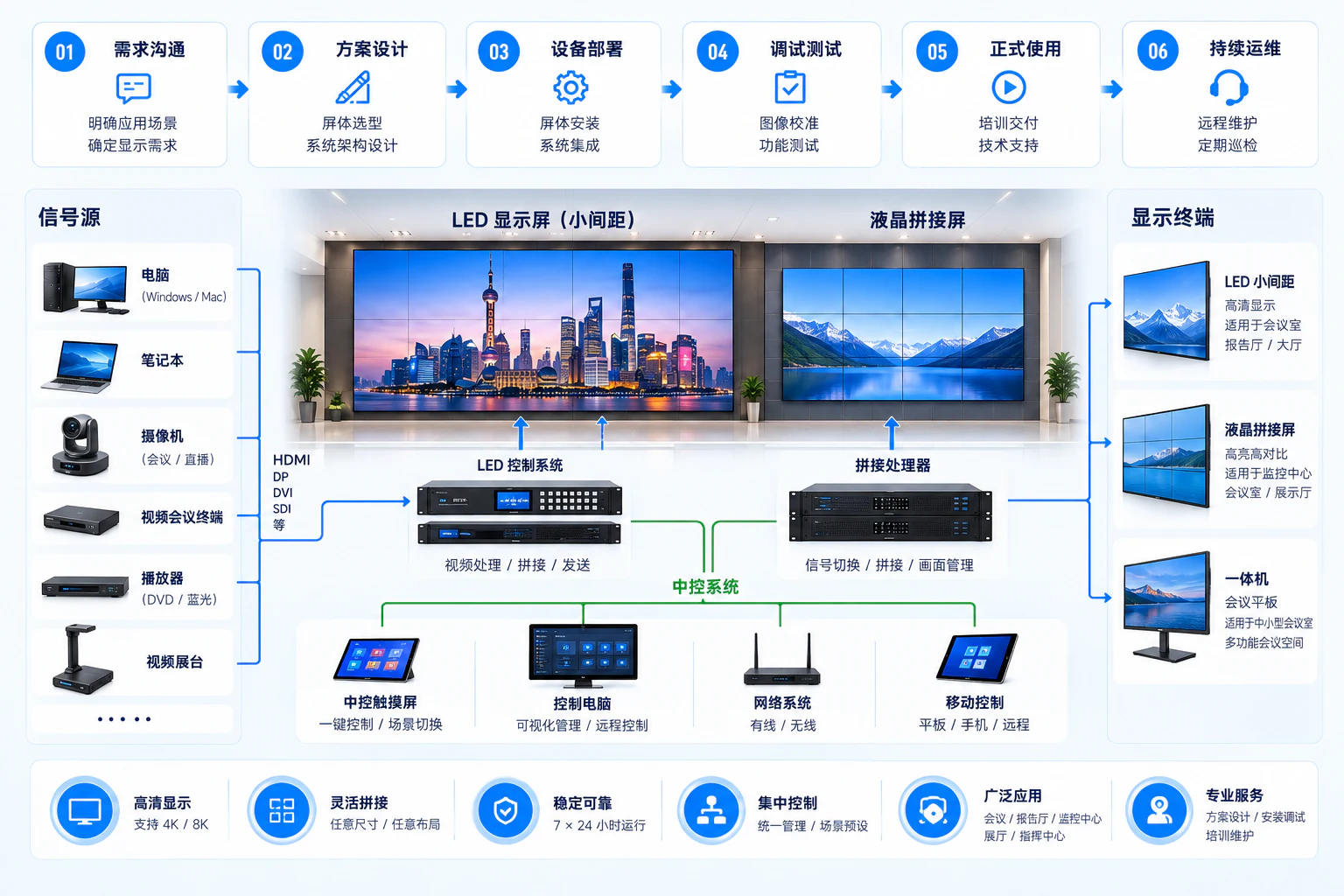
Computers, cameras, meeting endpoints and players enter signal routing/processing, then branch to LED control and sending/receiving or LCD wall processing. Central control is separate; the two display types are not forced into a serial chain. Animation illustrates relationships, not models, port counts or resolution commitments.
Sources enter routing/processing, then branch to LED sending/receiving or LCD wall processing and their corresponding displays. An independent central-control path manages switching, layouts and presets.
03Selection goes beyond display price
LED and LCD walls are not universally interchangeable. Assess content, distance, light, bezels, pixel pitch, native resolution, structure and maintenance against the total budget.
For small text, distant viewers or groups, derive pixels and dimensions from content and sightlines.
LCD bezels and LED pixel pitch are only display-side factors; installation and maintenance space also shape the design.
Map sources, routing, processing branches and display endpoints before confirming interfaces, resolutions and presets.
Budget for the entire delivery path. Discuss 4K/8K and 24/7 operation only with clear conditions and contracts.
04How Yuqi Intelligent helps
Yuqi Intelligent assesses, selects, supplies, installs, cables, tunes, calibrates and trains around the site, equipment, signals, structure/power, usage and maintenance boundaries.
Measure distance, text size, light, walls/structure, power, cooling, access and budget, then assess LED, LCD or mixed displays against sources.
Coordinate displays, processors and mounting structures, checking loading, wiring, distribution, cooling, service access and site entry.
Install displays, connect controls/processors, identify ports and test inputs, switching, layouts and representative scenarios.
Calibrate color, brightness and images for the equipment/site, create presets, train operators and document use and maintenance.
Retain diagnostic paths across displays, controllers, processors, signals and operating records. 24/7 or on-site response applies only within the agreed scope.
05Actual usage scenarios
Meetings, auditoriums, monitoring and showrooms may all need multiple sources, but distances, operating pace, light and maintenance differ.
Multi-user collaboration, remote meetings and source switching require attention to cameras, endpoints, text size and presets.
Long viewing distances and bright environments may coincide. Coordinate displays, content, signals and operator positions.
Continuous multi-window, alert and trend viewing requires layouts, sustained operation, brightness management and service access.
Content and visitor routes change; retain clear view-management boundaries for scene switching and content updates.
06Customer records and handover
After installation and tuning, customers need to locate displays, ports, wiring, presets, configuration and service paths. Visual results should be verifiable and operating methods transferable.
4K/8K, 24/7 operation, brightness/color objectives, on-site response and maintenance cycles require confirmation against signal paths, display models, design conditions and contract.
Handover checks
Equipment, ports, wiring, backups, presets, tests and maintenance instructions provide the starting point for expansion and troubleshooting.
View cabling and link handover07Frequently asked questions
Review viewing distance, text size, lighting, dimensions, bezel tolerance, access, sources and budget before choosing pixel pitch, bezels, native resolution and mounting. Do not select one product without site conditions and sample content.
No unconditional promise is possible without the signal chain, display models, processors, design and contract. 4K/8K requires compatible sources, transport, processing and displays; 24/7 operation also depends on cooling, power, maintenance and service terms.
No. Central control is independent, managing switching, layouts and presets. LED and LCD retain separate control/processing paths to their displays.
Deliver agreed equipment/port lists, layouts, wiring, configuration backups, signal/image tests, presets, training and maintenance instructions according to acceptance scope.
Next step / DISPLAY REVIEW
Bring viewing distances, display positions, sample content, sources, maintenance access and budget to define an LED, LCD or combined implementation.