

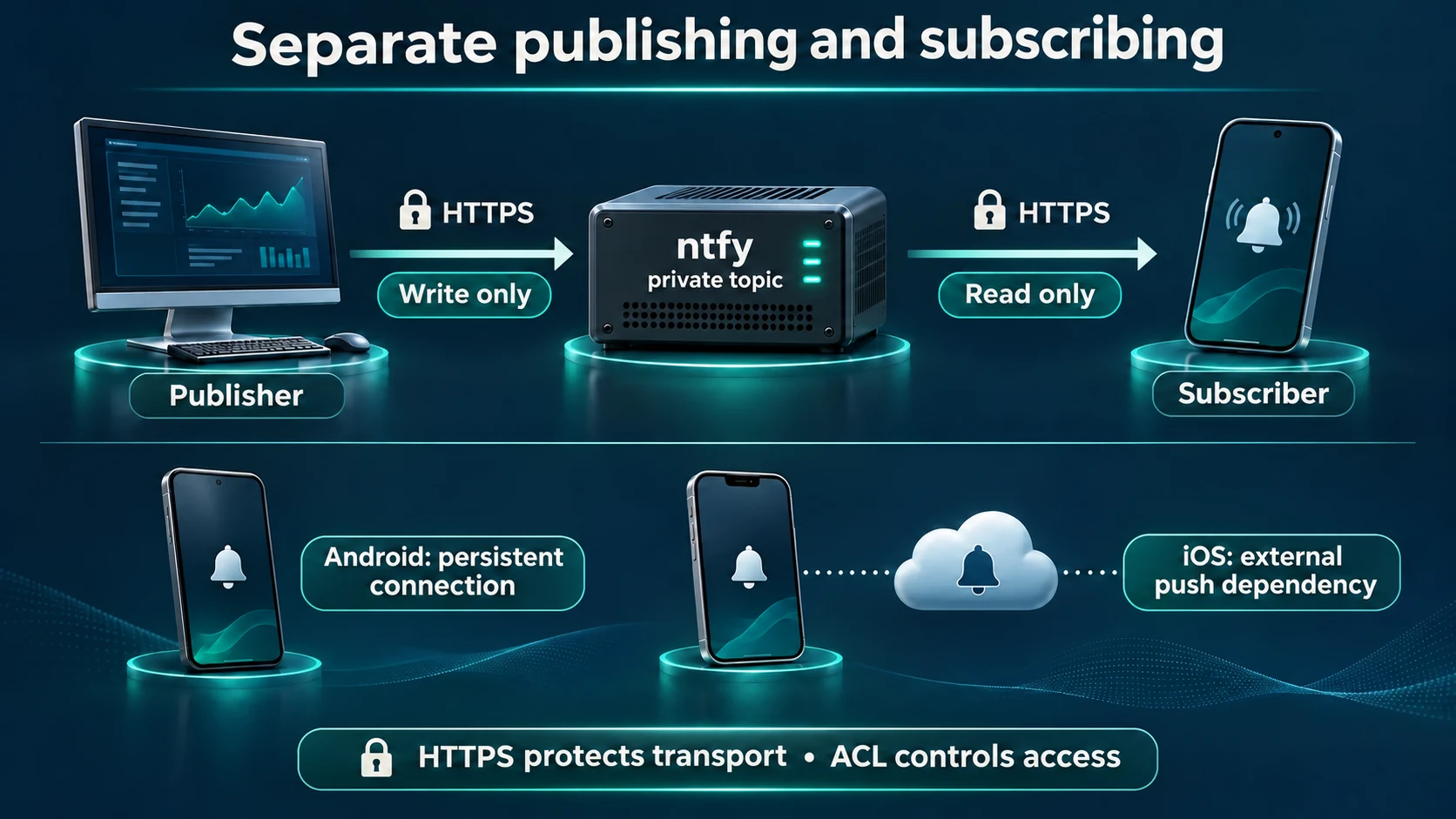
Start with an Android phone as your first acceptance target. A monitoring check publishes an HTTPS message to your private ntfy server, and the on-call phone subscribes to its topic. Validate the certificate, account boundaries and background delivery separately before connecting a real service: seeing a message in a browser does not prove delivery to a locked phone.
This tutorial uses a dedicated Ubuntu 24.04 LTS VM, Docker Engine with the Compose plugin, ntfy 2.37.2 and Caddy 2.11.9. Those releases were checked on November 11, 2026. The configurations below are operational examples; substitute your domain and validate your own network. ntfy release · Caddy release
1. Define the delivery path and prerequisites
ntfy transports notifications; your monitoring system still has to detect the fault. The final section uses an HTTP probe to demonstrate failure and recovery messages. Existing backup, storage and network checks can use the same publishing API from their notification action.
| Component | Tutorial arrangement | Acceptance question |
|---|---|---|
| Notification server | Dedicated Ubuntu VM | Does it avoid the monitored service's failure domain? |
| HTTPS entry point | Caddy reverse proxy | Do DNS, the certificate and connectivity work? |
| Publisher account | Write access to one topic | Are reading and other topics denied? |
| Phone account | Read access to that topic | Is publishing denied? |
| Monitoring node | Separate from the business service | Can it reach both endpoints? |
Use a new VM with Docker Engine and the Compose plugin installed. Follow the official Ubuntu installation guide if these prerequisites are missing. Your operator needs sudo access. Confirm that each command returns normally:
sudo docker version
sudo docker compose version
curl --version
You also need a domain you control. The example alerts.example.com is a placeholder, not a name you can obtain a certificate for. Point its public DNS A record at the entry point. Add an AAAA record only when IPv6 routing actually reaches it. This example obtains a publicly trusted certificate, so TCP ports 80 and 443 must reach the new VM and the VM must reach certificate authorities. The phone must reach the same HTTPS endpoint over mobile data. An internal-only deployment needs a separate trusted-certificate, VPN and reachability design.
If another website occupies those ports, or you do not control DNS, stop and arrange a dedicated host or coordinate the existing reverse proxy. Do not stop an existing website. Review Docker's firewall behavior: this example publishes only the proxy ports, never the ntfy backend's host port.
2. Write the private server configuration
Create a working directory on the new VM. If it already exists, identify its owner and contents before writing anything.
mkdir -p "$HOME/ntfy-ops/config"
cd "$HOME/ntfy-ops"
umask 077
Save the following as compose.yml. Named volumes preserve the identity database, message cache and certificate state across container replacement. See the official Docker installation notes.
name: ntfy-ops
services:
  ntfy:
    image: binwiederhier/ntfy:v2.37.2
    command: ["serve"]
    restart: unless-stopped
    volumes:
      - ./config:/etc/ntfy:ro
      - ntfy_data:/var/lib/ntfy
      - ntfy_cache:/var/cache/ntfy
  caddy:
    image: caddy:2.11.9-alpine
    restart: unless-stopped
    depends_on:
      - ntfy
    ports:
      - "80:80"
      - "443:443"
    volumes:
      - ./Caddyfile:/etc/caddy/Caddyfile:ro
      - caddy_data:/data
      - caddy_config:/config
volumes:
  ntfy_data:
  ntfy_cache:
  caddy_data:
  caddy_config:
Save config/server.yml, replacing the example domain with your real endpoint. Default denial ensures that knowing a topic name does not grant access. The persistent identity database enforces permissions. The example cache retains messages for 12 hours for short disconnections; it is not an alert audit archive. Versioned configuration reference
base-url: "https://alerts.example.com"
listen-http: ":80"
behind-proxy: true
auth-file: "/var/lib/ntfy/user.db"
auth-default-access: "deny-all"
cache-file: "/var/cache/ntfy/cache.db"
cache-duration: "12h"
upstream-base-url: ""
Save Caddyfile below. Its domain must match the ntfy base URL. The backend address uses the Compose service name, not the proxy container's loopback address. Caddy handles HTTPS and streaming connections. Do not add a second Basic Auth layer here; ntfy already owns authentication. Automatic HTTPS · Reverse proxy reference
alerts.example.com {
    reverse_proxy ntfy:80
}
Check Compose syntax and pull images before opening the service:
sudo docker compose config --quiet
sudo docker compose pull
3. Separate publishing and reading
Run these commands from the same directory. User creation prompts you to enter and confirm a password interactively. Use different strong passwords; do not put them in command arguments, screenshots or documentation. Keep both users as ordinary users, not administrators. The topic is ops-alerts; changing it requires corresponding changes to the ACL, phone and monitoring script. User command implementation · ACL command definition
sudo docker compose run --rm --no-deps ntfy user add ops-publisher
sudo docker compose run --rm --no-deps ntfy user add ops-reader
sudo docker compose run --rm --no-deps ntfy access ops-publisher ops-alerts write-only
sudo docker compose run --rm --no-deps ntfy access ops-reader ops-alerts read-only
sudo docker compose run --rm --no-deps ntfy access
Inspect the ACL output: the publisher can only write this topic, the reader can only read it, and everything else is denied. If a username already exists, inspect that state rather than deleting and recreating it. Once the list is correct, start the stack and inspect logs and the HTTPS health endpoint:
sudo docker compose up -d
sudo docker compose ps
sudo docker compose logs --tail=80 ntfy caddy
curl --fail-with-body --connect-timeout 5 --max-time 15 \
  https://alerts.example.com/v1/health
A healthy response does not imply that topics allow anonymous access. Fix certificate errors, DNS, system time or the trust chain before proceeding; do not disable TLS verification. Port conflicts or certificate issuance errors are stop conditions before integrating a business check.
4. Subscribe the phone and test all permission boundaries
Install the Android or iOS app through the official download links. Add your complete custom HTTPS server URL and the ops-alerts topic. Add ops-reader credentials in the app's account settings for that server; exact menus vary with app versions. Never give the phone the publishing account.
On Android, allow notifications and confirm that instant delivery or the subscription background service remains enabled for the self-hosted subscription. Review battery restrictions and background network access. A self-hosted server commonly relies on a persistent Android connection, so the public service's delivery behavior is not a guarantee for your private deployment.
For iPhone background delivery, an upstream wake-up service is an additional dependency. The base configuration explicitly leaves it empty. If organizational policy allows the external push path, replace that line with the setting below and restart ntfy. The upstream receives wake-up metadata, including a hash of the topic URL and the message ID; the phone fetches the message body from your own server. Assess that dependency and its privacy implications. The phone must still reach your server: an unavailable internal address or disconnected VPN is not fixed by upstream wake-up. Do not promise instant locked-screen delivery on isolated iOS networks. Official iOS explanation
upstream-base-url: "https://ntfy.sh"
Publish a harmless message. Supplying only the username makes curl prompt for its password; keep HTTPS enabled and do not enable shell trace output.
curl --fail-with-body --connect-timeout 5 --max-time 15 \
  --user ops-publisher \
  --header 'Title: ntfy smoke test' \
  --header 'Priority: default' \
  --data-binary 'SMOKE-001: verify the phone notification and timestamp' \
  https://alerts.example.com/ops-alerts
Record the message identifier and its actual phone arrival time. Next, verify four denials: anonymous publishing, publishing as the reader, reading as the publisher, and reading another topic as the reader. Each must be rejected, for example with HTTP 401 or 403. Finally, read this topic's cache as the reader and find the current test identifier. Publishing authentication · Subscription API
curl --silent --show-error --output /dev/null --write-out '%{http_code}\n' \
  --data-binary 'ANONYMOUS-DENY-TEST' \
  https://alerts.example.com/ops-alerts
curl --silent --show-error --output /dev/null --write-out '%{http_code}\n' \
  --user ops-reader --data-binary 'READER-DENY-TEST' \
  https://alerts.example.com/ops-alerts
curl --silent --show-error --output /dev/null --write-out '%{http_code}\n' \
  --user ops-publisher 'https://alerts.example.com/ops-alerts/json?poll=1'
curl --silent --show-error --output /dev/null --write-out '%{http_code}\n' \
  --user ops-reader 'https://alerts.example.com/another-topic/json?poll=1'
curl --fail-with-body --user ops-reader \
  'https://alerts.example.com/ops-alerts/json?poll=1'
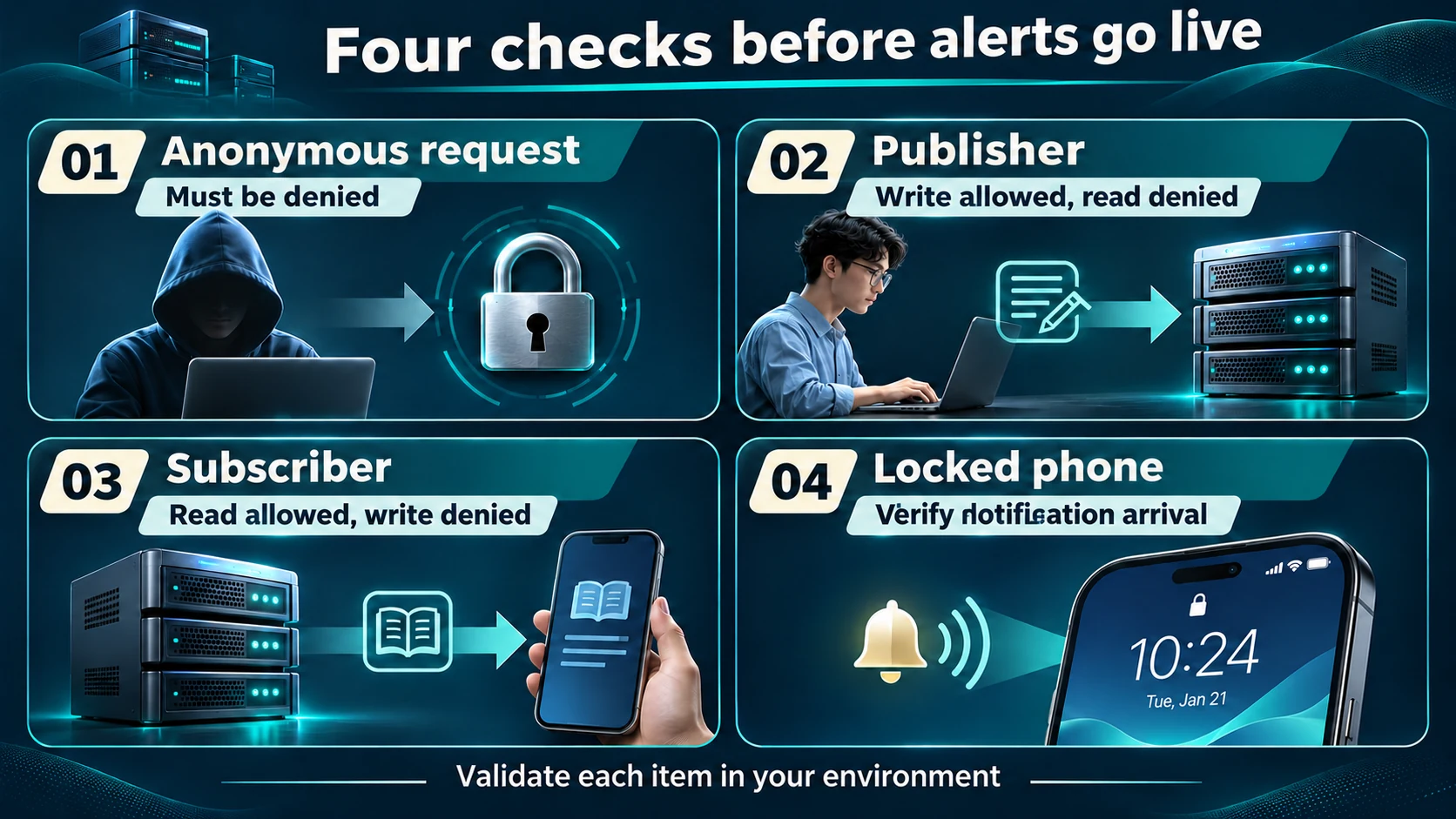
Test foreground delivery, a phone left locked, mobile data and reconnection after a short outage. Record sending and arrival times separately. Cache replay is not live delivery. If publishing succeeds but the locked phone stays silent, inspect notification permission, sound channels, do-not-disturb settings and the background connection before changing server authentication. Positive delivery tests alone do not prove account isolation.
5. Connect a real check with failure and recovery notifications
These examples have not been deployed or tested on a physical phone for this article; rehearse them in a test environment first. Use a separate Linux monitoring node with curl, Python 3 and systemd. It probes the business endpoint; do not install the business workload on the notification server. A production health URL must be safe to query and its success status must meaningfully represent the service.
An unattended job cannot answer a password prompt. Create a root-only curl configuration for the topic's write-only account. The following prompts for the password and refuses to overwrite an existing file. Treat that file as a credential, rotate it through your secret-management procedure, and exclude it from Git and article attachments.
sudo python3 - <<'PYSECRET'
import getpass, json, os
password = getpass.getpass('ntfy publisher password: ')
if not password or any(ord(ch) < 32 for ch in password):
    raise SystemExit('Password must be nonempty and contain no control characters')
fd = os.open('/etc/ntfy-monitor.curl', os.O_WRONLY | os.O_CREAT | os.O_EXCL, 0o600)
with os.fdopen(fd, 'w') as stream:
    stream.write('user = ' + json.dumps('ops-publisher:' + password, ensure_ascii=False) + '\n')
PYSECRET
First run a loopback-only rehearsal target in another terminal on the monitoring node. Create an empty directory so no business files are served. If port 18080 is already used, choose another unused port instead of stopping its owner. This temporary server exists solely to demonstrate state changes:
mkdir -p "$HOME/ntfy-probe-demo"
cd "$HOME/ntfy-probe-demo"
python3 -m http.server 18080 --bind 127.0.0.1
Save the script below as /usr/local/sbin/ntfy-http-check. Replace the notification URL, but initially retain the loopback probe URL. It notifies on the first failure, suppresses repeated failures and sends a recovery notification. Only HTTP 200 counts as a healthy probe; redirects, other statuses and connection errors count as failure. Publishing accepts only 2xx and does not follow redirects. State advances only after confirmed publication, allowing the next check to retry delivery failures. It is not an exactly-once message queue.
#!/usr/bin/env bash
set -eu
probe_url='http://127.0.0.1:18080/'
notify_url='https://alerts.example.com/ops-alerts'
state_dir='/var/lib/ntfy-http-check'
state_file="$state_dir/state"
install -d -m 700 "$state_dir"
old='unknown'
if [ -f "$state_file" ]; then
  old=$(cat "$state_file")
fi
current='down'
if probe_code=$(curl --silent --show-error --output /dev/null \
    --write-out '%{http_code}' --connect-timeout 5 --max-time 15 "$probe_url"); then
  if [ "$probe_code" = '200' ]; then
    current='up'
  fi
fi
if [ "$current" = "$old" ]; then
  exit 0
fi
if [ "$current" = 'down' ] || [ "$old" = 'down' ]; then
  if ! notify_code=$(curl --config /etc/ntfy-monitor.curl --silent --show-error \
      --output /dev/null --write-out '%{http_code}' \
      --connect-timeout 5 --max-time 15 \
      --header "Title: HTTP service $current" \
      --data-binary "HTTP probe state: $current; check the monitoring console." \
      "$notify_url"); then
    exit 1
  fi
  case "$notify_code" in
    2??) ;;
    *) printf 'Notification rejected: HTTP %s\n' "$notify_code" >&2; exit 1 ;;
  esac
fi
printf '%s\n' "$current" > "$state_file"
Set ownership to root and mode 0750, then create /etc/systemd/system/ntfy-http-check.service and the corresponding .timer. The interval is one minute, and only transitions generate a message. A successful HTTP request is not a complete business acceptance test.
# /etc/systemd/system/ntfy-http-check.service
[Unit]
Description=HTTP probe with ntfy state-change notification
After=network-online.target
Wants=network-online.target

[Service]
Type=oneshot
ExecStart=/usr/local/sbin/ntfy-http-check
# /etc/systemd/system/ntfy-http-check.timer
[Unit]
Description=Run HTTP probe once a minute

[Timer]
OnBootSec=1min
OnUnitActiveSec=1min
AccuracySec=1s
Unit=ntfy-http-check.service

[Install]
WantedBy=timers.target
Apply the script permissions, run the first check and enable the timer:
sudo chown root:root /usr/local/sbin/ntfy-http-check
sudo chmod 750 /usr/local/sbin/ntfy-http-check
sudo systemctl daemon-reload
sudo systemctl start ntfy-http-check.service
sudo systemctl enable --now ntfy-http-check.timer
sudo systemctl list-timers ntfy-http-check.timer
sudo journalctl -u ntfy-http-check.service -n 30 --no-pager
With the rehearsal HTTP server running, the initial check establishes a healthy baseline without a success message. Press Ctrl+C in that temporary server's terminal. The next check should deliver a down notification. Start that same temporary server again; the next check should deliver an up notification. Continued failure should not produce a message every minute. After this passes, stop the timer, replace the probe URL with the real service's health endpoint, run the service manually, and re-enable the timer. Do not stop a production service to manufacture an alert.
Also inspect task failure records with an incorrect publisher password or an unreachable notification endpoint in the test environment. If your notification system shares a host, power supply or network exit with the service it monitors, one outage may silence both. Arrange independent availability monitoring and a fallback contact path.
Raspberry Pi 4 Model B photograph by Laserlicht / Wikimedia Commons, licensed CC BY-SA 4.0; proportionally resized and re-encoded as WebP under the same license. This third-party hardware photo is not from the tutorial deployment and does not demonstrate deployment on that device.

6. Troubleshoot, maintain and roll back
| Symptom | Inspect first | Stop condition |
|---|---|---|
| HTTPS fails or certificate is invalid | DNS/AAAA, ports, time and Caddy logs | Never send credentials before trusted TLS works |
| Publishing is denied | Credentials, exact topic and write ACL | Never open anonymous access to make a test pass |
| Cached messages appear but locked phone stays silent | Background service, notification channel, iOS upstream and connectivity | Do not make this the primary on-call channel yet |
| No failure alert from a successful monitor run | Actual probe outcome and stored state | Do not erase state to hide logic problems |
| Accounts or cache disappear after recreation | Named volumes, directory and Compose project name | Restore identity state before reopening service |
Back up the Compose file, configuration and persistent volumes regularly. Stop this stack before taking a consistent copy of its SQLite identity database and cache. After restoration, repeat anonymous-denial, account-isolation and phone tests; copying a live database casually is not a recovery plan. Protect the identity store, certificate volume and script credentials as sensitive data.
To pause the rehearsal, stop only its timer. If you need to remove this new stack from service, run Compose down from this tutorial's directory without a volume-deletion option, retaining data for inspection and recovery:
sudo systemctl disable --now ntfy-http-check.timer
cd "$HOME/ntfy-ops"
sudo docker compose down
FAQ
Why does a successful API response not prove phone delivery? Acceptance by the server, retrieval by the app and notification display by the operating system are different stages. Check the current identifier and actual arrival time on the physical phone.
Can a complex topic name replace an account? Enterprise alerts should not depend on topic-name secrecy. This deployment denies access by default and grants separate minimum permissions to publishing and reading clients.
Should an alert include passwords or full logs? No. Send a service identifier, severity and a controlled troubleshooting link. Keep sensitive detail in your monitored platform rather than expanding its exposure through lock screens and caches.
Does isolated iOS deployment guarantee immediate notifications? No. The official app's background path requires upstream wake-up and phone access back to your instance. If those requirements do not fit, use a notification channel your organization has validated.
Related solutions and reading
For an existing monitoring platform, evaluate alert severity, fallback channels and recovery drills with Yuqi IT operations services before making a new channel part of on-call coverage.
- Deploy a private Gitea repository
- Uptime Kuma HTTP and keyword monitoring
- Official ntfy documentation
For an enterprise rollout, bring your network boundaries, phone operating systems, alert volume and current monitoring design to Yuqi for a scoped implementation discussion.