

When users can resolve an internal file server but cannot resolve external website names, identify their actual corporate DNS server first. Then investigate that server's external resolution path. Changing domain members to public DNS can hide the symptom while disrupting internal applications and domain discovery. This Windows Server 2022 guide follows a controlled sequence: record the baseline, isolate the scope, verify upstream servers, make one justified change, and test or roll back.
These are operational examples based on Microsoft documentation, not a claim that the procedure has been tested on your infrastructure. Involve the owners of DNS policies, private namespaces, and network controls when their configuration is relevant.
1. Establish the failure scope
A forwarder is an upstream DNS server that receives queries the local server needs help resolving. Internal records can remain available even when external resolution fails. A working internal lookup therefore proves only part of the service path.
Choose a small repeatable test set: one known internal fully qualified name and two known external names from different domains. Confirm that the names exist. Avoid short hostnames, which can involve search suffixes. A website loading or failing is not a DNS-only test; proxies, TLS, routing, and the application can produce similar symptoms.
| Observation | Investigate first | Avoid initially |
|---|---|---|
| One workstation fails while peers work | Its active interface, DNS settings, and VPN | Changing every DNS server |
| Several clients using one DNS server fail externally | That server's upstream path and policy | Deleting internal zones |
| Only one private or partner namespace fails | Matching conditional forwarder, zone, or delegation | Redirecting all lookups to public DNS |
| An address is returned but the application fails | Expected address, application ports, proxy, and TLS | Repeated DNS configuration changes |
On an affected Windows client, open Settings → Network & Internet → Advanced network settings → More network adapter options. Open the active adapter's Status → Details and record its DNS servers. Compare with a working client. Record IPv6 DNS settings too when IPv6 is in use. A machine can have Ethernet, Wi-Fi, and a VPN simultaneously; identify the interface involved rather than assuming the first adapter is relevant. Do not change addressing during this check.
If the client cannot discover a domain controller either, start with DNS checks before joining Active Directory. This article addresses external resolution rather than domain joining.
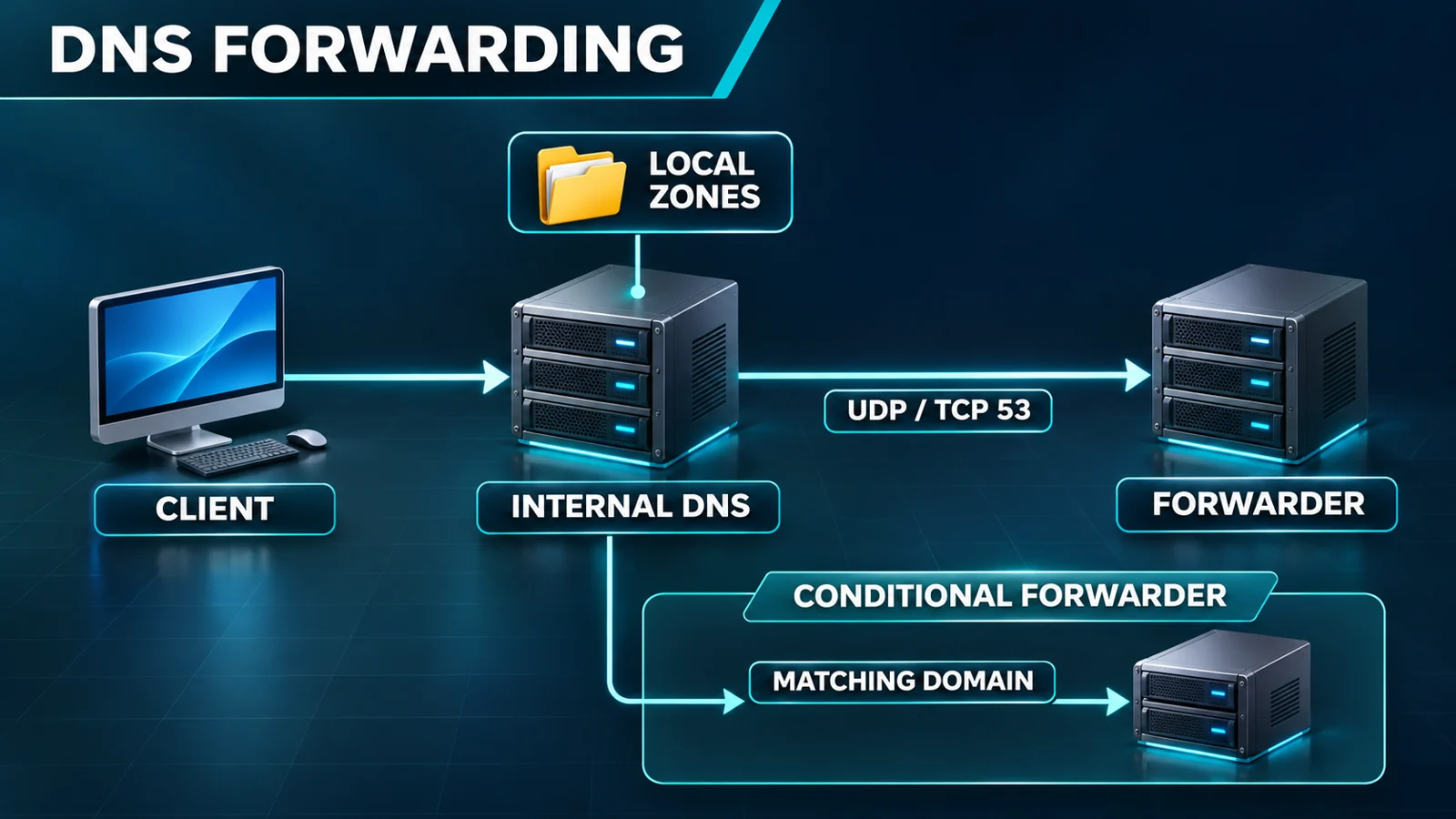
The diagram separates the client-to-DNS path from the DNS-to-upstream path. It is not a capture from a customer network.
2. Record a recoverable baseline
You need Windows Server 2022 with the DNS Server role, delegated administrative access, and an approved maintenance window. Confirm that remote management remains available and that the network and upstream owners can help if required.
- Open Server Manager → Tools → DNS. Check the server name selected in the tree, especially when the console manages several servers.
- Right-click the server → Properties → Forwarders. Record all addresses, their displayed order, timeout-related fields, and the current root-hint fallback choice.
- Inspect recursion-related options on Advanced. Record their values without changing them.
- Expand Conditional Forwarders. Record entries matching the failing name's suffix, their target servers, and relevant storage or replication information. Inspect Forward Lookup Zones for a hosted zone covering the name.
- Record the Root Hints tab. Do not delete entries or import an unverified address list.
- Capture the baseline test results: timestamp, complete name, queried DNS server, response or error, and affected client. Write down the previous value and reversal procedure for every proposed edit.
Keep this information in a controlled change record. Screenshots can expose internal names and addresses; do not publish them casually. If you cannot reconstruct the original configuration, stop before editing. A remembered approximation is not a rollback plan.
3. Identify the applicable resolution path
A failing name does not necessarily use the general server-level forwarder list. Hosted data, caches, conditional forwarding, and delegation can select another path. For a failure confined to one suffix, inspect that suffix before changing the general upstream list. Microsoft's resolution-path reference explains the interaction and fallback constraints.
Use these boundaries during investigation:
- If the server hosts an authoritative zone covering the name, confirm the zone's intended role and records. Do not delete it merely to force a query outward.
- If a conditional forwarder matches, involve the target namespace owner. An alternative recursive path for private names must be an intentional design choice.
- If the organization requires a designated filtering resolver, do not enable root hints to bypass it. Network controls must enforce the required boundary as well.
- If recursion is disabled, establish whether this is an intentional authoritative-only server before enabling anything.
This procedure does not create or migrate conditional forwarders or change their recursion policy. Those changes affect an entire namespace and need separate planning.
4. Verify upstream DNS from the forwarding server
A successful test from your workstation does not establish that the DNS server's source address is allowed upstream. Ask the network team to inspect the server's route, outbound rule, return traffic, and any source translation for each approved upstream. Include both UDP 53 and TCP 53. A ping result or a successful TCP connection alone is insufficient evidence of DNS operation.
You can use DNS Manager for preliminary checks:
- Open server Properties → Monitoring. Select a simple query against this DNS server and a recursive query, then select Test Now. Record both results and the time.
- If the simple query fails, investigate the local service, listening interfaces, and hosted data before replacing upstream servers.
- If only the recursive test fails, continue investigating external resolution. This does not identify a particular forwarder or prove that both transport protocols failed.
- Inspect address-validation messages on Forwarders, but do not treat a failed server-name validation as conclusive proof that the address is unusable.
- Have an authorized administrator perform direct DNS queries from the forwarding server to every candidate upstream, separately over UDP and TCP. Record the chosen name, response code, answer, and timing. Follow the direct-query procedure in Microsoft's configuration guide.
Continue with these GUI-based evidence-collection steps. Do not interpret Monitoring as an arbitrary-name or individually targeted upstream query tool.
- Open Server Manager → Tools → Event Viewer. Locate DNS Server under Applications and Services Logs, or the corresponding custom view provided by the installation. Filter around the incident time. Record the event source, ID, full message, and server time. No logged event does not prove normal service; an old warning alone does not justify a configuration change.
- In the approved firewall or network-monitoring console, filter sessions by this DNS server's source address, one upstream destination, incident time, and port 53. Record UDP and TCP separately, including permitted or denied traffic and evidence of requests and replies. An allow rule without an observed response is not a successful DNS test.
- Ask the network team, using approved tools and access, to issue direct queries from this DNS server to each upstream. The handoff must identify the complete test name, record type, source server and address, destination, UDP/TCP, time, response code, answer, and timing. Test a known existing external name and the original failing name. If a tool can fall back to TCP, distinguish its default result from observed UDP exchanges.
- When packet capture is approved, have the team start capture at the server and necessary boundary, reproduce one request through the original affected client's application, and stop capture. Correlate the actual name, selected DNS server, request, and reply. Store captures in a controlled incident record because they can contain internal names. A client-side trace alone cannot establish whether the upstream replied.
- After a change, retest the original business entry point and full name. Correlate new DNS exchanges with the client's application result. A browser can reuse cached data, so record whether a fresh DNS query was actually observed. Repeat relevant internal-service checks as well.
These steps do not require the operator to install unapproved tools or imply that Event Viewer can query a chosen name. If direct upstream evidence is unavailable, preserve the monitoring results, logs, and timeline and escalate to the network and upstream owners. Do not replace upstream addresses or claim recovery at that point.
The final step requires a DNS query tool. DNS Manager's monitoring results cannot replace it. If you are limited to GUI access and no team can provide protocol-level evidence, finish the baseline and preliminary isolation, then stop before claiming a confirmed diagnosis or repair.
5. Interpret the response before choosing a repair
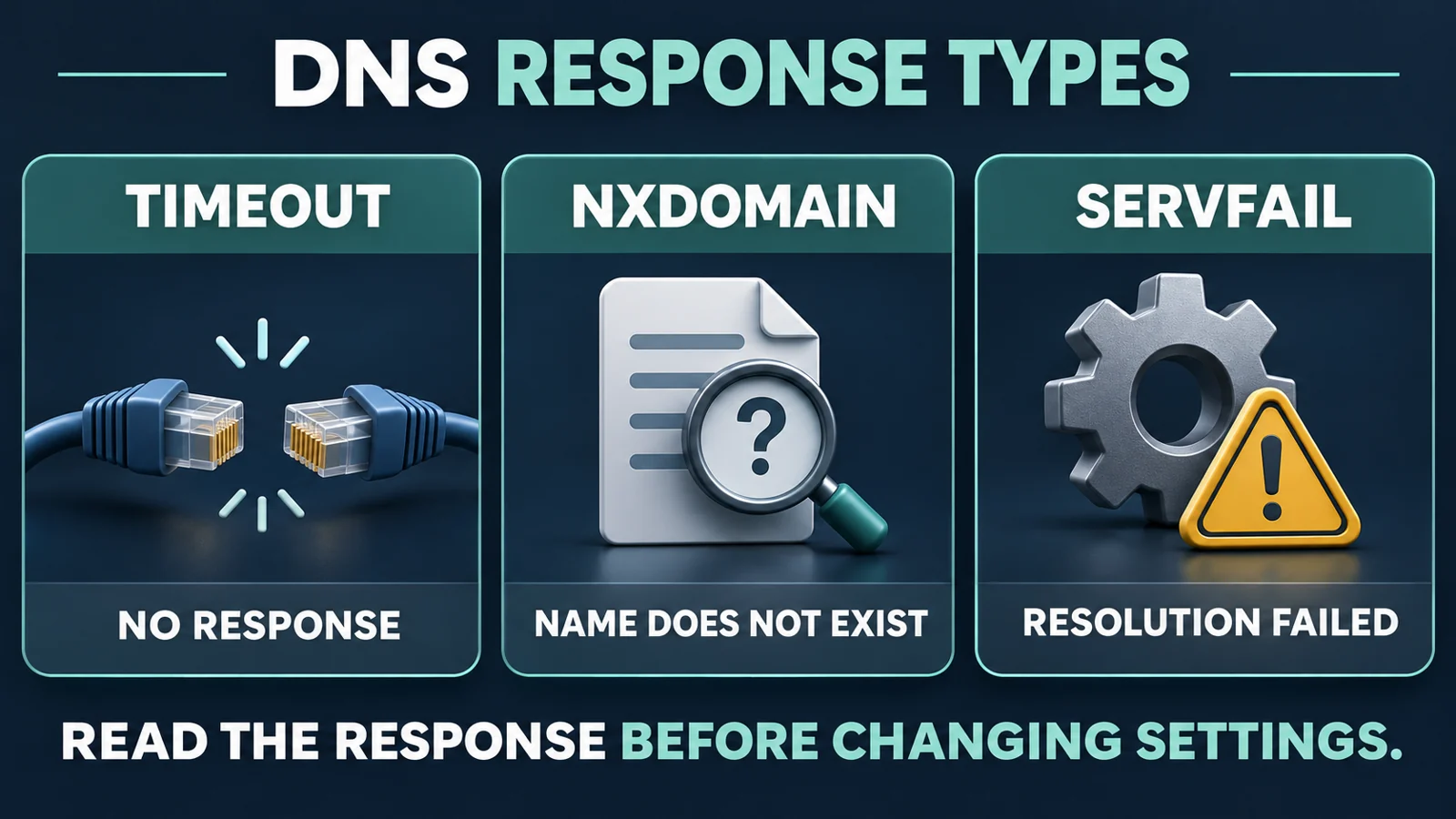
The decision diagram distinguishes a missing response from a received answer. They require different investigations.
| Result | Interpretation | Next action |
|---|---|---|
| Timeout or no observed response | A path, upstream, or return-traffic problem is possible | Correlate server and boundary evidence |
| NXDOMAIN | That resolution path reports the name does not exist | Check the exact name, authoritative data, and negative caching |
| REFUSED | The server declines the query | Inspect source permissions, recursive access, and policy |
| SERVFAIL | Recursive processing failed | Inspect the upstream path and logs; do not infer a missing record |
| An address is returned | DNS supplied an answer | Check whether it is expected, then investigate the application path |
Do not assume that a second forwarder will correct a negative or refused answer from the first. Microsoft's forwarder troubleshooting cases distinguish transport delay, refusal, and missing records. Adding addresses is not a substitute for correcting data or policy.
6. Make the smallest supported change
Proceed only when direct queries, network evidence, and configuration review identify a wrong or unusable general upstream address, and an approved replacement has passed the required tests.
- Return to DNS → the correct server → Properties → Forwarders → Edit. Recheck the selected server name.
- Correct the mistyped address or replace the confirmed failed entry. Preserve working corporate upstreams. Do not empty the entire list as an experiment.
- Check the intended order. Do not assume the displayed first server is necessarily used first for every query; Windows can maintain an active order based on response behavior.
- Return to Properties. Preserve the approved root-hint fallback setting. If changing the resolution boundary is necessary, stop and handle that as a separate change.
- Apply the edit, reopen Properties, and compare the saved values with the change record. Record the actual difference and time.
Do not routinely restart DNS or reboot the server to apply this edit. A restart broadens impact and can conceal a timing problem. Do not increase timeouts without evidence; a longer wait can simply postpone failure.
7. Validate recovery and prepare rollback
Repeat the server-side monitoring and direct upstream checks first. Then retest the original internal and external names from previously affected clients. Keep the test set consistent for before-and-after comparison. Add one previously untested but known valid external name to reduce the chance of judging success solely from an old cache entry.
| Check | Acceptance condition | If it fails |
|---|---|---|
| Saved configuration | Approved addresses and intended fallback policy remain in place | Restore the baseline |
| Upstream protocols | Required UDP/TCP DNS tests from the server return expected results | Escalate with network evidence |
| Client resolution | Original clients receive expected answers for known names | Check their actual DNS path and cache |
| Internal services | Previously working domain and file services remain available | Roll back and escalate internal impact |
| Application access | The target service works through its normal access path | Investigate the application without repeatedly editing DNS |
Caches can retain old positive and negative answers. Record TTLs and timestamps before clearing anything. If cache removal is approved, distinguish the affected client's cache from the server cache and limit the scope. Do not clear every DNS server merely to troubleshoot one report.
For rollback, restore the previous addresses, order, and options actually changed in this window. Save, reopen the configuration, and retest internal services. Restoring settings does not instantly eliminate every cache effect. If the baseline is restored but the incident remains, preserve the evidence and escalate instead of layering on speculative changes.
Photo: Solomon203, Intel EXPI9301CTBLK adapter, CC BY-SA 4.0. Resized and converted to WebP; not the incident location. A working Ethernet link does not establish UDP/TCP 53 access. This photograph makes no server-compatibility or DNS-health claim.

Frequently asked questions
Can domain members keep using public DNS if it restores website access?
Follow the internal DNS design. Bypassing it can affect private names and domain services while making external lookups appear fixed. Repair the intended corporate resolution path and restore temporary client changes according to the change record.
Does enabling root hints guarantee recovery?
No. Recursion policy, usable hint data, network access, and the remaining query time all matter. The organization may also prohibit direct internet DNS queries. Treat fallback as a design decision.
Why do two configured forwarders still fail?
They can share one failing network path, or the first can already provide a negative or refused response. Overall query timing and active ordering also matter. Test each upstream before assuming the pair provides useful redundancy.
Does a successful recursive monitoring test complete acceptance?
No. Verify the incident names, affected clients, necessary transports, and internal services. One monitoring test establishes only the behavior it exercised at that time.
Related solutions
For ongoing DNS and server operations, Yuqi's enterprise IT services can help organize dependency records, approved upstream lists, and escalation ownership.
Further reading
- DNS checks before joining Active Directory: domain discovery rather than external recursive resolution.
- Microsoft DNS forwarding configuration: official query and configuration reference.
If several servers or branches fail together, prepare a shared incident timeline, DNS response evidence, and boundary logs before arranging joint investigation.