
Endpoints and secure access
Office PCs / Thin clients / Compatible clients
Internal network or authorized gateway / Link conditions
Virtualization and cloud platforms / Desktop virtualization
Turn a desktop tied to one computer into an identity-delivered workspace. Starting with job applications and user experience, Yuqi Intelligent selects, deploys and migrates desktop platforms, servers, storage, endpoint access and security policies, making desktops both deliverable and manageable.
Centralized execution does not guarantee a consistent experience. Validate applications, links and peripherals together.
Why it matters
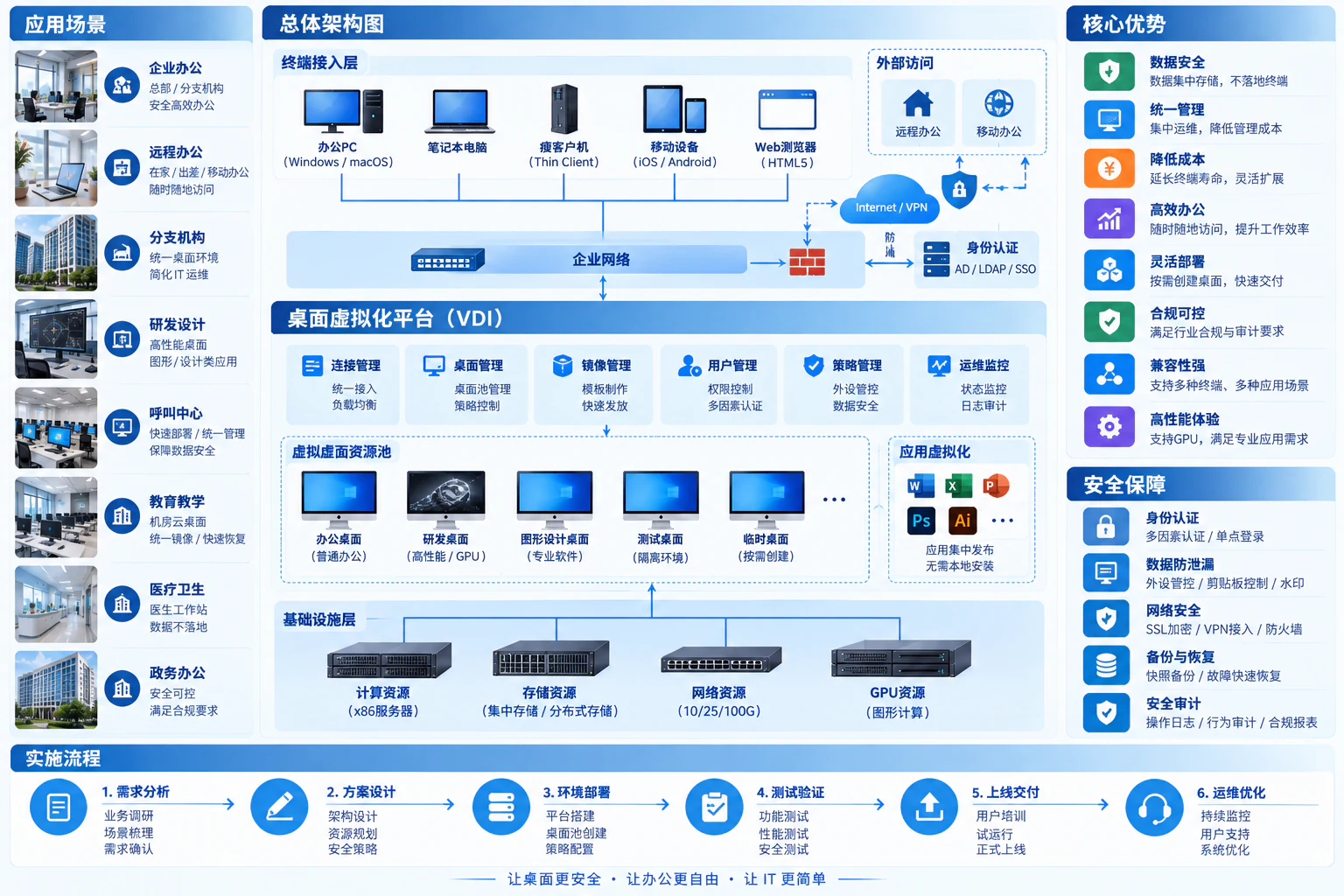
Users access centrally hosted desktops through endpoints. In VDI, each desktop runs in a virtual machine, allocated by identity and permissions. Servers, storage and networking provide the runtime, while endpoints handle display, input and permitted peripherals.
Consider virtual desktops when branch devices are dispersed, role environments differ, onboarding is slow or sensitive files need centralized management. Office, engineering graphics, contact-center and temporary roles have different loads, habits and offline needs, not one universal configuration.
How the architecture works
Users sign in to authorized desktops. Connection management handles allocation and reconnection; desktop VMs host the actual sessions. Display and input use a session protocol, optionally through an access gateway. The connection manager is not necessarily in every display-traffic path.
Office PCs / Thin clients / Compatible clients
Internal network or authorized gateway / Link conditions
Authentication / Desktop permissions / Allocation and reconnection
Desktop catalog / Images and policies
Desktop VMs / Applications / User profiles
Compute / Storage / Optional GPU resources
After allocation, an endpoint establishes a session with its desktop, through a gateway where designed. Storage services hold user profiles and business data. Platform management, display transport and data retention have different responsibilities.
Plan retention and recovery separately for desktops, images, profiles and business data. Snapshots do not replace independent backups. Clipboard, disks, printing and USB redirection follow role permissions; data is not inherently prevented from reaching endpoints. Animated lines show relationships, not measured speed or performance.
Desktop types
Desktop virtualization centralizes execution and management while endpoints provide interaction. Choose pools after reviewing personal settings, standardization, application load and peripherals.
| Desktop model | Suitable usage | Maintenance focus |
|---|---|---|
| Persistent desktop | Long-lived personal settings and diverse role environments | Individual updates, user-data protection and capacity growth |
| Non-persistent desktop pool | Contact-center, training or standardized office desktops rebuilt from one image | Separate image versions from user data; verify profile restoration after rebuilding |
| Graphics desktop | Validated design, modeling or graphics workloads | GPU capacity and licensing, display responsiveness, multiple monitors and peripherals |
Authenticate users and allocate authorized desktops under role policies.
Applications run on remote desktops; display and input travel over the session protocol.
Retain files and profiles by policy to protect work during desktop rebuilding.

Frequently asked questions
Remote desktop describes an access method. Desktop virtualization also manages pools, images, user allocation, policies and lifecycle. VDI typically provides separate desktop VMs, while session desktops may share a server OS. Choose by application and isolation requirements.
Not universally. Check client support, decoding, OS security, multiple displays, peripherals and networking. Keep compatible endpoints and replace those that do not meet requirements.
Central storage helps management, but clipboard, drive mapping, USB, printing and screenshots require additional controls. Confirm policies, endpoint capabilities, business exceptions and audit scope in the pilot.
Measure representative workloads, concurrent users, login peaks, application and graphics needs, then plan headroom and failure capacity. Validate experience instead of replacing assessment with a fixed per-user configuration.
Yuqi Intelligent builds or upgrades centralized desktops with supporting servers, storage, networks and endpoints, deploying platforms, images, applications and access policies. Validate representative roles before phased departmental migration, rather than purchasing solely by user count.
Review users, real concurrency, applications, printing/USB peripherals, graphics and access locations. Pilot representative roles and record login, application startup, audio/video and peripheral experience before sizing the platform.
Check virtualization, desktop platform, OS, application and GPU licenses against compute, storage, networking and endpoints. Define desktop types, redundancy, headroom and expansion so licensing costs are not discovered after rollout.
Configure identity access, pools, base images, applications and role policies; migrate user files and profiles. Arrange trial operation, rollback and support while checking printing, shares, peripherals, remote access and permissions.
Support image updates, desktop troubleshooting, capacity analysis, configuration backups and recovery exercises. Hand over provisioning/revocation, application changes, alert handling and administrator training for ongoing lifecycle management.
Next step / Site assessment
Share user scale, applications, access locations and key experience problems so Yuqi Intelligent can define assessment, pilot scope and equipment options.