

Data protection and business continuity / Off-site disaster recovery
Off-Site Disaster Recovery
When a site failure affects business, Yuqi Intelligent designs a recovery path around production and independent recovery sites, replication links and recovery dependencies, with agreed objectives, exercises and handover.

Replication provides a path; independent backups and recovery validation provide handover evidence.
01Clarify failure impact and dependencies first
A site failure can propagate through dependencies
When production stops, define which systems recover first, where data comes from, and how standby compute, networking, DNS, identity and business interfaces reconnect.
Disaster recovery is not simply a longer replication link. It brings independent copies, recovery resources, failover actions and business confirmation into one exercise plan.
Site failure propagates through dependencies
When production is unavailable, compute, storage, networking, DNS, identity and business interfaces may all lose prerequisites. Recovery requires more than copying data to another device.
Replication is not an independent backup
Copies in the same failure domain, account or path can be affected alongside production. Off-site copies also need isolation, encryption and recoverability.
A recovery site exists, but failover is unproven
Without tiered isolation exercises, failover and failback tests, standby compute, networking, identity and application dependencies remain unverified.
02Production, recovery sites and dependencies
Make the failover path executable through exercises
Production and independent recovery sites may be linked by replication, but recovery also needs standby compute, networking, DNS, identity and business confirmation. Replication is neither an independent backup nor proof of successful failover.
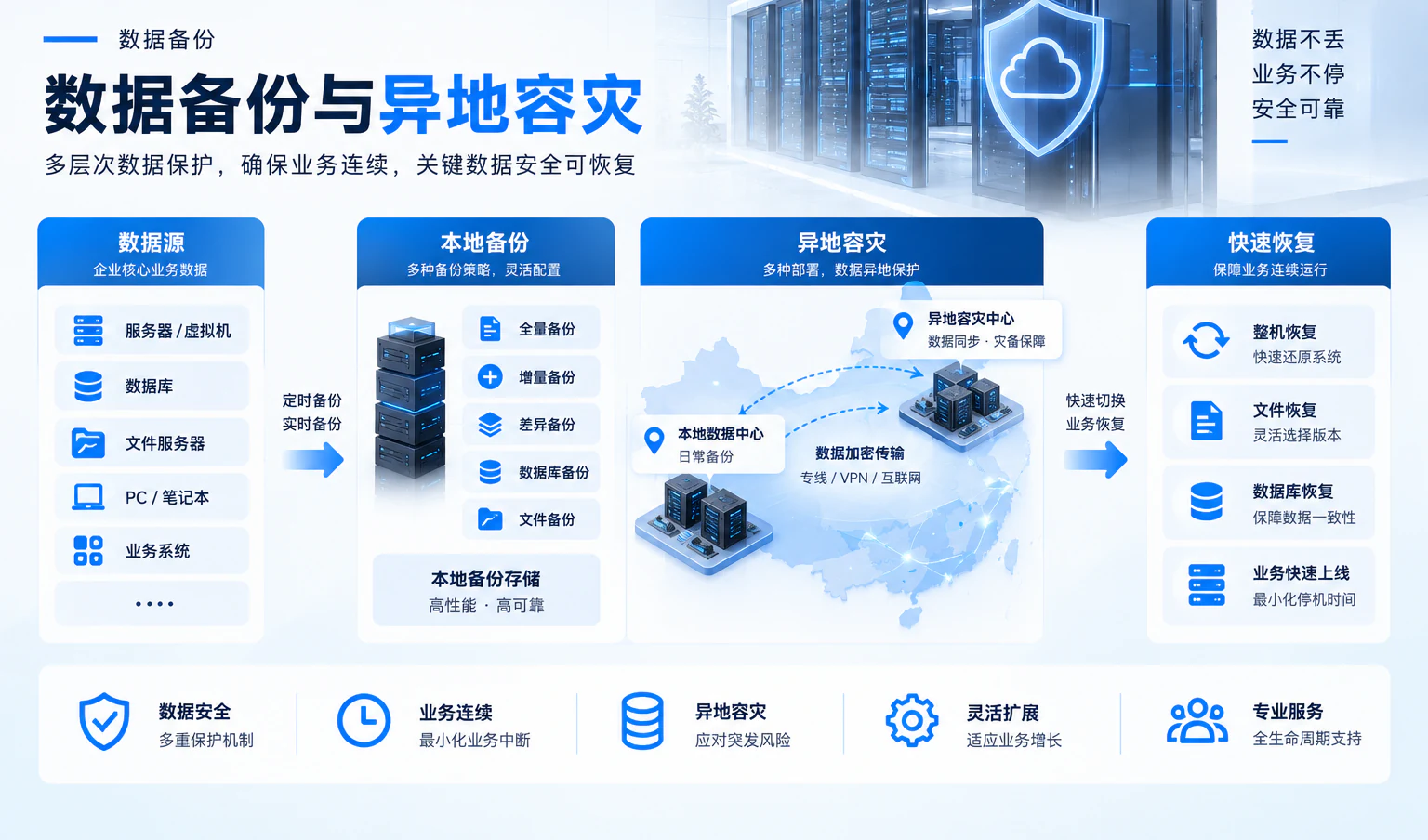
A replication link connects production with an independent recovery site. Standby compute, networking and identity are recovery dependencies; isolation exercises validate failover and failback.
Business systems, primary data, operations
Confirm priorities and acceptable interruptionSynchronization, network path, permissions
Replication is not an independent backupStandby compute, storage and access
Tier by objectives and capacityRecovery dependencies
03Independent copies and recovery validation
Turn available copies into evidence of recoverability
Replication supports synchronization; independent offline encrypted copies provide isolation. Validate that copies can be located, retrieved and used, and that business owners know when to confirm results.
- 01Protection scope
Define protection boundaries by systems, data, dependencies and business priorities.
- 02Copy isolation
Assess independent media, offline windows, encryption, permissions and retention.
- 03Recovery validation
Record recovery paths, data integrity, business confirmation and issue resolution.

04How Yuqi Intelligent helps
What we can do for your organization
Bring the current environment, objectives, equipment, replication, recovery dependencies, exercises, failover/failback and handover into one implementation scope.
Environment and dependency assessment
Review production and independent recovery sites, system priorities, replication paths, compute/network/identity dependencies and existing backup boundaries, identifying assumptions that need verification.
RPO / RTO objective tiers
Agree objectives by business criticality, data change, recovery order and acceptable interruption. Avoid arbitrary targets and translate agreed goals into testable exercise conditions.
Equipment supply and deployment
Support equipment selection, supply, deployment and capacity definition around compute, storage, backup media, networking and recovery-site conditions.
Replication, recovery and dependency configuration
Configure replication policies, independent encrypted copies, recovery networking, standby compute and DNS/identity dependencies, retaining authorization, isolation and rollback paths.
Isolation exercises, failover/failback and maintenance
Run scenario-based recovery validation, failover, business confirmation and failback. Deliver exercise records, resolved issues, runbooks and a maintenance cadence.
05Failover, failback and handover
Validate in isolation before handing the recovery path to operations.
Yuqi Intelligent starts with assessment and RPO/RTO tiers, then supports equipment deployment, replication and recovery configuration, standby networking and identity checks, with failover, business confirmation and failback in agreed windows.
- Production and recovery-site inventory, system priorities and dependencies
- Agreed RPO/RTO tiers, recovery order and owners
- Replication, independent offline encrypted copies, recovery network and access records
- Isolated exercise, failover/failback results, resolved issues and handover documentation
For a coordinated review of inter-site links and access boundaries, see Network Modernization.
- 01AssessScope, dependencies, objectives
- 02DeployEquipment, copies, paths
- 03ExerciseIsolation, failover, confirmation
- 04Hand overFailback, records, maintenance
06Frequently asked questions
Clarify backup boundaries, recovery objectives and failover evidence.
Is off-site replication an independent backup?
No. Replication synchronizes copies but does not replace independent backups. Plan independent, isolated or offline encrypted copies around business and risk boundaries, then verify they can be located, retrieved and used.
Can fixed RPO and RTO values be applied to every system?
Not reliably. Agree objectives against system priorities, data changes, dependencies, recovery resources and business windows, then validate them with exercise records.
Will the recovery site automatically fail over successfully?
Do not assume so. Automation, recovery order, identity and network access depend on product capabilities and site dependencies, verified through isolation exercises, failover and failback.
Can business recover if networking or identity also fails?
These are dependencies that recovery assessment must identify first. Beyond compute and data, prepare the order and ownership for recovery networking, DNS, identity, certificates and business interfaces, and retain exercise evidence.
Next step / RECOVERY DESIGN
Start with the actual recovery dependencies.
Share the production site, critical systems, existing copies, networking and identity dependencies, and available exercise windows to define assessment, objectives, deployment and handover.