
Authorized live viewing
Operator clients / Display walls
View footage under access permissions
Low-voltage and intelligent systems / Video surveillance
See the site clearly, retain important records and assign someone to respond. Yuqi Intelligent plans cameras, networking, recording storage, platforms and permissions together, from location surveys and equipment supply through integration and handover.
Live viewing, recording retention and event response must each work reliably for a usable surveillance system.
Why it matters
Video surveillance sends site footage to recording and management systems for authorized live viewing, retrieval and event verification. It serves campuses, offices, warehouse routes and important equipment areas, not merely additional images on a display.
Online cameras without usable recordings, poor night images, inaccurate timestamps or shared permissions undermine the system. Yuqi Intelligent reviews coverage alongside Structured Cabling, network power and storage to reduce later additions, replacements and repeated construction.
How the architecture works
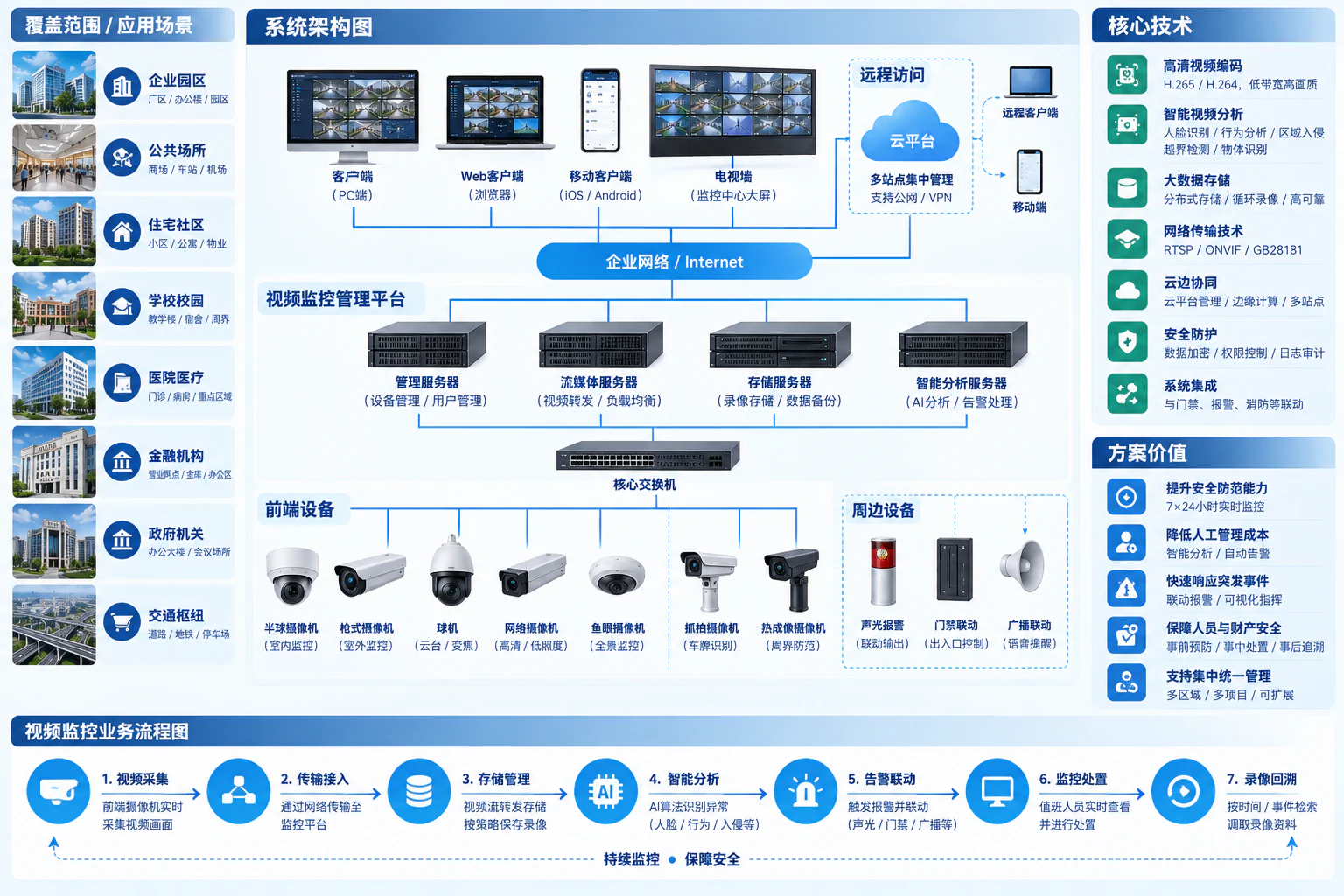
Cameras capture and encode video. After network access, streams can support live viewing and recording in parallel, with analytics on devices or platforms as configured. Management coordinates devices, accounts and events; not every stream must traverse one management server.
View angle / Lighting / Encoding
Optional analytics
Power budget / Network segmentation
Uplink bandwidth / Time synchronization
Operator clients / Display walls
View footage under access permissions
NVR or storage servers
Scheduled recording / Playback / Export
Device or platform analytics
Notifications / Human review
Manage devices, accounts, recording policies and event logs. Platform, recording and relay deployment depends on scale and selection. Remote viewing uses an approved secure access method.
Animated lines illustrate separate service paths, not bandwidth, real-time performance or mandatory serial deployment. Recognition and integration capabilities depend on equipment, licensing and site testing.
Images and records
Entrance identification, work review and perimeter observation need different imagery. Resolution is only one factor; lenses, distance, angle and lighting determine whether recordings are useful.
Mark people/goods routes, obstructions and critical actions on the plan. Wide angles provide context; detail recognition needs suitable lenses and distances. Validate backlit entrances, night-time outdoors and reflective areas separately.
Channel count, average bitrate, daily recording hours and retention days determine capacity, with redundancy and growth reserves. Check schedules, clocks, overwrite behavior and disk alerts alongside playback and retrieval.

Locate alerts by camera and event type, first checking offline devices, obstruction and false triggers.
Review live video and footage before/after the event rather than relying on one snapshot.
Export authorized clips with timestamps, source and operation records; document the response.
Frequently asked questions
Assess models, encoding, power, protocols, platform licenses and actual image quality. Matching protocol names do not establish complete compatibility; test integration before deciding what to retain or replace.
Confirm business and applicable retention requirements, camera count, actual bitrates and schedules before calculating usable capacity and reserves. Image quality, overwrite behavior and recovery require acceptance; no single retention period is promised for all projects.
No. Analytics depend on cameras/platforms, licenses, scenes and lighting. Remote access requires network, security and account review. Device management ports are not exposed directly to the internet.
Agreed services can include inspections, offline-camera/recording diagnostics, configuration backups, capacity reviews and platform maintenance. Response methods, hours, spares and site support follow the service agreement.
Yuqi Intelligent builds, expands and upgrades enterprise surveillance, supplying cameras, recorders, storage and networking, with installation, recording configuration, platform testing and operator training. Ongoing diagnostics and inspections are available as agreed.
Survey entrances, routes and important areas, matching cameras, recorders, surveillance drives and PoE switches to view angles, night lighting and recording needs, with equipment lists and quotations.
Install agreed locations, cabling, segmentation, image settings, schedules and authorized remote access. Test live views, playback, export and alerts individually.
Assess retained devices and address blurred images, blind spots, insufficient recording capacity, incompatibility and fragmented management through location additions, network changes or platform integration.
Diagnose offline cameras, recording issues and network/power faults. Provide agreed inspections, backups and capacity reviews, train administrators and hand over location plans, inventories, tests and repair reporting.
Next step / Site assessment
Share site type, existing camera locations, recording needs and problems to define surveys, selection, installation, testing and support.